EasyManua.ls Logo

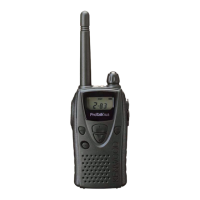
Kenwood TK-3107 - Service Manual

Kenwood TK-3107
28 pages
Print Icon
To Next Page IconTo Next Page
Loading...
© 2000-2 PRINTED IN JAPAN
B51-8572-00(S) 141
TK-3107
GENERAL.................................................................. 2
REALIGNMENT......................................................... 2
DISASSEMBLY FOR REPAIR................................... 4
CIRCUIT DESCRIPTION ........................................... 5
SEMICONDUCTOR DATA ......................................... 8
DESCRIPTION OF COMPONENTS.......................... 9
PARTS LIST............................................................. 10
EXPLODED VIEW ................................................... 17
PACKING ................................................................. 18
ADJUSTMENT......................................................... 19
PC BOARD VIEWS
TX-RX UNIT (X57-6030-11) ................................ 23
SCHEMATIC DIAGRAM .......................................... 29
BLOCK DIAGRAM .................................................. 33
LEVEL DIAGRAM ................................................... 35
KNB-15A (Ni-Cd BATTERY) ................................... 36
SPECIFICATIONS ................................BACK COVER
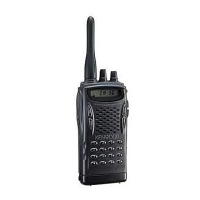
Antenna
(T90-0694-15)
Cabinet assy
(A02-2448-13)
Knob(VOLUME)
(K29-5255-03)
TK-3107 (16 channels)
CONTENTS
Knob
(CHANNEL SELECTOR)
(K29-5278-03)
UHF FM TRANSCEIVER
SERVICE MANUAL
M2 version

Other manuals for Kenwood TK-3107

Questions and Answers

  • S
    Savannah WellsJul 27, 2025
    What to do if I cannot talk to or hear other members in my group using my Kenwood TK-3107?
    • R
      Regina StewartJul 27, 2025
      To ensure proper communication with your group on the Kenwood Transceiver, verify that you are using the same frequency and Quiet Talk tone as the other members. Also, make sure you are within range of the other transceivers, as distance can affect communication.
  • M
    Mallory ThorntonAug 4, 2025
    Why my Kenwood TK-3107 has no power?
    • M
      Matthew BrownAug 4, 2025
      If your Kenwood Transceiver has no power, the battery pack may be dead or not installed correctly. Try recharging or replacing the battery pack. If that doesn't work, remove the battery pack and install it again to ensure it is properly connected.
  • L
    Linda SchaeferAug 10, 2025
    Why does the battery power of my Kenwood Transceiver die shortly after charging?
    • C
      Cynthia Cooper MDAug 10, 2025
      If the battery power of your Kenwood Transceiver dies shortly after charging, it's likely that the battery pack life is finished. Replace the battery pack with a new one.
  • B
    Bill LopezAug 17, 2025
    How to remove other voices (besides group members) that are present on the channel of my Kenwood TK-3107 Transceiver?
    • A
      Amy JonesAug 17, 2025
      If you are hearing other voices besides your group members on the channel of your Kenwood Transceiver, change the Quiet Talk tone. Be sure to change the tone on all transceivers in your group.

Summary

GENERAL

Introduction, Safety, and Familiarization

Manual overview, parts ordering, safety precautions, and device controls.

REALIGNMENT AND PROGRAMMING

Operational Modes and PC Setup

Explains operational modes and the PC programming setup for realignment.

DISASSEMBLY AND CIRCUIT DESCRIPTION

Disassembly Procedures

Instructions for separating case, chassis, and removing the lever.

Circuit Description Overview

Covers receiver, transmitter, squelch, PLL, APC, and control circuits.

COMPONENT DATA AND PARTS LIST

Semiconductor Data

Lists pinouts and ratings for microprocessor, transistors, and FETs.

Parts List Overview

Details general capacitors, resistors, and TX-RX unit components.

ASSEMBLY, PACKAGING, AND ADJUSTMENT

Exploded View and Packaging

Illustrates exploded view and details packaging procedures.

Adjustment Procedures

Lists required test equipment and outlines adjustment procedures.

Kenwood TK-3107 Specifications

General IconGeneral
frequency range470-490 MHz
RF power output4W
number of channels16CH
Power IconPower
operating voltage7.5 VDC ± 20 %
Operating Environment IconOperating Environment
temperature range-30 °C to + 60 °C (-22 °F to + 140 °F)
Weight and Dimensions IconWeight and Dimensions
dimensions with battery58 W X 125.5 H X 35 D mm
weight with battery380g (0.83lbs)

Related product manuals