EasyManua.ls Logo

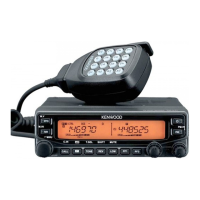
Kenwood TM-V71A - User Manual

Kenwood TM-V71A
107 pages
Print Icon
To Next Page IconTo Next Page
Loading...
INSTRUCTION MANUAL
144/440 MHz FM DUAL BANDER
TM-V71A
144/430 MHz FM DUAL BANDER
TM-V71A/ TM-V71E
© B62-1926-10 (K, E, M4)
09 08 07 06 05 04 03 02 01
NOTIFICATION
This equipment complies with the essential requirements of
Directive 1999/5/EC.
The use of the warning symbol means the equipment is subject
to restrictions of use in certain countries.
This equipment is requires a licence and is intended for use in the
countries as below.
AT BE DK FI FR DE GR IS
IE IT LI LU NL NO PT ES
SE CH GB CY CZ EE HU LV
LT MT PL SK SI BG RO
ISO3166

Table of Contents

Other manuals for Kenwood TM-V71A

Questions and Answers

  • T
    Tracy AndersonJul 26, 2025
    How to fix a Kenwood TM-V71A Car Receiver that won't power on?
    • T
      tammyklineJul 26, 2025
      If your Kenwood Car Receiver doesn't power up after connecting the DC power supply, and nothing appears on the display, check these possible causes: 1. The power cable may be connected incorrectly. Ensure the supplied DC power cable is connected correctly (red to the + terminal and black to the – terminal). 2. One or more of the power cable fuses might be blown. Identify what caused the fuse(s) to blow. After fixing any issues, install a new fuse(s) with the same ratings.
  • S
    Scott BishopAug 1, 2025
    What to do if my Kenwood TM-V71A won't transmit when pressing PTT?
    • K
      Karen WilsonAug 1, 2025
      If you cannot transmit using the Kenwood Car Receiver even when pressing [PTT], there might be a few reasons: 1. The microphone plug might not be fully inserted. Turn the power OFF, then firmly insert the microphone plug until you hear the locking tab click. 2. You may have selected a transmit offset that puts the transmit frequency outside of the permitted range. Try turning the offset shift function OFF. 3. If you're using an external TNC, it might still be transmitting. Press [PTT] after the TNC has completed its transmission.
  • L
    Lauren GregoryAug 7, 2025
    Why are most keys and the tuning control not working on my Kenwood TM-V71A?
    • H
      heathercantrellAug 7, 2025
      If most keys and the tuning control on your Kenwood Car Receiver are not working, it could be due to the following reasons: * One of the Lock functions is activated. You should unlock all of the Lock functions. * The receiver might be in Channel Display mode. To exit this mode, turn the transceiver power OFF, then press [LOW] and power it ON again.
  • A
    Allison BrewerAug 13, 2025
    Why can't I select the frequency on my Kenwood TM-V71A?
    • W
      Wendy FrankAug 14, 2025
      If you cannot select the frequency on your Kenwood Car Receiver using the Tuning control or the microphone [UP]/[DWN] buttons, it might be because Memory Recall is selected. Try pressing [VFO].
  • J
    Jason MoraAug 19, 2025
    What to do if memory channels cannot be selected on Kenwood Car Receiver?
    • W
      williamshahAug 19, 2025
      If memory channels cannot be selected on your Kenwood Car Receiver, it might be because no data has been stored in any memory channel. Store data in some memory channels.

Summary

User Notices and Safety Precautions

FCC Warnings and Information

FCC compliance, warnings about modifications, and interference correction measures.

Environmental and Operational Safety

Precautions for condensation, explosive atmospheres, RF transmissions, and blasting caps.

General Precautions and Warnings

DC Power Source and Cable Safety

Requirements for the 13.8V DC power source and safety notes for the DC power cable.

Mobile Installation and Vehicle Safety

Safety precautions for mobile installation and potential interference with vehicle electronics.

Preparation and Getting Acquainted

Initial Setup Procedures

Supplied accessories, mobile installation, power and antenna connections, and panel orientation.

Basic Operations Guide

Power ON/OFF, volume/squelch adjustment, band/mode selection, and transmitting.

Menu Mode and Repeater Access

How to access the menu system and procedures for operating through repeaters.

Memory Channel Management

Memory Channel Types and Storage

Understanding memory channel types and storing simplex/repeater/odd-split frequencies.

Memory Channel Operations

Recalling, clearing, naming, and transferring memory data to VFO.

Programmable Memory (PM) Functions

Storing and recalling transceiver configurations in PM channels with application examples.

Scan Operations and Squelch Systems

Scan types, resume methods, memory lockout, CTCSS, DCS, and DTMF functions.

Data and Wireless Operations

Transceiver Reset Procedures

Performing transceiver resets (VFO, PART, PM, FULL) via key operation or menu.

Installation and Connections

Mobile Installation Guidelines

Guidance on selecting a safe and convenient location for mobile installation.

Power Cable and Antenna Connections

Mobile Operation Power Cable Wiring

Instructions for connecting the DC power cable for mobile operation.

Antenna Connection and Safety

Connecting Antenna and Feed Line

Connecting antenna and feed line, with cautions on transmitting without antenna.

Antenna Connection Safety Cautions

Important cautions regarding antenna connection and lightning protection.

Basic Operation: Power and Volume

Power ON;OFF Procedure

Procedure for turning the transceiver ON and OFF, including password entry.

Adjusting Transceiver Volume

How to adjust the audio volume level using the control.

Squelch Adjustment and Band Selection

Adjusting the Squelch Level

Procedure for setting the squelch level to eliminate background noise.

Selecting Operating Band A or B

How to select between band A and band B for operation.

Dual;Single Band Mode Selection

Switching Between Dual and Single Band Modes

Switching between dual band and single band operation modes.

Frequency Band Selection

Changing Default Frequency Bands

How to change the default frequency bands for bands A and B.

Operating Mode Selection

VFO Mode Operation

Manually changing the operating frequency in VFO mode.

Memory Channel Mode Operation

Quickly selecting frequently used frequencies from memory.

Call Channel Mode and Transmitting

Call Channel Mode Usage

Selecting a preset channel for immediate calls or emergencies.

Transmitting Audio Signals

Steps involved in transmitting audio signals from the transceiver.

Menu Mode Navigation and Configuration

Accessing the Menu System

How to access and navigate the transceiver's menu system.

Overview of Menu Configuration

Overview of menu items and their configurable settings.

Detailed Menu Configuration

Menu Item Details and Reference Pages

Detailed list of menu items, settings, and reference pages.

Storing Repeater Frequencies

Storing Simplex and Standard Repeater Frequencies

Steps to store simplex and standard repeater frequencies in memory.

Storing Odd-Split Repeater Frequencies

How to store odd-split repeater frequencies for non-standard offsets.

Recalling and Managing Memory Channels

Recalling Memory Channels

Procedure to retrieve stored frequencies and data from memory channels.

Programmable Memory (PM) Usage

Storing and Recalling PM Data

Steps to save transceiver configurations into PM channels and load them.

Scan Operations Overview

Scan Features and Types

Using scan features for hands-off monitoring of frequencies.

Scan Resume Method and VFO Scan

Selecting a Scan Resume Method

Choosing how the transceiver resumes scanning after detecting a signal.

VFO Scan Operation

Scanning all frequencies within the current band.

Memory Scan and Channel Lockout

Memory Scan Operation

Monitoring all stored Memory channels for activity.

Group Scan and Memory Linking

Group Scan Operation

Scanning memory channels organized into specific groups.

Program Scan Setup and Usage

Setting Scan Limits for Program Scan

Defining frequency ranges for Program Scan.

Operating the Program Scan Feature

How to operate the Program Scan feature.

CTCSS System Operation

Using the CTCSS Function

How to activate and use the CTCSS function for selective calls.

DCS System Operation

Using the DCS Function

How to activate and use the DCS function for selective calls.

Advanced Repeater Operations

Cross-Band;Locked-Band Operation

Using the transceiver for cross-band or locked-band repeater operations.

Transceiver Reset Procedures

Resetting via Key Operation

Performing transceiver resets (VFO, PART, PM, FULL) via key combinations.

Resetting via Menu Mode

Performing transceiver resets through the menu system.

Troubleshooting Common Problems

Problem Resolution Guide

Common operational problems and their corrective actions.

Kenwood TM-V71A Specifications

General IconGeneral
Input voltage13.8 V
Microphone includedYes
Product typeCar CB radio
Product colorBlack
Housing material-
Frequency range45.05 - 455000 MHz
Channels quantity1000 channels
Weight and Dimensions IconWeight and Dimensions
Depth213.1 mm
Width140 mm
Height43 mm

Related product manuals