EasyManua.ls Logo

Kenwood TM-V71E - Service Manual

Kenwood TM-V71E
103 pages
Print Icon
To Next Page IconTo Next Page
Loading...
SERVICE MAN UAL
144/430 (440) MHz FM DUAL BANDER
TM-V71A/V71E
© 2007-5 PRINTED IN JA PAN
B51-8791-00
(
N
)
289
This product uses Lead Free solder.This product complies with the RoHS directive for the European market.
Photo is TM-V71A.
CONTENTS
DISASSEMBLY FOR REPAIR ......................2
CIRCUIT DESCRIPTION ..............................3
SEMICONDUCTOR DATA .........................11
COMPONENTS DESCRIPTION .................14
TERMINAL FUNCTION .............................19
PARTS LIST ...............................................22
EXPLODED VIEW ......................................38
PACKING ....................................................39
ADJUSTMENT ..........................................40
PC BOARD
DISPLAY UNIT (X54-3590-00) ...............60
TX-RX UNIT (X57-731X-XX) .................64
INTERCONNECTION DIAGRAM ..............72
SCHEMATIC DIAGRAM ............................74
BLOCK DIAGRAM .....................................86
LEVEL DIAGRAM ......................................88
OPTIONAL ACCESSORIES .......................90
SPECIFICATIONS ......................................91
Microhone
(T91-0657-15)
Metallic cabinet
(A01-2206-02)
Front glass (Display)
(B10-2775-12)
Panel (Display)
(A62-1135-03)
Knob (ENC)
(K29-9376-03)
Knob (VOL)
(K29-9377-03) x 2
Knob (SQL)
(K29-9380-03) x 2
Button knob (VFO,MR)
(K29-9378-03)
Button knob (POWER,PM)
(K29-9379-03)
Button knob (7KEYS)
(K29-9381-02)

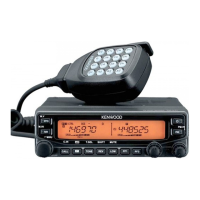
Table of Contents

Other manuals for Kenwood TM-V71E

Questions and Answers

  • K
    Kimberly HicksAug 11, 2025
    How to fix a Kenwood TM-V71E that won't power on?
    • J
      Johnathan EllisAug 11, 2025
      If your Kenwood Car Receiver doesn't power up after connecting the DC power supply, and nothing appears on the display, check these possible causes: 1. The power cable may be connected incorrectly. Ensure the supplied DC power cable is connected correctly (red to the + terminal and black to the – terminal). 2. One or more of the power cable fuses might be blown. Identify what caused the fuse(s) to blow. After fixing any issues, install a new fuse(s) with the same ratings.
  • M
    Marcia PhillipsAug 17, 2025
    What to do if my Kenwood TM-V71E won't transmit when pressing PTT?
    • M
      melissa78Aug 18, 2025
      If you cannot transmit using the Kenwood Car Receiver even when pressing [PTT], there might be a few reasons: 1. The microphone plug might not be fully inserted. Turn the power OFF, then firmly insert the microphone plug until you hear the locking tab click. 2. You may have selected a transmit offset that puts the transmit frequency outside of the permitted range. Try turning the offset shift function OFF. 3. If you're using an external TNC, it might still be transmitting. Press [PTT] after the TNC has completed its transmission.
  • K
    Kathleen GravesAug 23, 2025
    Why are most keys and the tuning control not working on my Kenwood TM-V71E?
    • J
      Jasmine CruzAug 23, 2025
      If most keys and the tuning control on your Kenwood Car Receiver are not working, it could be due to the following reasons: * One of the Lock functions is activated. You should unlock all of the Lock functions. * The receiver might be in Channel Display mode. To exit this mode, turn the transceiver power OFF, then press [LOW] and power it ON again.
  • X
    xberryAug 29, 2025
    Why can't I select the frequency on my Kenwood TM-V71E Car Receiver?
    • D
      Dennis HartmanAug 29, 2025
      If you cannot select the frequency on your Kenwood Car Receiver using the Tuning control or the microphone [UP]/[DWN] buttons, it might be because Memory Recall is selected. Try pressing [VFO].
  • H
    Harold WheelerSep 3, 2025
    What to do if memory channels cannot be selected on Kenwood TM-V71E Car Receiver?
    • M
      Mary GreenSep 4, 2025
      If memory channels cannot be selected on your Kenwood Car Receiver, it might be because no data has been stored in any memory channel. Store data in some memory channels.

Kenwood TM-V71E Specifications

General IconGeneral
BrandKenwood
ModelTM-V71E
CategoryCar Receiver
LanguageEnglish

Related product manuals