48 MLS_C-BA-e-1330
9.1.2 Setting drying parameters
You can enter parameters for each drying process in the menu, as follows:
• Heating profile (temperature, time)
• Shutoff criterion
• Unit of measured result
• Output interval
Operation Display
To enable the operator menu, press the Menu-key.
The first menu item “Profiles“ appears.
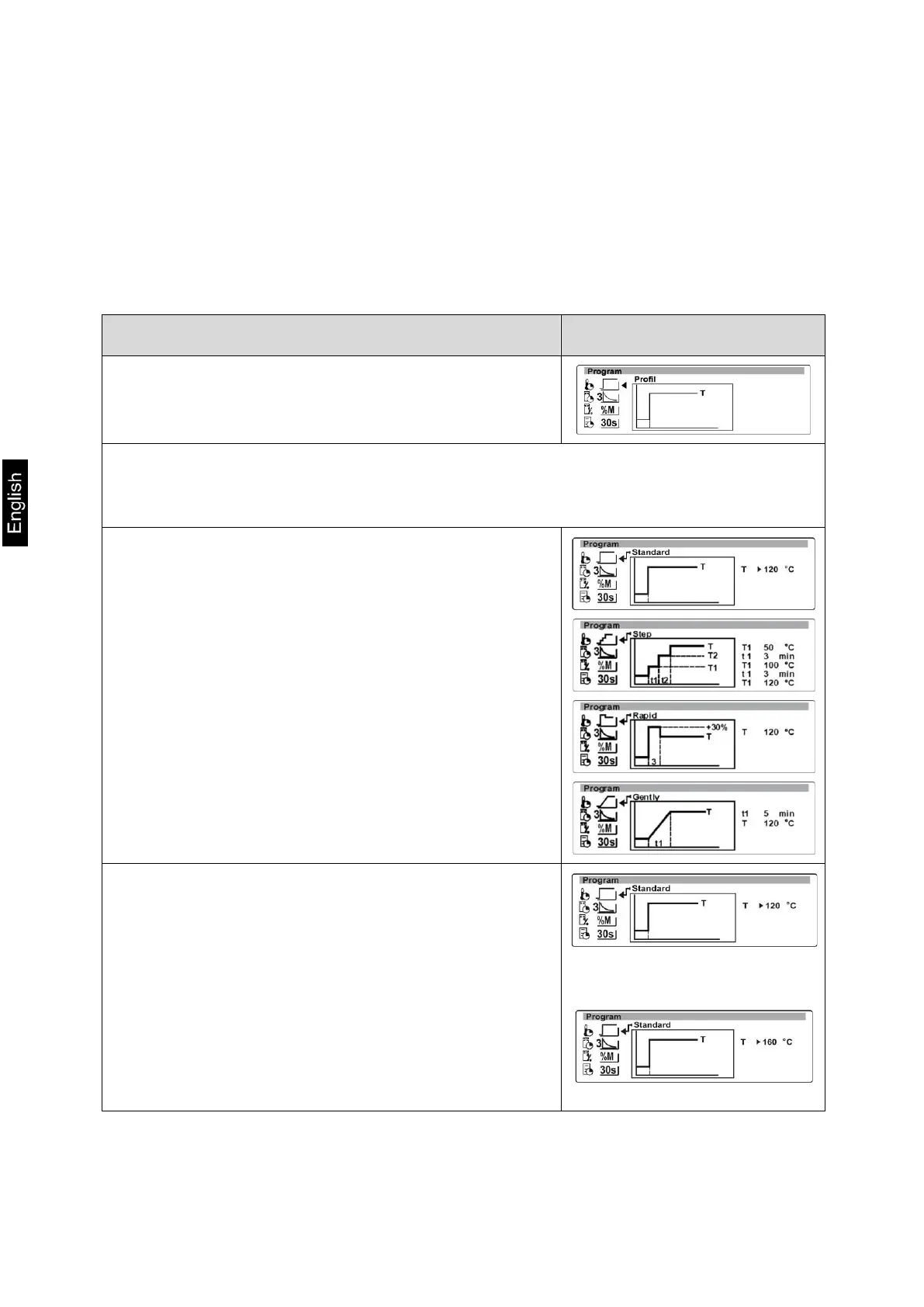
1. Heating profiles
This is used to select suitable heating programs as well as to enter drying
temperature and drying time.
Press button
Press the arrow keys ( ), to select among the
heating programs below (see also chpt. 11.8)
• Standard
• Step-by-step
• Soft
• Fast
First select a heating profile, then enter the desired
parameters (temperature/drying time).
Press the -button; the cursor (►) marks the
adjustable parameter
Press the -button anew and the current setting will
flash
Press the arrow keys ( ), to carry out the desired
setting
Confirm by pressing the PRINT key
For further parameter settings proceed as above


 To Next Page