5
CONTROLS
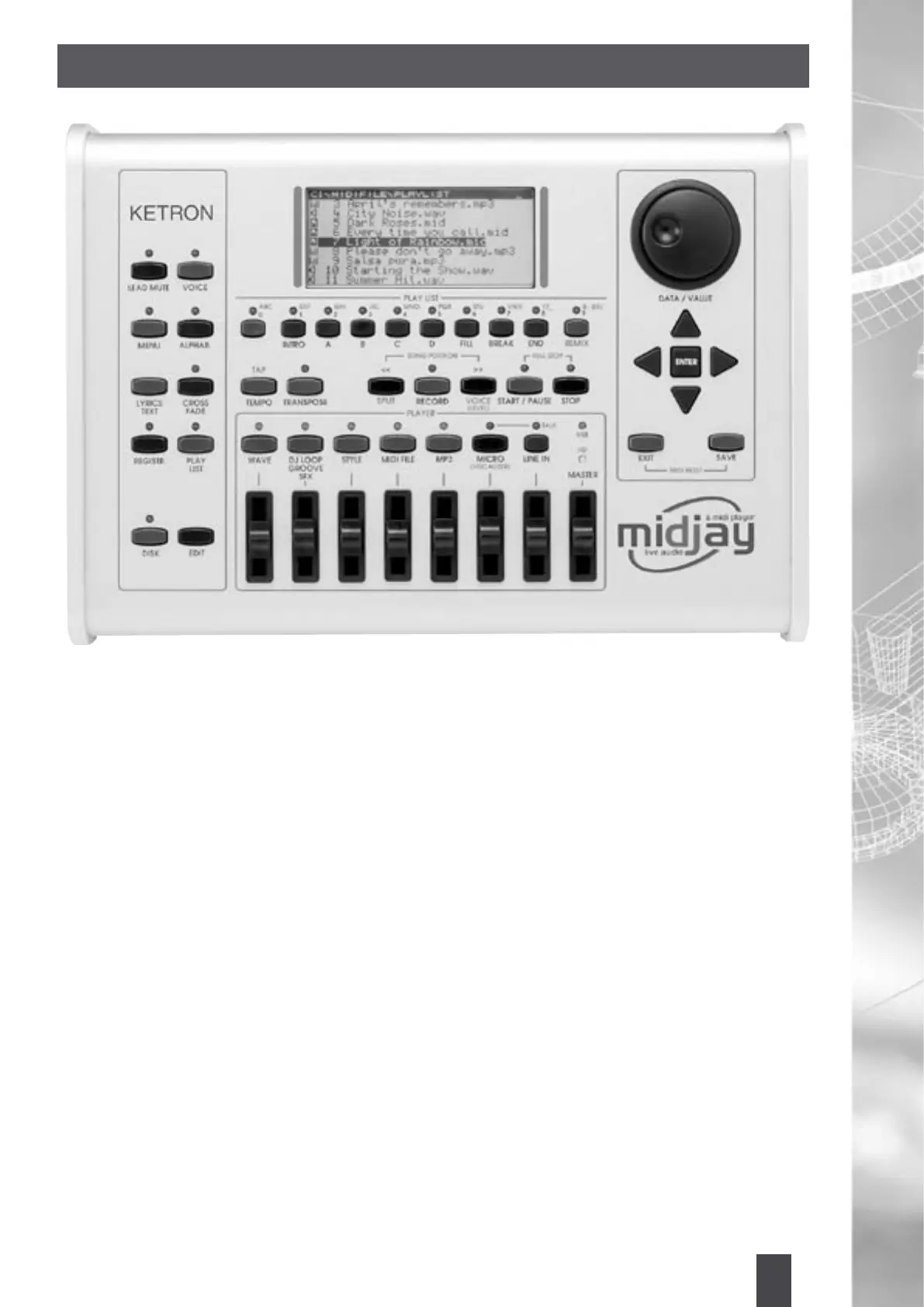
The controls of the MIDJAY are clearly laid out for easy operation. The buttons on the left side of the unit are
used for functions and in some cases, these functions will change depending on the current situation/use
of the unit.
[Lead Mute] This button is used to remove the Lead Voice (or notes) from a MIDI File or suppress it from a
Wave File.
[Voice] This button is used to select the Voices within the MIDJAY module. These Voices can be played through
an external controller such as the KETRON GP10, a MIDI accordion or MIDI Guitar. The Voices can be recalled
using two different methods: Program Change (see related table) or directly from the MIDJAY panel.
[Menu] This accesses a bunch of functions within the module such as the Play Modes, MIDI settings, DSP,
Footswitch settings, Monitor settings and Metronome Click settings.
[Alphab] This button is in conjunction with the Play List buttons ABC, DEF... Z to search for Files alphabetically
within any selected Folder.
[Lyrics/Text] This is used to display lyrics or text associated with MIDI Files or Wave Files.
[Cross Fade] It allows the capability of obtaining a fading effect between one Song and the next (works on
MIDI and Wave Files).
[Registr.] This is used to call up different settings of MIDJAY for quick performance and access to Song
settings.
[Play List] This button grants access to the various Play Lists (combination of up to 10 Songs that are instantly
recalled). They are displayed by simply pressing the Play List buttons 0-9.
[Disk] This activates access to the Disk functions when used in conjunction with the Edit button (Copy, Move,
Delete, Rename, New Folder) for File or Song management.
[Edit] This button is used for various edit purposes. According to the type of File chosen (Wave, MIDI, MP3),
the Edit command will ensure different functions.
[Tap/Tempo] The Wave and MIDI File Modes allow to display and edit the time value of the current Song. In
Style Mode, the key operates in Tap\Time function.


 To Next Page