Owner’s Manual SD1
47
FAST: Increases the Tempo value of the Arranger or the Sequencer. Pressing both SLOW and FAST push buttons at the same
time blocks the Tempo value (which will then be marked with an *) so that this will not be modified when calling up
another Style having a different Tempo. If you wish to disable the blocking, press SLOW and FAST at the same time.
If you wish to restore the Style default Tempo, press PAGE + and PAGE - at the same time.
CONT/PAUSE/RESTART: Controls three different functions.
With the Arranger Off, COUNT enters a Count Down bar where a stick beats the fourths.
If before the COUNT also an INTRO was pressed, with the LED of the JUMP button lighting, at the end of the count-
ing the selected introduction will be activated.
With the Arranger On, pressing this button causes the immediate return to the first fourth of the bar, no matter in
what moment it is pressed. This may be useful in case of a singer a bit out of tempo!
If you are working with the Midifiles (the LED SONG/OLAY is lit), this button stops reproduction (pause) and restarts
it on the next press of COUNT/PAUSE/ RESTART.
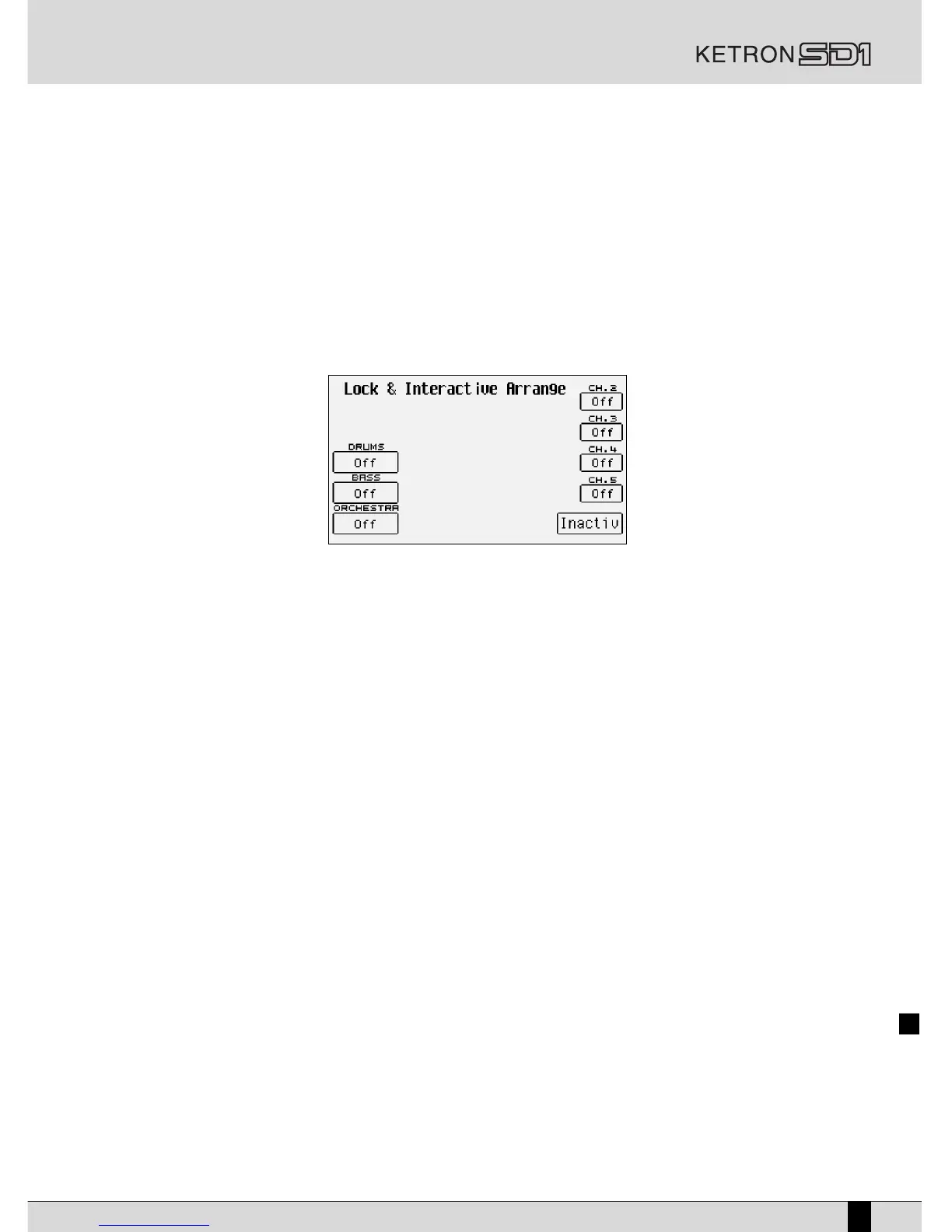
LOCK:
Calls up the Lock and Interactive Arranger page from where two different functions are controlled.
Lock is used to select the tracks of the accompaniment out of Drums, Bass and Orchestra that will not change their
timbre and rhythm, independently from which Arrange will be chosen, within the same Style. This means that when
you change from one Arrange to another, this section will remain unaltered.
If this function is activated while switching over to another Style, the previous settings will be maintained with the
timbres of the Style selected, i.e. also the Style selected last will have one or more accompaniment tracks identical
for all Arranges. The LED of the LOCK button lights up if at least one of the tracks is locked.
The Lock parameters are as follows:
F3 Drums: pressing repeatedly the function key F3 changes the activation status of the Drums and Drums 2
tracks lock..
F4 Bass: the same as F3 Drums, but used to lock the bass track.
F5 Orchestra: The tracks Chord 1, 2, 3, 4 and 5 are locked all together.
Interactive Arrange is used to mute the Chord accompaniment while playing the lead on the Right section, on the right from the split
point of the keyboards. In this way, when the musician plays a solo, some sections of the accompaniment chosen by
him will be muted, enhancing the solo. At the end of the solo, the muted sections will be automatically re-activated.
The Interactive Arrange parameters are:
F6 Chord 2: Pressing function button F6 activates the Interactive Arrange function for the Chord 2 track.
Pressing the same button once more disables the function.
F7 Chord 3: the same as F6 Chord 2 but for the Chord 3 track.
F8 Chord 4: the same as F6 Chord 2 but for the Chord 4 track.
F9 Chord 5: the same as F6 Chord 2 but for the Chord 5 track.
F10 Active/Inactive: pressing the function button F10 activates or deactivates the Interactive Arrange
function.
KEY START: When the relative LED is lit and the Arranger is in Stop condition, the automatic accompaniment is started as soon as
you play a chord on the left to the split point of the keyboard. If an INTRO is selected, as soon as you play a chord
the introduction will be started. If you wish to control the behaviour of the Lower section, i.e. the one providing the
background for the left hand, go to the ARRANGE MODE menu from the main display page, where you can disable
the Lower timbre if the Arranger is not On. In this way you avoid that together with the chord played, before the
Arranger is started, also the Lower notes are played. If the HOLD LED is lit, the Arranger remembers the chord played
even after you stopped playing the chord.
KEY STOP: If this LED is on, playing a chord or a note of short duration interrupts the Arranger performance. It is restarted as
soon as you play another one, even if identical. If the note or the chord is pressed for a longer duration, the Arranger
continues playing. If the Arranger is Off, KEY STOP restarts it if you play a chord over a longer time than the one fore-
seen. If you have selected a FILL or an INTRO, the Arranger is Off and you play a chord over a longer time than the


 To Next Page