Tosetthe“”ofthesound,holddown.Thedisplayshows“”and
thenthevalueset.Edittheparameterusingthekeys(range0to63).
Toindicatewhetherthesoundshallreacttothecommands,
press.Thefirsttimeyoupressit,thedisplayshows“”andthenthestatus,
whichmaybe“”or“”.Thesecondtimeyoupressit,thedisplayshows“EXP”and
thenthestatus,whichmaybe“ON”or“OFF”.Editthesettingsusingthekeys.
You can set all the parameters back in their
defaultconditionsbypressingthe
keyssimultaneously.In thecaseofthe
Volume, if you press the Value+ and Value-
keys simultaneously, the voice is muted and
the displayshows “OFF”. Theedit procedures
canberepeatedonallthreesoundsmakingup
the Preset. To select the sound to be edited,
pressthe(sound1),(sound2)
(sound 3). To exit the Preset editing
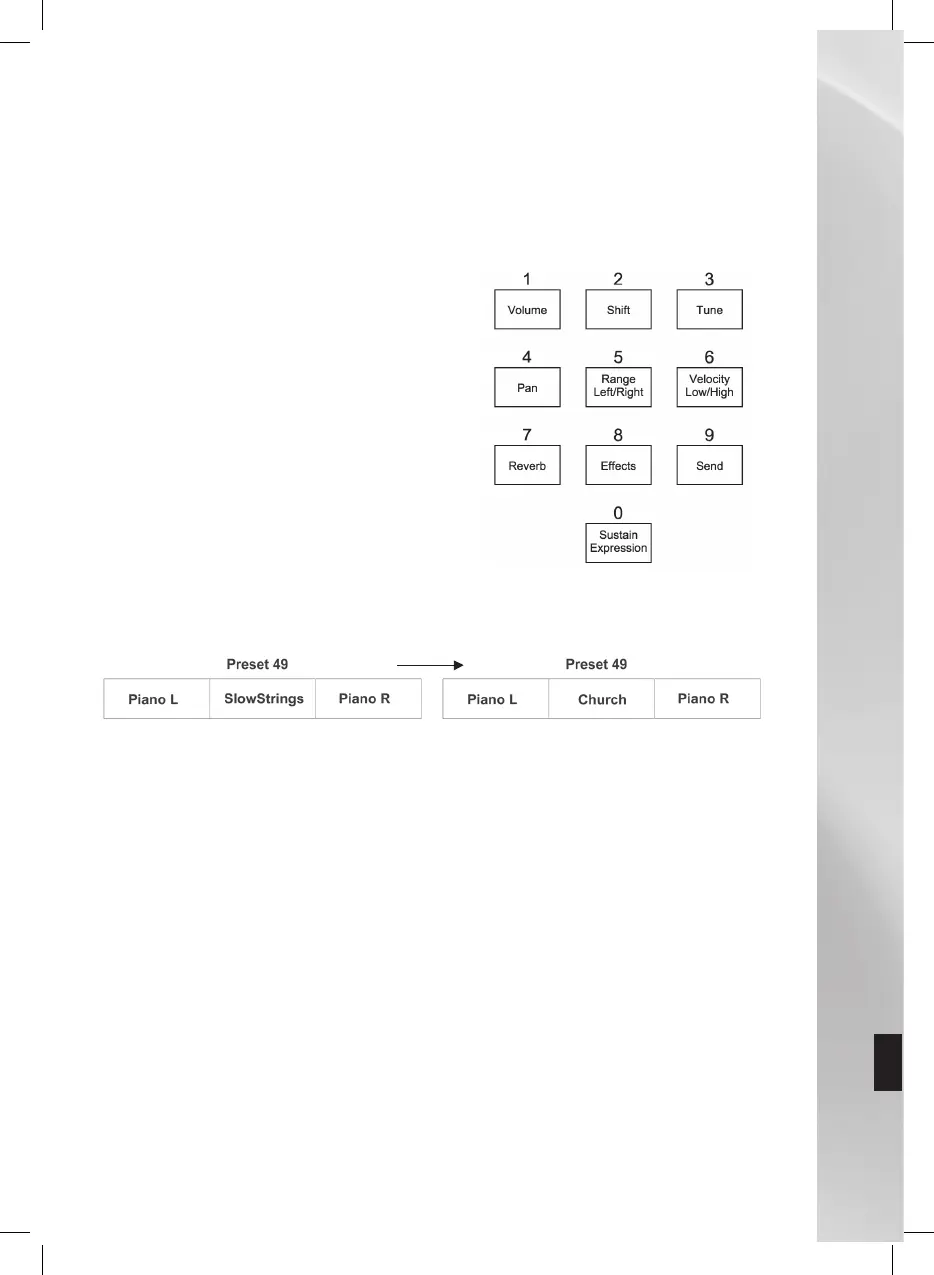
mode, press the Edit key. Here’s the complete
map of the functions assigned to each key of
the numerical keypad within the Edit menu.
Supposing you want to change the value of Preset 49 (Piano&Strings) and turn it into
Piano&Organ.
Selectthevoicebypressingthecorrespondingbutton(RightLEDblinking)
LoadPreset49byenteringonthenumericalkeypad(thedisplayshows049)
Accessmodebypressingthecorrespondingbutton(theEdit,Right,LeftandBass
LEDsblinkandthedisplayshows“---”).
Pressthebuttontochangethesecondvoiceofthepreset(LeftLEDblinking,the
displayshows050,beingthenumberoftheGMsoundcorrespondingtoSlowString).
Selectsound020(correspondingtotheChurchsound)byholdingtheValue-keydown
(thedisplayshows020).
ToincreasethevolumeoftheChurchtimbre,holdkey1downandsimultaneouslypress
theValue+keytoadjustthevolumeatpleasure.
Pressthe“Edit”keytoexitandgobacktotheinitialcondition.
Becarefulatthisstage,becauseifyouloadanotherPreset,allthemodificationsmadewillbe
lostifyoudonotsavethePreset.
Proceedasfollowstosaveapresetinoneofthememorylocationsavailable:
Holdthe“”buttondownforafewseconds.
Whenthe displaystartsblinking,use thenumerical keypadandenter thelocationin
whichyouwishtosavethecurrent(from65to128).



 To Next Page