CHORUS 1 - 5, FLANGER, SHORT DELAY, FEEDBACK, USER CHORUS 1 - 4.
The User Chorus are 4 locations in which up to 4 Chorus
effects modified by the user may be saved.
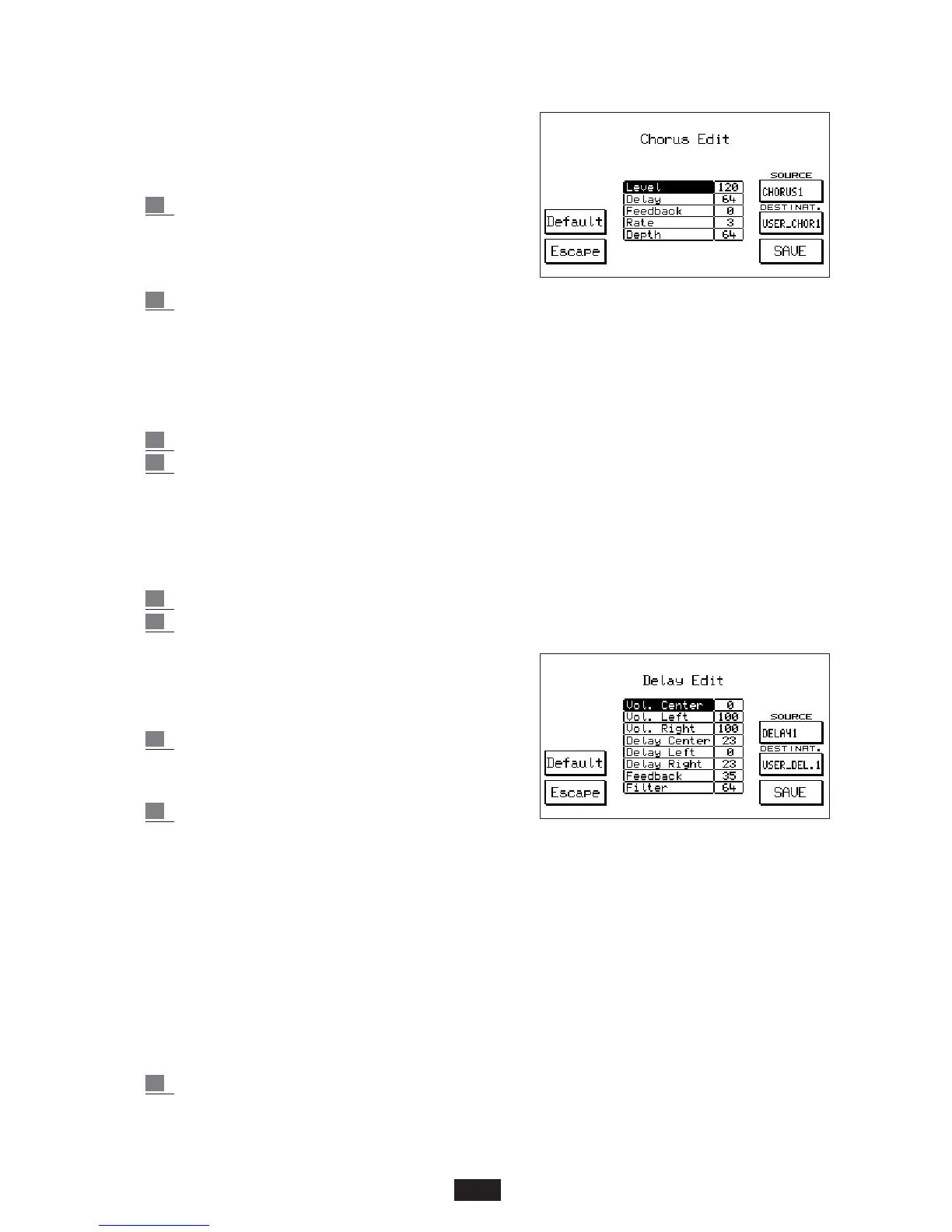
To gain access to the Chorus Edit function press key
F 10 – Edit.
3 The F 8 and F 9 parameters are used to select
the Chorus to be modified (Source) and the
User Chorus where the new effect is to be
located (Destination) respectively.
4 Using Cursor < > the parameters are selected and using Value + / - the value is modified:
Level: global amount of the effect.
Delay: length of the delay.
Feedback: : feedback level on the delay.
Rate: Modulation Velocity.
Depth: modulation Intensity.
5 Simply press F10 - SAVE to save the new Chorus in the pre-selected User Chorus.
6 To exit from Edit press Escape – F 5.
The Default function – F 4 is used to restore the original Chorus effects.
DELAY: to gain access to the Delay effects:
1 Enter into the Effects menu using key F2 from the main display.
2 press key F 8 . Use the Value + / - keys to select the 12 types of Delay available:
DELAY 1 – 8 , USER DELAY 1 – 4 .
The Delay effects modified by the user may be saved in
the 4 User locations.
To gain access to the Edit function of Delay press key F10:
3 Use keys F 8 and F 9 to set the Delay to be
modified (Source) and the destination User
location (Destination).
4 Using Cursor < > the various parameters are
selected and using Value + / - the value is modified.
Considering that the Delay functions in stereophony the following parameters on the Left
and Right may be controlled:
Volume Center: central level
Volume Left: left part level
Volume Right: right part level
Delay Center: amount of delay on the center
Delay Left: amount of delay on the left part
Delay Right: amount of delay on the right part
Feedback: feedback level on the delays.
Filter . softening control of the filter on the repeats.
5 Press F10 - SAVE to save the new Delay.
Using the Default function (F 4) the original Delays may be restored.
Press F5 - Escape to exit from the function.
21



 To Next Page