19
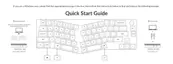
TURN OFF THE KEYBOARD
RECONNECT:
1. Switch the keyboard to the Bluetooth opon to acvate the keyboard.
2. The Bluetooth indicator flashes for 4 seconds and automacally pairs with the last paired device.
3. If the Bluetooth indicator is off, press any buon to enter the connecon again.
* The keyboard must have been paired with the device to perform this funcon.
Switch the keyboard to the OFF opon.
OS TOGGLE SWITCH
Switch the toggle to Mac/iOS when the keyboard is connected to a Mac or iOS operang system.
Switch the toggle to Windows/Android when the keyboard is connected to a Windows or Android
operang system.
*When using the Windows/Android mode, keys are used for “Windows” and “Alt” funcons.
1 — MAC/iOS
2 — WINDOWS/ANDROID
Short press key combinaon “fn1” + “A” / “fn1” + “Z” to switch between different types of lighng effects.
Short press key combinaon “fn1” + “caps lock” to turn the backlight on/off.
BACKLIGHT SETTING


 To Next Page