Need help?
Do you have a question about the Keychron K11 Pro and is the answer not in the manual?
Guide for Windows users to replace specific keycaps.
Instructions for pairing the keyboard via Bluetooth.
Instructions for connecting the keyboard via USB cable.
Layer 0 is activated when the system toggle is set to Mac.
Layer 1 is activated when the system toggle is set to Windows.
Layer 2 is activated for Mac multimedia keys.
Layer 3 is activated for Windows multimedia keys.
Layer 4 is activated for function keys.
Key combination to toggle the backlight on or off.
Key combination to cycle through backlight lighting effects.
Recommendation to watch a video tutorial for keyboard building.
Step-by-step guide to perform a factory reset on the keyboard.
Description of the Bluetooth indicator light.
Explanation of the switch for OS (Mac/iOS, Win/Android).
Explanation of the switch for Bluetooth/Wired mode.
Identification of the keyboard's charging port.
Defines Layer 0 activation for Mac system.
Defines Layer 1 activation for Windows system.
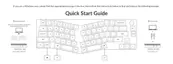
Overview of LED indicator locations and their status meanings.
Detailed explanation of the charging process and indicators.
Instructions for switching between Bluetooth and wired modes.
How to switch between paired Bluetooth devices.
Steps to reconnect the keyboard to a paired device.
Instructions on how to turn off the keyboard.
Key combinations for backlight control.
How to switch the keyboard's OS compatibility.
How to switch input methods for iOS and Android.
Guidance for common issues like pairing and connection problems.
Steps to resolve keyboard non-responsiveness issues.
Advice on troubleshooting Bluetooth signal interference.
Warning about potential issues with third-party input tools.
Explanation for why some keys might not function correctly.
 General
| Frame Material | Aluminum |
|---|---|
| Battery | 4000mAh |
| Model | K11 Pro |
| Type | Mechanical |
| Hot-swappable | Yes |
| Keycaps | Double-shot PBT |
| Backlight | RGB |
| Connectivity | Bluetooth 5.1 / Wired (USB-C) |
| Polling Rate | 1000 Hz (Wired) / 90 Hz (Wireless) |
| Operating System | macOS/Windows |

 To Next Page