iButton Series Programming Guide Section: Programming Guide Software Version
An Alternative way to enter existing locks to the system:
Overview
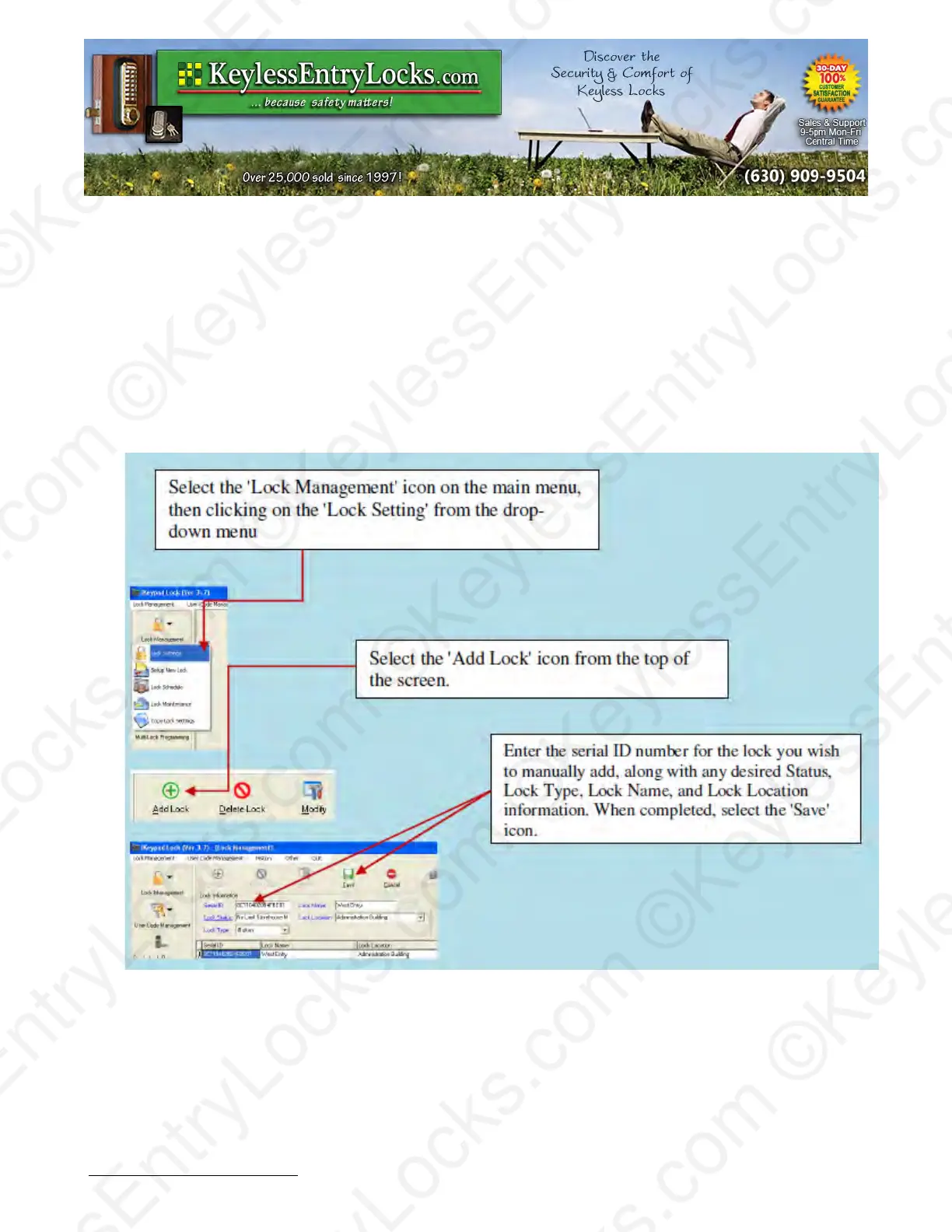
Selecting the 'Lock Management' icon on the main menu, then clicking on the 'Lock Setting' from
the drop-down menu is an alternative way to add existing locks to the system if you already have
initialized them using the same Facility Code at some point and have the lock ID number, but have
a need to manually enter them again. We recommend users keep the lock ID on file after the new
lock setup so that you can manually input a lock profile into the system if ever needed.
Note: You cannot change the user assignments from the 'Lock Setting' screen. User assignments
to a given lock are made through the 'User Code Management' screen.
Keyless Enty Locks For current prices, please visit our website. www.KeylessEntyLocks.com
46 Danada Sq West #4133 Phone: (630) 909-9504
Wheaton, IL 60189 Page 31 of 58 FAX: (630) 447-3635
LockO rders@KeylessEntryLocks.com Path: Z:\KEY\suppliers\Lockey\website-KEL-zc\_dev\pdfs Modified 08/12
©KeylessEntryLocks.com ©KeylessEntryLocks.com
©KeylessEntryLocks.com ©KeylessEntryLocks.com
©KeylessEntryLocks.com ©KeylessEntryLocks.com
©KeylessEntryLocks.com ©KeylessEntryLocks.com
©KeylessEntryLocks.com ©KeylessEntryLocks.com
©KeylessEntryLocks.com ©KeylessEntryLocks.com ©KeylessEntryLocks.com
©KeylessEntryLocks.com ©KeylessEntryLocks.com ©KeylessEntryLocks.com


 To Next Page