EasyManua.ls Logo

Keyless Entry iButton Eternity Series - User Manual

Keyless Entry iButton Eternity Series
58 pages
Print Icon
To Next Page IconTo Next Page
Loading...
iButton Eternity Series Locks
Programming Guide
Keyless Entry Locks For current prices, please visit our website. www.KeylessEntryLocks.com
46 Danada Sq West #4133 Phone: (630) 909-9504
Wheaton, IL 60189 Page 1 of 58 FAX: (630) 447-3635
LockO rders@KeylessEntryLocks.com Path: Z:\KEY\suppliers\Lockey\website-KEL-zc\_dev\pdfs Modified 08/12
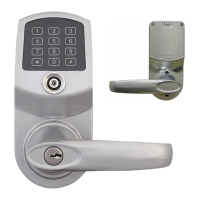
iButton Eternity E5
Keypad/Combination
Entry Door Lock
with Lighted Keypad
iButton Eternity E4
Keypad/Combination
Entry Door Lock
Heavy-Duty Commercial Grade
©KeylessEntryLocks.com ©KeylessEntryLocks.com
©KeylessEntryLocks.com ©KeylessEntryLocks.com ©KeylessEntryLocks.com


Questions and Answers

  • L
    Lindsey KelleyAug 4, 2025
    Why is my iButton Key not working on Keyless Entry Door locks?
    • D
      daviddavidsonAug 5, 2025
      If the iButton Key is not working on your Keyless Entry Door locks, ensure the user was properly programmed or change the time restrictions on the particular iButton, as it could be a time-restricted key or an invalid user.
  • D
    dannyherreraAug 10, 2025
    What to do if Keyless Entry Door locks don’t accept any valid iButton key?
    • R
      Robert CooleyAug 10, 2025
      If the Keyless Entry Door lock doesn’t accept any valid iButton key, it might be in 'Lockout' mode. To resolve this, issue a new Lockout Key to release the lockout mode.
  • M
    matthew80Aug 17, 2025
    Why is my temporary key code not working on Keyless Entry iButton Eternity?
    • J
      Jessica LynchAug 17, 2025
      If the temporary key code for your Keyless Entry Door locks isn't working, the access code may have expired, or the lock time could be incorrect. Check and set the correct time and date inside the lock, or issue a new temporary code.
  • B
    brownmiguelAug 22, 2025
    What to do if red light is on and three beeps on Keyless Entry iButton Eternity Door locks?
    • J
      Jodi BaxterAug 23, 2025
      If the red light is on and there are three beeps on your Keyless Entry Door locks, it typically indicates that the batteries are low. You should change the batteries. Also, reset the lock time and date (function 88#).
  • E
    Edward SchmidtAug 28, 2025
    What to do if green light is on and two beeps, but motor is not running on Keyless Entry iButton Eternity Door locks?
    • M
      Molly BarnesAug 28, 2025
      If the green light is on and there are two beeps, but the motor isn't running on your Keyless Entry Door locks, it suggests there's no power to the lock motor. To fix this, make sure the motor wire is firmly connected to the PCB and that the wire isn't pinched or damaged by the latch.

Summary

Non-Software iButton Lock Programming

General Information and Lock Indicators

Overview of lock features, indicators, and basic functions for non-software models.

Memory Reset and Default Settings

Procedures for resetting lock memory and default settings for E4/E5 models.

Programming Modes, Codes, and Lock Types

Explains programming modes, types of codes (master, user, installer), and lock modes.

Programming Functions and Schedules

Covers basic/advanced functions, schedules, time/date formats, and examples.

Troubleshooting and Support

Troubleshooting Common Lock Issues

Identifies common problems, their possible reasons, and solutions for lock operation.

Warranty and Contact Information

Provides details on product warranty, sales, and technical support contact information.

Software-Based iButton Lock Programming

Software Overview, Setup, and Installation

Details on software versions, system compatibility, driver/software installation.

User and Lock Management

Covers user setup, log-in, facility code changes, and basic lock configuration.

Key, Schedule, and Parameter Assignment

Assigning users, locks, schedules, time shifts, and setting lock parameters via software.

Audit Trail, Operator Log, and Key Functions

Managing audit trails, operator logs, and specific key functions like lockout and one-off.

Keyless Entry iButton Eternity Series Specifications

General IconGeneral
BrandKeyless Entry
ModeliButton Eternity Series
CategoryDoor locks
LanguageEnglish