iButton Series Programming Guide Section: Programming Guide Software Version
Assigning Users to a Single Lock
Overview:
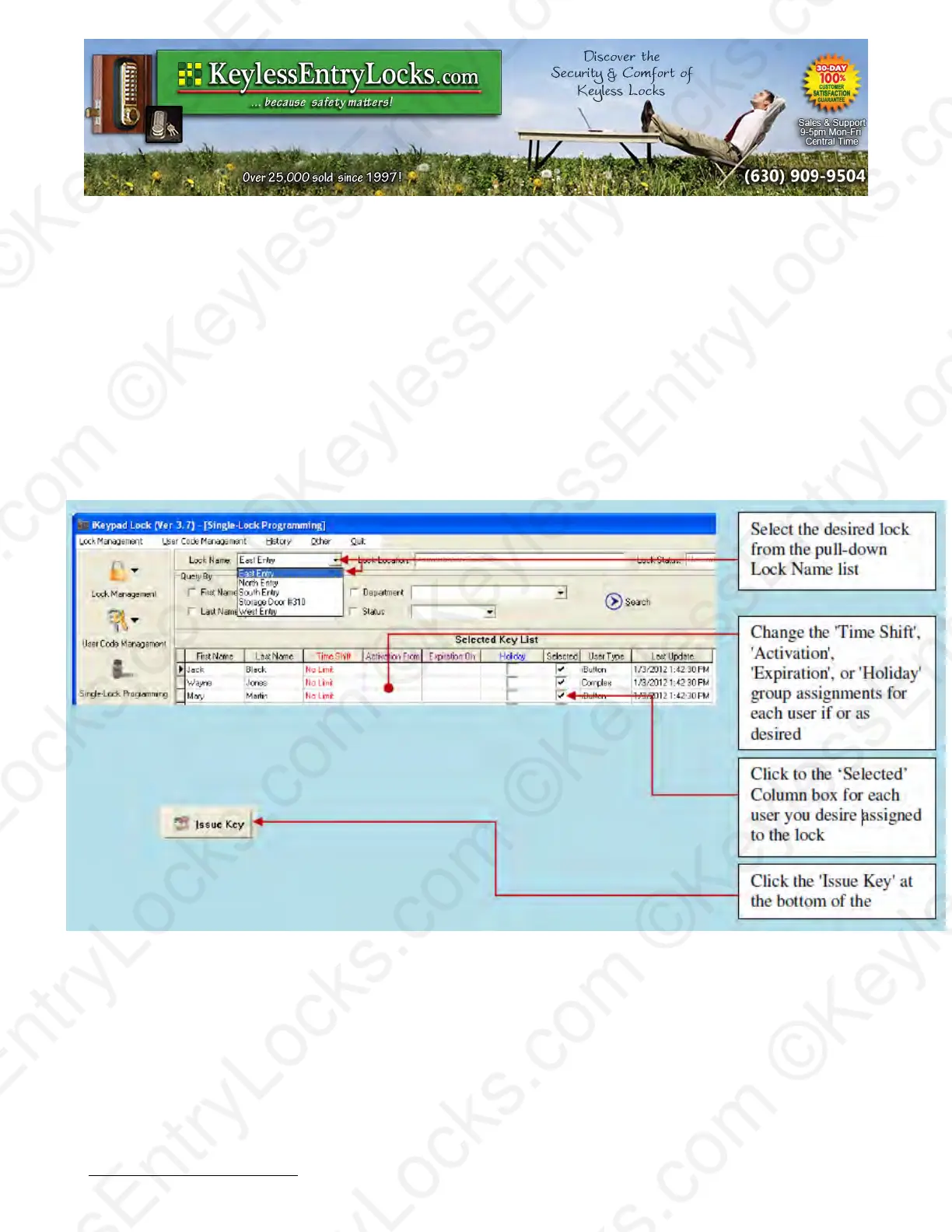
This menu is used to assign iButton keys and user codes to one lock.
•
Select lock from lock name list
•
Change Time Shift, Activation / Expiration, or Holiday (Exception) settings to be assigned to
the lock
•
Click on the ‘Selected’ column to assign users you desire for the lock
•
Snap in DS1977 programming key into the USB blue dot receptor
•
Click 'Issue Key'
•
Complete the lock programming by touching the programming key to the target lock reader
until you hear a double beep.
Keyless Enty Locks For current prices, please visit our website. www.KeylessEntyLocks.com
46 Danada Sq West #4133 Phone: (630) 909-9504
Wheaton, IL 60189 Page 35 of 58 FAX: (630) 447-3635
LockO rders@KeylessEntryLocks.com Path: Z:\KEY\suppliers\Lockey\website-KEL-zc\_dev\pdfs Modified 08/12
©KeylessEntryLocks.com ©KeylessEntryLocks.com
©KeylessEntryLocks.com ©KeylessEntryLocks.com
©KeylessEntryLocks.com ©KeylessEntryLocks.com
©KeylessEntryLocks.com ©KeylessEntryLocks.com
©KeylessEntryLocks.com ©KeylessEntryLocks.com
©KeylessEntryLocks.com ©KeylessEntryLocks.com ©KeylessEntryLocks.com
©KeylessEntryLocks.com ©KeylessEntryLocks.com ©KeylessEntryLocks.com


 To Next Page