iButton Series Programming Guide Section: Programming Guide Software Version
Multiple Lock Assignment
Overview:
This process is to assign a key list to multiple locks at one time. Up to 8 locks can be assigned to
each programming key, with a maximum of 114 keys total. The process is similar to single lock
programming, but allows limited programming of multiple locks without returning the DS1977
program key to the USB blue dot receptor between each lock. The limited memory available in the
DS1977 key means that you may have to use 'Single Lock' programming to pass the time
schedules database tables to the locks if they have been changed. The data tables of all the
available 'Time Shift', 'Holiday', 'Activation', and 'Expiration' are only passed to locks during 'Single
Lock' programming process. As long as that data has not changed, you may assign these already
existing time-group tables to locks and users using the 'Multi-Lock' programming menu as desired.
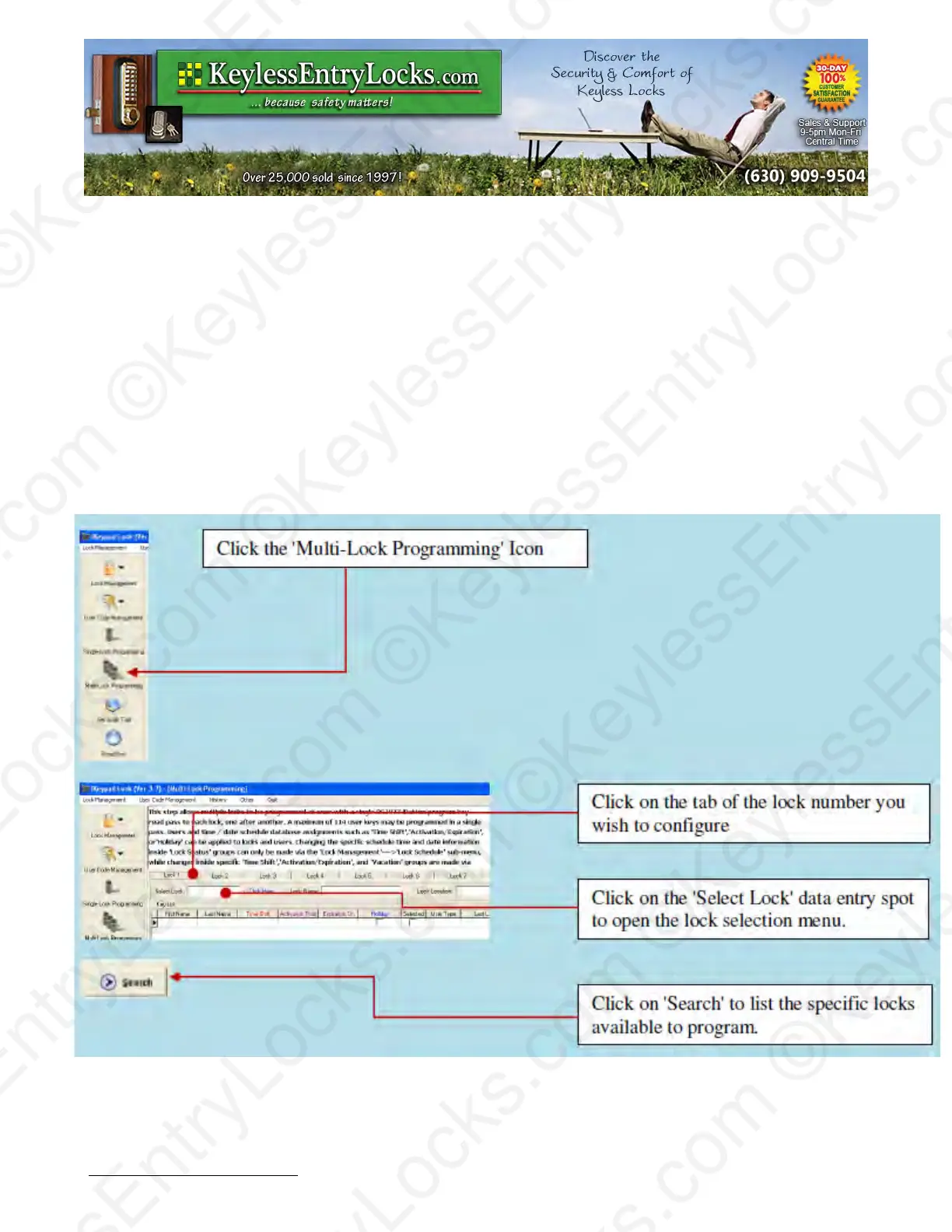
To Use Multi-Lock Programming:
Keyless Enty Locks For current prices, please visit our website. www.KeylessEntyLocks.com
46 Danada Sq West #4133 Phone: (630) 909-9504
Wheaton, IL 60189 Page 36 of 58 FAX: (630) 447-3635
LockO rders@KeylessEntryLocks.com Path: Z:\KEY\suppliers\Lockey\website-KEL-zc\_dev\pdfs Modified 08/12
©KeylessEntryLocks.com ©KeylessEntryLocks.com
©KeylessEntryLocks.com ©KeylessEntryLocks.com
©KeylessEntryLocks.com ©KeylessEntryLocks.com
©KeylessEntryLocks.com ©KeylessEntryLocks.com
©KeylessEntryLocks.com ©KeylessEntryLocks.com
©KeylessEntryLocks.com ©KeylessEntryLocks.com ©KeylessEntryLocks.com
©KeylessEntryLocks.com ©KeylessEntryLocks.com ©KeylessEntryLocks.com


 To Next Page