iButton Series Programming Guide Section: Programming Guide Software Version
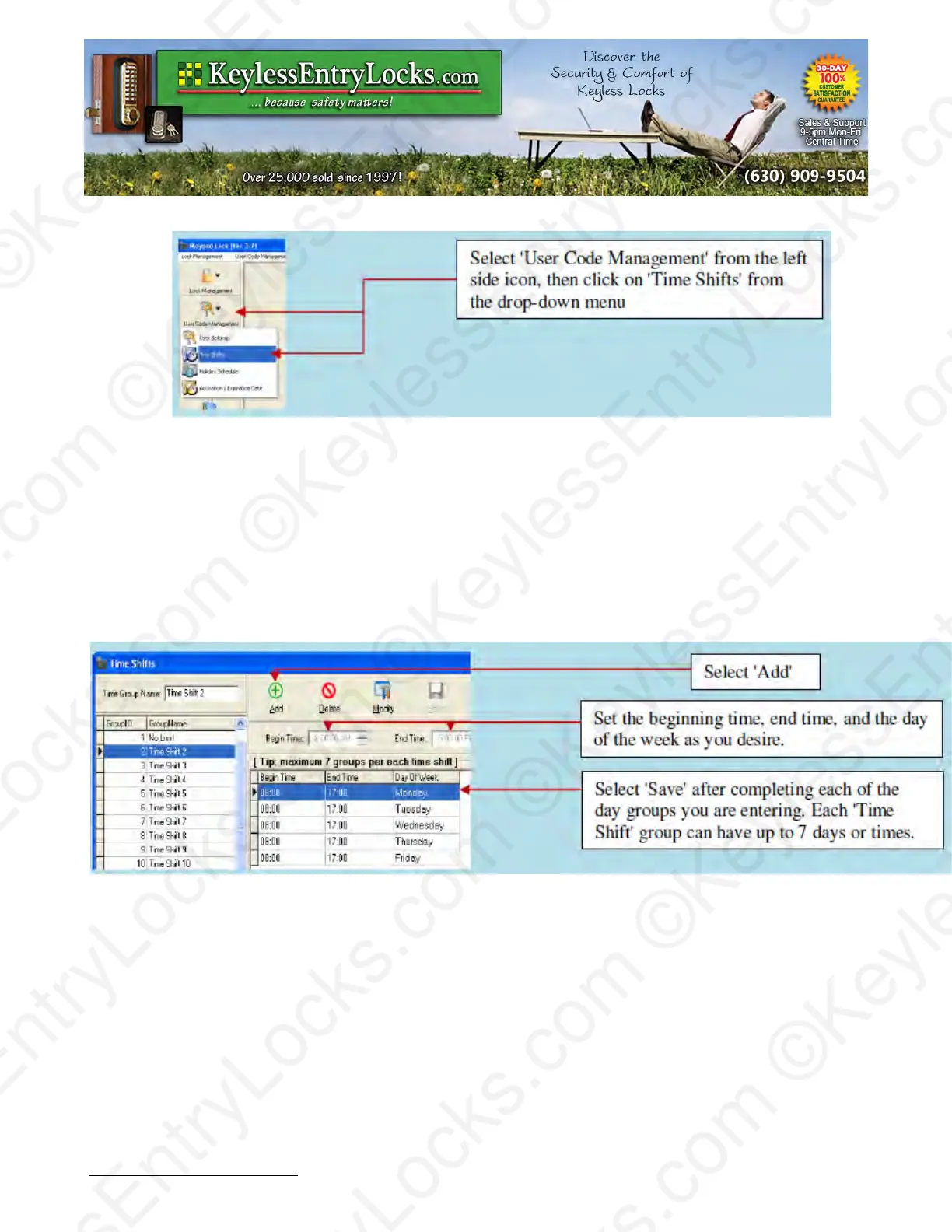
To add or modify each time period in a time group:
•
Select the group number you want from the left side window, then click on Add, Modify, or
Delete button to edit the settings in the right side window.
Note: Group 1, 'No Limit' is the default and cannot itself be modified.
Here is the example for Time Shift Group 2:
A company wants to set the Group 2 Shift to have access from Monday to Friday 8:00am to
5:00pm, and no access allowed on Saturday and Sunday. Select 'Add', then set the beginning,
end, and day of week you desire. Select 'Save' after each of the groups you are entering.
Keyless Enty Locks For current prices, please visit our website. www.KeylessEntyLocks.com
46 Danada Sq West #4133 Phone: (630) 909-9504
Wheaton, IL 60189 Page 39 of 58 FAX: (630) 447-3635
LockO rders@KeylessEntryLocks.com Path: Z:\KEY\suppliers\Lockey\website-KEL-zc\_dev\pdfs Modified 08/12
©KeylessEntryLocks.com ©KeylessEntryLocks.com
©KeylessEntryLocks.com ©KeylessEntryLocks.com
©KeylessEntryLocks.com ©KeylessEntryLocks.com
©KeylessEntryLocks.com ©KeylessEntryLocks.com
©KeylessEntryLocks.com ©KeylessEntryLocks.com
©KeylessEntryLocks.com ©KeylessEntryLocks.com ©KeylessEntryLocks.com
©KeylessEntryLocks.com ©KeylessEntryLocks.com ©KeylessEntryLocks.com


 To Next Page