iButton Series Programming Guide Section: Programming Guide Software Version
Set Time Key
Overview:
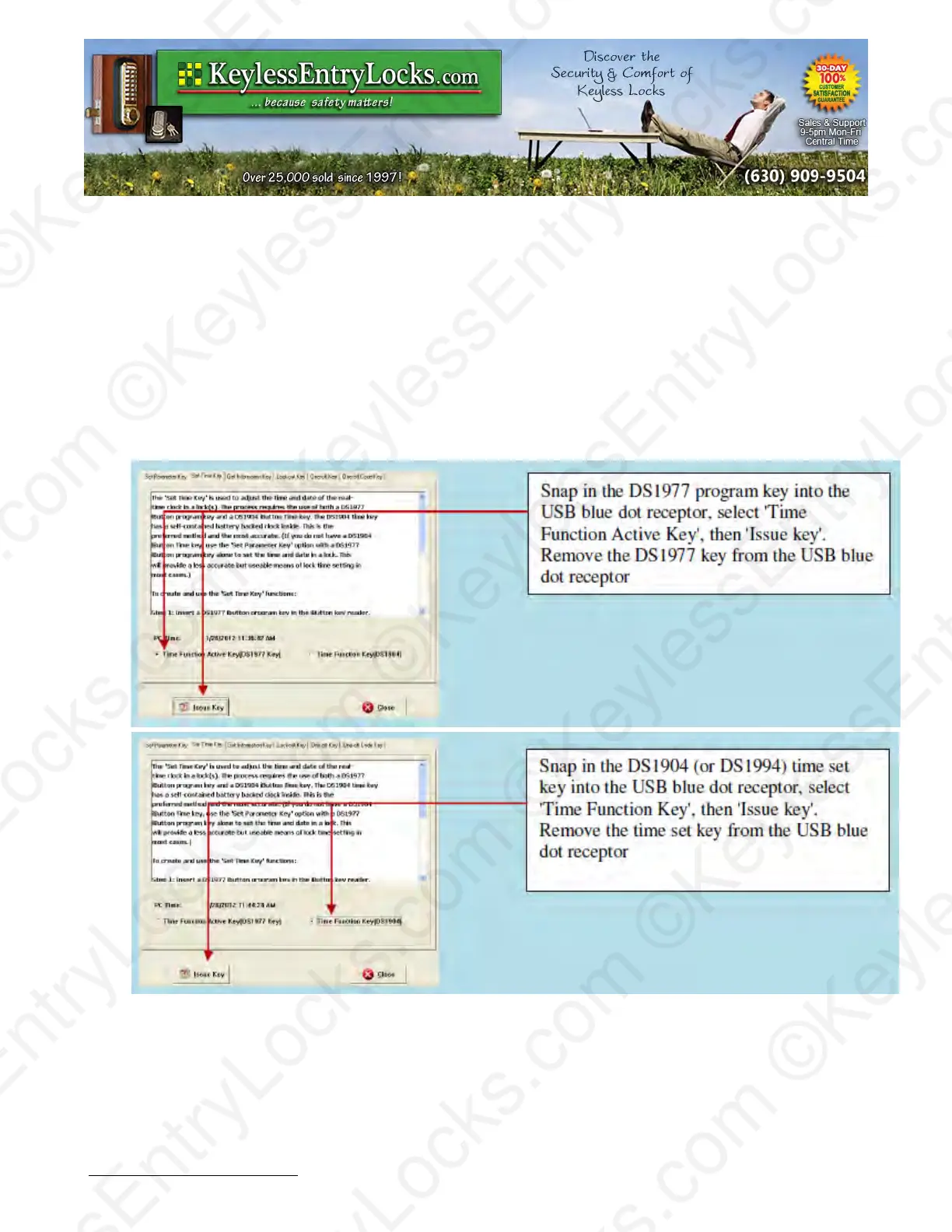
This process uses a DS1977 program key and a DS1904 (or DS1994) iButton key to set the real
time and date of the lock.
•
Follow the on screen instructions to first 'Issue' the DS1977 key to 'allow' the lock to accept
a time setting, then 'Issue' the DS1904 (or 1994) time set key.
•
Apply first the DS1977 program key to each lock, then apply the DS1904 (or 1994 time)
time set key to each lock. The DS1904/1994 key has a real-time clock inside that continues
to run, so that even if there is delay at getting to a lock the time will still be right when
applied to the lock.
Tip: Other than DS1904/1994 real time key, just the DS1977 program key can also set the time of
the lock. This is just a 'snap-shot' of the time however. Using just the program key set will cause
some time errors since programming the key and programming the lock will take some time,
particularly if there is a long distance between the computer and the lock. We recommend using
Keyless Enty Locks For current prices, please visit our website. www.KeylessEntyLocks.com
46 Danada Sq West #4133 Phone: (630) 909-9504
Wheaton, IL 60189 Page 50 of 58 FAX: (630) 447-3635
LockO rders@KeylessEntryLocks.com Path: Z:\KEY\suppliers\Lockey\website-KEL-zc\_dev\pdfs Modified 08/12
©KeylessEntryLocks.com ©KeylessEntryLocks.com
©KeylessEntryLocks.com ©KeylessEntryLocks.com
©KeylessEntryLocks.com ©KeylessEntryLocks.com
©KeylessEntryLocks.com ©KeylessEntryLocks.com
©KeylessEntryLocks.com ©KeylessEntryLocks.com
©KeylessEntryLocks.com ©KeylessEntryLocks.com ©KeylessEntryLocks.com
©KeylessEntryLocks.com ©KeylessEntryLocks.com ©KeylessEntryLocks.com


 To Next Page