iButton Series Programming Guide Section: Programming Guide Software Version
Lockout Key
Overview:
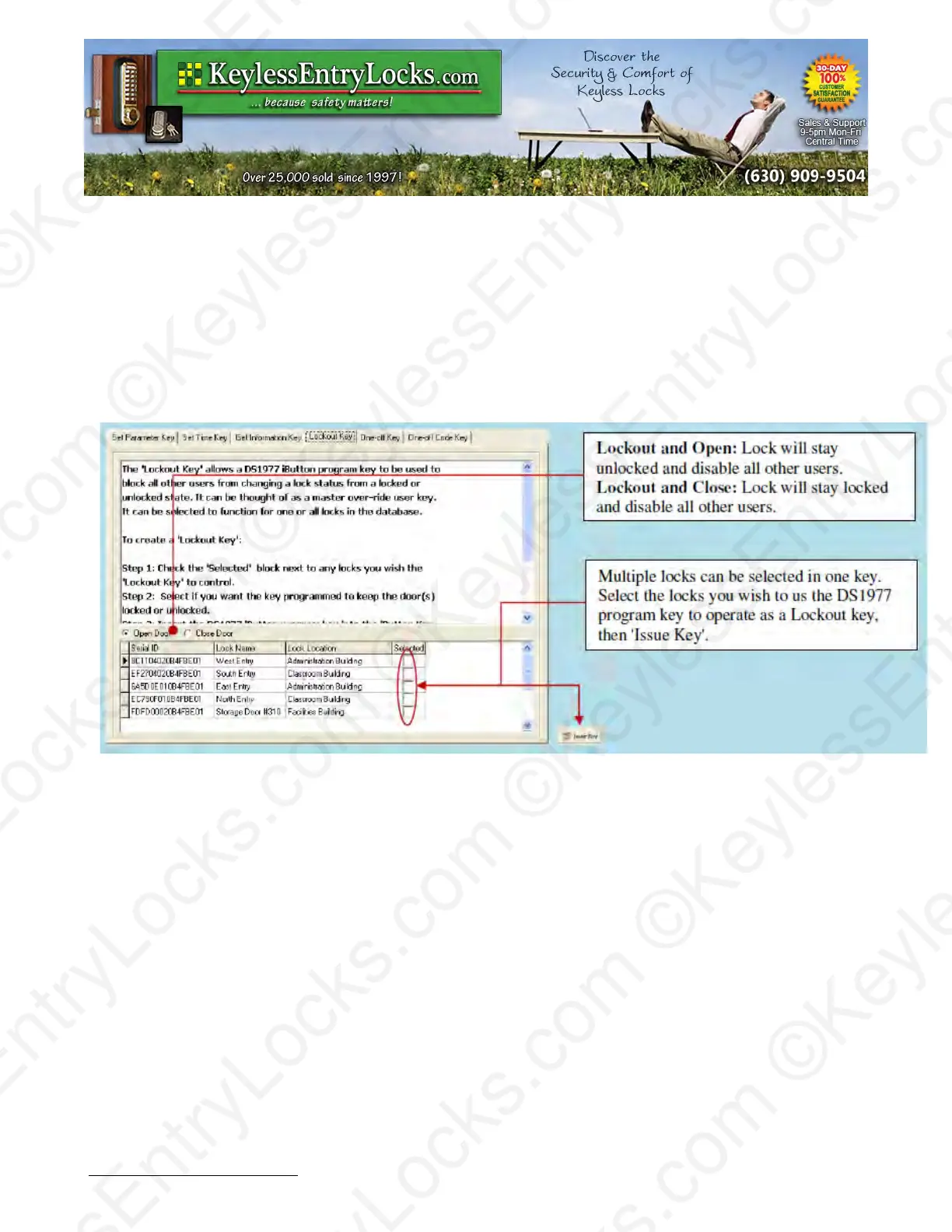
Lockout forbids all assigned keys/codes from operating the lock. Apply any Lockout key to put the
lock in Lockout Mode, and apply again to release the Lockout Mode. To apply the key, snap the
program key into the USB blue dot receptor, select open door or close door, press the “Issue Key”
button, and then press the program key to the lock to set the Lockout Mode. There are two types
of Lockout Modes.
One-Off key/One-Off Code
Overview:
These are two types of One Time User: one time service key using the DS-1977 programming key
or keypad codes (up to 10)
•
One-Off Key
Step1: Select locks from Lock List.
Step2: Issue key.
This key will immediately work on the selected lock one time only. (No need set up on the lock)
Keyless Enty Locks For current prices, please visit our website. www.KeylessEntyLocks.com
46 Danada Sq West #4133 Phone: (630) 909-9504
Wheaton, IL 60189 Page 52 of 58 FAX: (630) 447-3635
LockO rders@KeylessEntryLocks.com Path: Z:\KEY\suppliers\Lockey\website-KEL-zc\_dev\pdfs Modified 08/12
©KeylessEntryLocks.com ©KeylessEntryLocks.com
©KeylessEntryLocks.com ©KeylessEntryLocks.com
©KeylessEntryLocks.com ©KeylessEntryLocks.com
©KeylessEntryLocks.com ©KeylessEntryLocks.com
©KeylessEntryLocks.com ©KeylessEntryLocks.com
©KeylessEntryLocks.com ©KeylessEntryLocks.com ©KeylessEntryLocks.com
©KeylessEntryLocks.com ©KeylessEntryLocks.com ©KeylessEntryLocks.com


 To Next Page