Features of your vehicle
1364
SYSTEM CONTROLLERS AND
FUNCTIONS
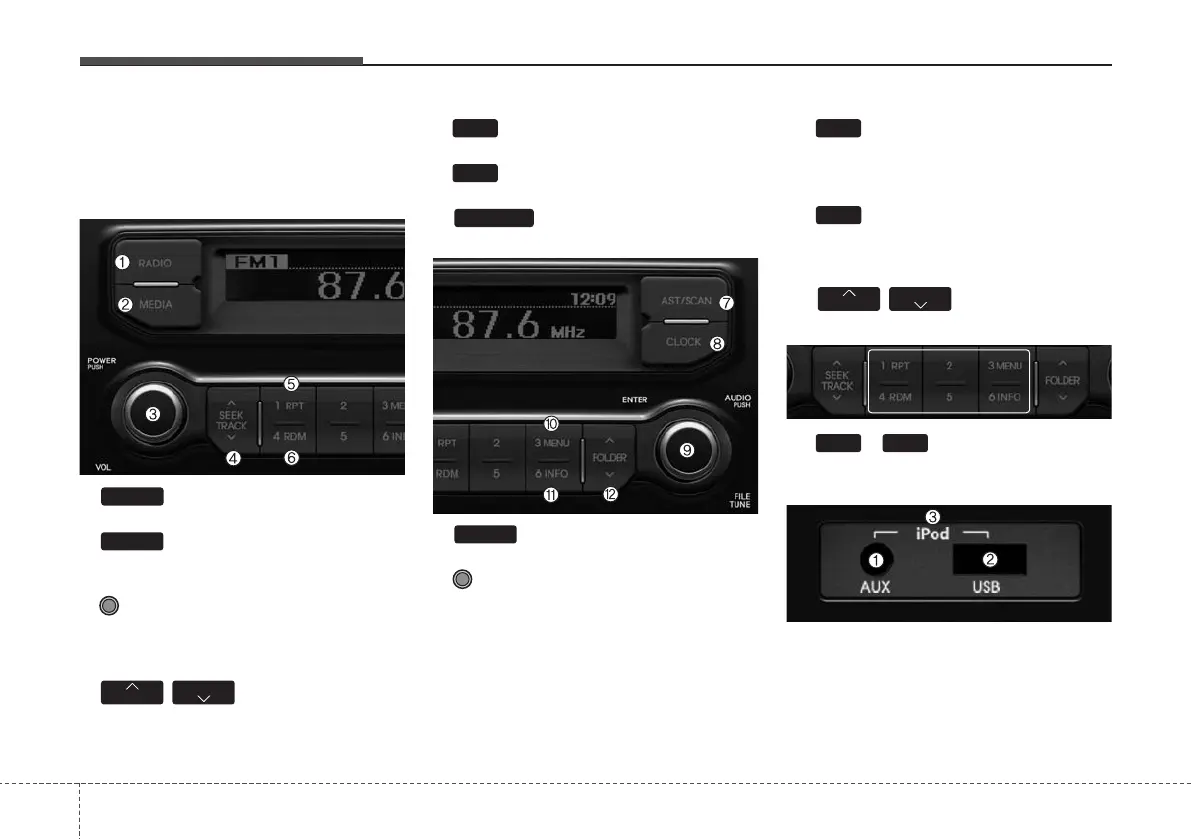
Audio Head Unit
1. : Changes to FM/AM mode
2. : Changes to USB, iPod, and
AUX modes
3. Power/Volume Knob
• Power knob : turn power on/off
• Volume knob: set volume
4. / : Searches for
broadcast frequencies and files
5. : Repeat
6. : Random
7. : Files scanning or auto
save radio broadcast frequencies.
8. : Shows and sets current time
9. Tune knob
• Radio mode : Changes frequency by
turning the knob left/right
• USB, iPod mode: Searches files by
turning the knob left/right
❈ When the desired song is displayed,
press the knob to play the file.
• Moves focus in all selection menus and
selects menus
10. : MENU
In iPod mode, moves to parent folder
upon category search
11. : INFO
USB, iPod mode : Displays the informa-
tion of the current file
12. / : Search and move
between folders
13.
~
(Preset)
In radio mode, Saves and receives fre-
quencies (channels)
1. AUX terminal : External device con-
nection terminal
2.
USB terminal : USB connection terminal
3.
iPod terminal: iPod connection terminal
❈ To play an iPod, always use the iPod
car cable.
61
FOLDER
FOLDER
6
3
CLOCK
AST/SCAN
4
1
TRACK
SEEK
MEDIA
RADIO



 To Next Page