4137
Features of your vehicle
Audio Settings
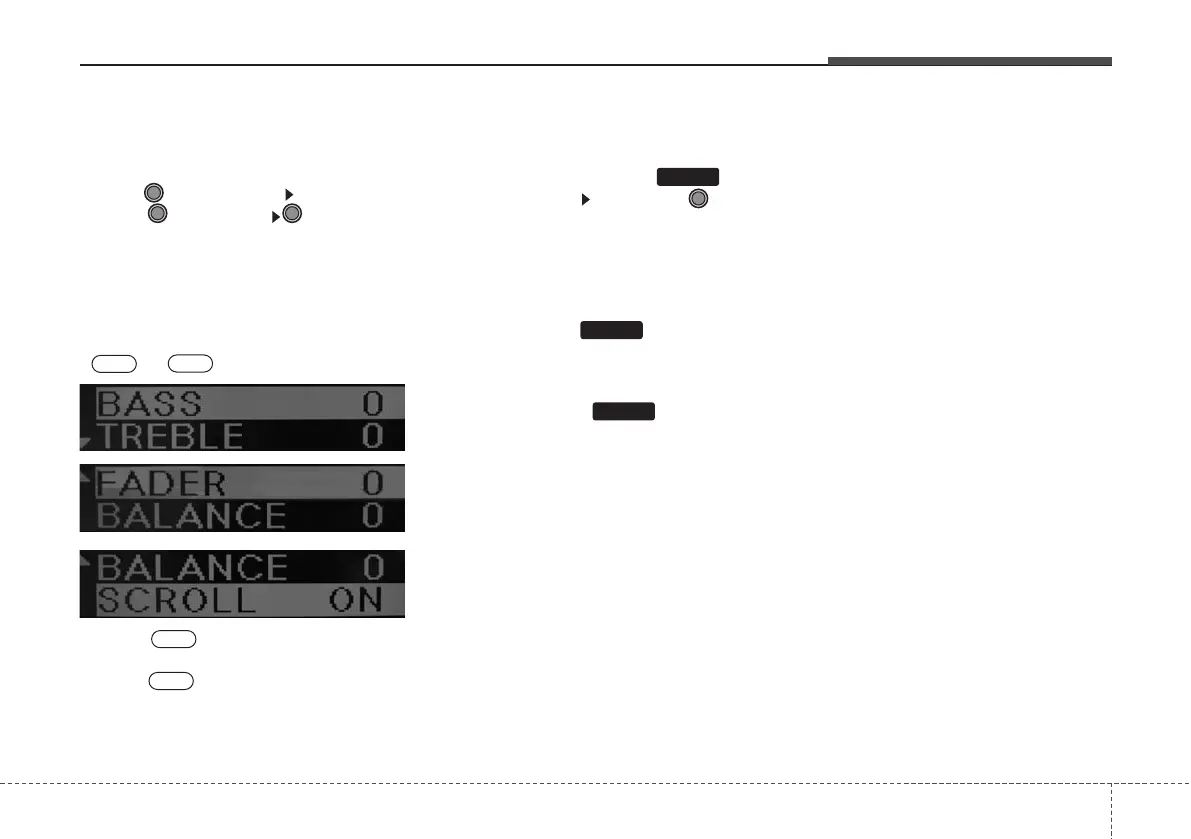
This feature is used to control the Bass,
Treble, Fader, Balance, and Scroll.
Press
TUNE
knob
Select menu
through TUNE knob TUNE knob
left/right to set
• Bass, Treble : Sets the sound values.
• Fader, Balance : Moves the sound fader
and balance.
• Scroll : Turns Text Scroll feature
or
.
❈ Scroll : Upon playing MP3, text
is continuously scrolled.
Scroll : text is scrolled only one
time.
Clock Settings
This feature is used to set the clock.
Pressing and holding the key
(over 0.8 seconds) Set through
TUNE
knob
❈
Adjust the number currently in focus. Set
the [hour]and press the tune knob to set
the [minute].
•
Shortly press the key (under 0.8
seconds): shows the current time and
restores the previous screen after 5 sec-
onds.
•
Press and hold the key (over 0.8
seconds): allows you to set the time. If
there are no operations, restores the pre-
vious screen after 8 seconds.
CLOCK
CLOCK
CLOCK
Off
On
Off
On



 To Next Page