8
TROUBLESHOOTING
Q: Battery is discharging but the display is showing it is charging or vice versa.
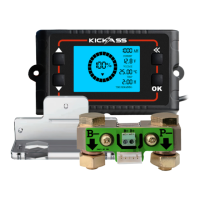
A: It is likely the Shunt is wired back to front. Ensure the negative battery terminal is connected to
the B- side of the shunt and loads/chargers are connected to the P- side of the shunt.
Q: The display is not turning on.
A: Check to see all connection between display and shunt are fully connected, ensure dongle
connection is screwed together.
A: Check to ensure that the red wire is connected to the positive terminal of the battery and to one
of the two B+ points on the Shunt.
A: Press the OK button, if the display turns on than turns off again, it is likely the battery voltage is
below the POV setting.
Q: The Displayed SOC% is not accurate. This could occur if the display shows 0% SOC
before the system is at the correct DOD or the calibrating to 100% SOC is not occurring at
the excepted time. For example, too early or not at all.
A: Check the CAP setting, this may need to be adjusted for the type of battery.
Review the FCV - The setting value for the max charging voltage may need to be reduced (100%
not reached once charger is in float stage) or increased (100% reached before the charger has
reached float stage).
Check ZCV - If 0% is reached too soon, this value needs to be increased and via versea.
Q: What is the maximum current the shunt can monitor?
A: The shunt is rated to 500A continuous draw.
OPERATION
Backlight
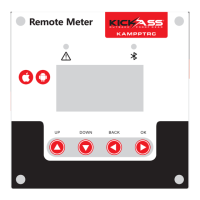
The LCD is fitted with a backlight, when charging the backlight will remain on to indicate the battery
is receiving charge. When in standby or discharging, the backlight will remain off. The backlight can
be turned on by pressing the OK button, it will then turn off after 5 minutes.
Alarm
The alarm will sound when the capacity of the battery goes below the set value. This alarm can be
muted by pressing the OK button.
Power off voltage
If the battery falls below the user set power off voltage (POV), the display will turn off within 10
seconds. To view the display, press the OK button, the display will turn off again after 10 seconds of
inactivity.
SOC% Calibration
Manual Calibration is necessary on initial setup and after some time of use, if the SOC% does not
reach 100% under normal opratration. To do this simply fully charge your battery and hold the UP
arrow for 3 seconds. If the display is frequently getting out of calibration, the user defined setting
may require review.


 To Previous Page
 Loading...