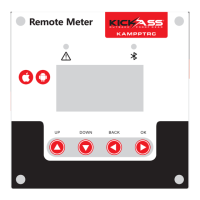
The KickAss 12V Battery Monitor with 500A Shunt is a comprehensive device designed to provide detailed information about your battery's status, ensuring optimal performance and longevity for your 12V products. It's engineered for ease of use, making it a plug-and-play solution for camping and outdoor enthusiasts.
Function Description
The primary function of this battery monitor is to provide real-time data on your battery's state, including its charge, current flow, voltage, and temperature. It acts as a central hub for monitoring your battery bank, whether it's a single battery or a parallel configuration. The device helps prevent over-discharge and provides crucial information for efficient power management.
Important Technical Specifications
- Working Voltage Range: 10-30V DC, making it suitable for a wide range of 12V systems.
- Working Current (backlight on): Approximately 100 mA.
- Standby Current (backlight off): Approximately 1-2 mA, ensuring minimal power consumption when not actively in use.
- Accuracy: 1%, providing precise readings for critical battery parameters.
- Battery Capacity Range: 0.1 - 999.9Ah, accommodating various battery bank sizes.
- Operating Temperature Range: -10° to 60°C, allowing for operation in diverse environmental conditions.
- Display Housing Dimensions: 126L x 66.6H, a compact size for easy integration into different setups.
- B+ Wire: 20AWG, Length: 100mm, for power and voltage sensing.
- Display Temperature Sensor Cable: 5m, offering flexibility in sensor placement.
- Display Data Cable: 500mm.
- Shunt Assembly Data Cable: 500mm.
- Optional Extension Cable Wire Length: Recommended 5m Extension Cable (SKU: KARDUEXT5M) for remote display mounting.
- Shunt Rating: 500A continuous draw, capable of handling high current applications.
Usage Features
The KickAss 12V Battery Monitor offers a range of features designed to enhance user experience and provide critical information:
- Battery State of Charge (SOC %): Displays the remaining battery capacity as a percentage, often visualized with an "Energy Ring" for quick reference.
- Instantaneous Current (A) Flow: Shows the real-time current flowing into (charging, positive value) or out of (discharging, negative value) the battery.
- Battery Voltage: Provides an accurate reading of the battery's voltage.
- Ambient Temperature: Measures the surrounding temperature, which can be crucial for battery health and performance.
- Remaining Time to Full/Empty Calculations: Estimates how much time is left until the battery is fully charged or completely discharged, based on current draw and capacity.
- Low Battery / Low SOC Alarm: An audible alarm sounds when the battery capacity falls below a user-defined threshold, alerting you to critical power levels. This alarm can be muted.
- Remote Display with Backlit LCD Screen: The display unit can be mounted remotely, and its backlight ensures visibility in various lighting conditions. The backlight automatically turns on during charging and can be manually activated for 5 minutes when discharging or in standby.
- Parameter Setting Menu: Accessible by holding the OK button for 3 seconds, this menu allows users to customize various settings:
- CAP (Battery Capacity): Set the total Ah capacity of your battery bank.
- FCV (Full Cell Voltage): Define the voltage point at which the battery is considered fully charged, triggering a 100% SOC calibration.
- LCA (Low Capacity Alarm): Set the Ah value below which an audible alarm will sound, and the current (A) value will flash.
- ZCV (Zero Cell Voltage): Specify the voltage point at which the battery is considered empty, automatically resetting SOC% to 0% and flashing the voltage display.
- POV (Power Off Voltage): Determine the voltage at which the display screen will turn off after 10 seconds to conserve power.
- ATT (Battery Attenuation Ratio): Input the percentage ratio at which the effective capacity of your battery bank reduces after each full discharge/charge cycle. This feature helps track battery degradation over time.
- Initial Setup and Calibration: Before powering any system loads, the display must be calibrated to 100% SOC. This is done by ensuring the battery bank is fully charged and then pressing and holding the UP arrow for 3 seconds. The connected battery charger should be in the float stage during manual calibration.
Maintenance Features
While the device itself requires minimal maintenance, certain aspects contribute to its longevity and accurate performance:
- Proper Installation: Ensuring all connections are correctly terminated and secured tightly is crucial for accurate readings and safe operation. This includes connecting the negative battery terminal to the B- side of the shunt and all loads/chargers to the P- side.
- Circuit Protection: The B+ Wire should be fitted with circuit protection, such as split conduit or an in-line fuse rated at 3A, to prevent damage.
- Environmental Protection: Avoid exposing the display to excessive moisture, dust, or direct sunlight, as these can shorten the lifespan of the LCD and other components.
- Troubleshooting Guide: The manual provides solutions for common issues, such as incorrect charging/discharging display (shunt wired backward), display not turning on (connection issues, low battery voltage), and inaccurate SOC% (incorrect CAP, FCV, ZCV settings).
- Regular Calibration: Manual calibration of the SOC% is recommended during initial setup and periodically after some use, especially if the display frequently shows inaccurate readings. This ensures the monitor accurately reflects the battery's state.
The KickAss 12V Battery Monitor with 500A Shunt is a robust and intelligent solution for anyone needing reliable and detailed battery monitoring in their 12V systems.

 Need help?
 General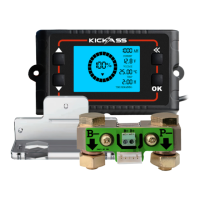

 To Next Page