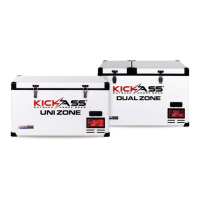
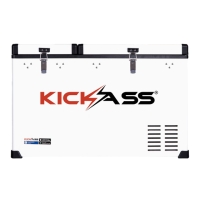
This document describes the KICKASS Outback Series™ Fridges, which include models KAF-48UZ, KAF-42DZ, and KAF-95DZ. These are portable refrigerators designed for outdoor and proof gear applications.
Function Description
The KICKASS Outback Series™ Fridges are designed to provide reliable cooling for various applications, particularly in outdoor and vehicle settings. They utilize a Danfoss-designed compressor manufactured by SECOP, known for its efficiency and low energy consumption. The fridges offer both single and dual-zone cooling capabilities, allowing users to set different temperatures for different compartments in dual-zone models. They are equipped with a multi-voltage system, making them versatile for use with both DC and AC power sources. A key feature is the digital battery protection, which safeguards the vehicle's battery from excessive discharge. Additionally, the fridges include a USB charging port for small devices and a thermostat override switch for emergency operation.
Important Technical Specifications
- Cooling System: Reliable cooling system with Danfoss designed compressor manufactured by SECOP.
- Energy Efficiency: Efficient electronic technology, low energy consumption.
- Voltage System: Multi-voltage system supporting DC 12-24 Volt and AC 100-120/220-240 Volt.
- Battery Protection: Digital Battery Protection to protect vehicle batteries effectively.
- Compressor Operation Voltage: Approximately 11.0 Volts for 12 Volt System or 23.0 Volts for 24V System. The compressor will cut out if the voltage drops below these thresholds and restart when the voltage returns to the cut-in value.
- Cable Specification: Requires suitable DC cable cross-section for length.
- For 12V Max Cable Length:
- 2.5 mm² (AWG 13): 2.5 m (8 ft)
- 4 mm² (AWG 11): 4 m (13 ft)
- 6 mm² (AWG 9): 6 m (20 ft)
- 10 mm² (AWG 7): 10 m (33 ft)
- For 24V Max Cable Length:
- 2.5 mm² (AWG 13): 5 m (16 ft)
- 4 mm² (AWG 11): 8 m (26 ft)
- 6 mm² (AWG 9): 12 m (39 ft)
- 10 mm² (AWG 7): 20 m (66 ft)
- USB Charging Port: Rated to 500mA / 5 Volts.
- Battery Protection Settings (Cut Out Voltage / Cut In Voltage):
- Low (LO/V_L): 10.1V / 11.1V
- Medium (NE/V_M): 11.4V / 12.2V
- High (HI/V_H): 11.8V / 12.6V (Recommended setting by KickAss)
Usage Features
- Turning On: Plug in AC or DC power cable, then hold the power button for 4 seconds until the green LED illuminates. An orange LED indicates the unit is plugged in but off.
- Temperature Setting (Single Zone):
- Press the SET button to open the TEMPERATURE SETTING MENU.
- Use the
+ or - buttons to adjust the temperature.
- Wait 5 seconds for the fridge to return to the home screen or press SET again to enter the TEMPERATURE TYPE MENU.
- Temperature Type Setting (Single Zone):
- From the TEMPERATURE TYPE MENU, use the
+ or - buttons to switch between CELSIUS and FAHRENHEIT.
- Wait 5 seconds for the fridge to return to the home screen or press SET again to enter the BATTERY PROTECTION MENU.
- Battery Protection Setting (Single Zone):
- From the BATTERY PROTECTION MENU, use the
+ or - buttons to select Low (LO), Medium (NE), or High (HI) battery protection. KickAss recommends the HI setting.
- Dual Zone Operation:
- Left Room Temperature Setting: Press SET to open the left room TEMPERATURE SETTING MENU. Use
+ or - to change the setting.
- Right Room Temperature Setting: Wait 5 seconds or press SET again to enter the RIGHT ROOM TEMPERATURE SETTING MENU. Use
+ or - to change the setting.
- Temperature Type Setting (Dual Zone): Wait 5 seconds or press SET again to enter the TEMPERATURE TYPE SCREEN. Use
+ or - to switch between CELSIUS and FAHRENHEIT.
- Battery Protection Setting (Dual Zone): Wait 5 seconds or press SET again to enter the BATTERY PROTECTION MENU. Use
+ or - to select Low (V_L), Medium (V_M), or High (V_H) battery protection. KickAss recommends the V_H setting.
- USB Charging Port: Located on the unit, it allows charging of small devices like mobile phones and remote controllers.
- Thermostat Override Switch: An emergency feature. If the digital thermostat fails, this switch can be used to force the compressor to run at 100% continuously until the faulty component can be replaced. This bypasses temperature control and increases power consumption, so it is not recommended for everyday use.
- Ventilation: Requires good ventilation, with at least 200mm clearance around vents and 100mm around the rest of the unit.
- Placement: Should be placed on a flat surface, away from edges and heat sources. When used in a vehicle, a fastening device is recommended for security.
- Humidity: Avoid high humidity to prevent frost buildup, which can impair cooling.
Maintenance Features
- Cleaning:
- Clean the appliance inside and out with a damp cloth weekly.
- For dirty units, use sodium bicarbonate dissolved in lukewarm water.
- Rinse with clean water and dry carefully after washing.
- Do not use abrasive products, detergents, or soap.
- Never clean the appliance under running water or submerge it.
- Storage: Do not leave the refrigerator off with food inside or the lid closed.
- Troubleshooting: The manual provides guidance for common issues:
- Appliance not turning on: Check power supply, plug/socket connection, fuse, and ensure the power button is held for 4 seconds.
- Food frozen: Setting temperature too low or thermostat override switch enabled.
- Bad refrigeration performance: Too much food, unlocked/open lid, broken/obstructed/deformed lid seal, poor ventilation, too much warm product inside, no room around fridge/vents, heat source nearby, or inappropriate temperature setting.
- Sound of water: Normal, due to refrigerant flow.
- Unusual noise: Refrigerator not on a level surface or loose part inside (contact KickAss Products).
- Error Codes: The error light flashes in sequences every four seconds to indicate specific issues:
- ERR1 or ERR2 (On Display): Faulty temperature probe (Contact KickAss).
- 1 Flash: Low Voltage. Check source voltage, lower voltage cut-out setting to LO, check cable cabling, or try a different power source.
- 2 Flashes: Fan or compressor running issue. Fan drawing too many Amps (replace fan), compressor drawing too many Amps (possible electronic box or compressor fault), or contact KickAss.
- 3 Flashes: Compressor speed too low. Reduce products/items, move unit to lower ambient temperature, clean vents, and ensure clear airflow.
- 4 Flashes: Ambient Temperature too high. Clean vents, ensure clear airflow, or fan fault (replace fan).

 Need help?
 General

 To Next Page