USB Charging Port and Thermostat Override Switch
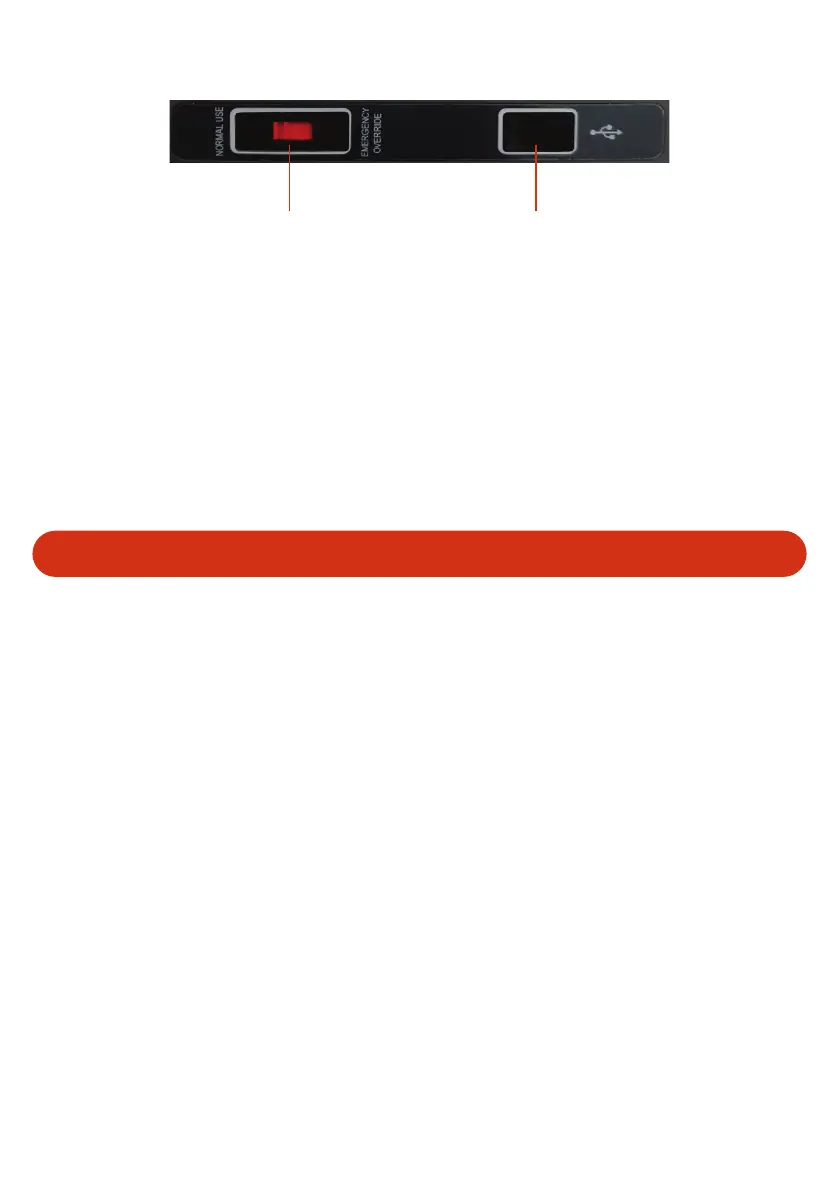
Thermostat Override Switch USB Charging Outlet
Ÿ USB Port – This USB port can be used to charge small devices. E.g. mobile phones and
remote controllers. The socket is rated to 500mA / 5 Volts.
Ÿ Thermostat Override Switch – If your digital thermostat fails and you are unable to set
the temperature, turn this switch to Emergency override. This enables the fridge to run
until you reach a service centre to replace the faulty component.
Please Note: If emergency override is enabled the compressor will attempt to run 100% of the time.
This removes the ability to set the internal temperature and will increase power usage (Total
consumption) and is not recommended for everyday use.
5
Cleaning and Maintenance
Ÿ Clean the appliance inside and out with a damp cloth every week. If it is dirty, use
sodium bicarbonate dissolved in lukewarm water to clean the unit.
Ÿ Do not use abrasive products, detergents or soap. After washing, rinse with clean water
and dry carefully.
Ÿ Do not leave the refrigerator off with food inside or lid closed.
Ÿ Never clean the appliance under running water.


 To Next Page