7
4. Troubleshooting Guide
If you are experiencing a problem with your alarm, or a fault, and are unsure of the next action, please
contact product support at 1-800-880-6788 before discharging the battery. You may also write us at:
Kidde, 1016 Corporate Park Drive, Mebane, NC 27302, or visit our internet address at www.kidde.com.
3. Other Alarm Visual And Audible Indicators
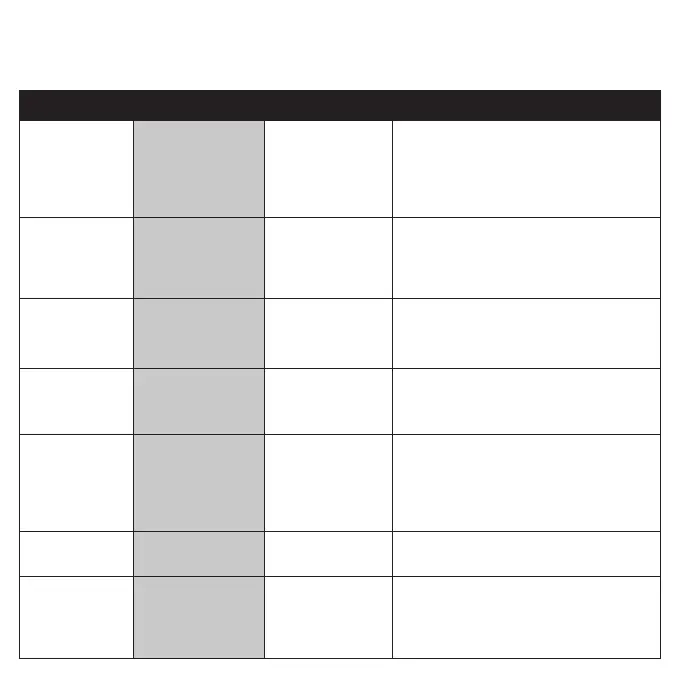
Operational Mode Visual Indications Audible Indications Action/Note
Normal (standby) Green LED blinks approx every
60 sec.
Test (button press when
no alarm condition is
present)
(Note: Test is very loud,
stand a few feet away.)
Red LED blinks in time with
alarm pattern.
• Single beep.
• 3 long beeps, pause, 3 long beeps,
4 quick beeps, pause, 4 quick beeps.
Perform button press once a
week to verify proper alarm
operation.
Smoke or CO Alarm
Memory (unit has
experienced a smoke or
CO alarm event, or has
detected 100ppm CO or
greater.)
Smoke: Red LED blinks
every 15 sec.
CO: 2 red LED blinks
every 15 sec.
NOTE: Alarm memory is only
retained for 24 hrs. Push button
to clear Alarm Memory.
Smoke Alarm Hush
TM
Mode
Red LED blinks every 2 sec. After button push, smoke alarm pat
-
tern stops. (If there is too much smoke
to allow Hush
TM
, smoke alarm pattern
continues.)
This feature is to be used only
when a known alarm condition,
such as smoke from cooking,
activates the alarm. Push
button during Hush
TM
to clear
Hush
TM
and perform a test.
CO Alarm Reset None. After button push: CO alarm pattern
stops.
Unit is confirming if CO is
present or if it experienced a
nuisance situation. Re-alarm
means danger. Move to fresh
air and call 911.
Trouble Condition
Visual Indications Audible Indications Action
Low Battery Amber LED blinks every
60 sec.
Chirp every 60 sec. * Push button once to silence for 24 hrs. (Push
button again to clear Hush
TM
and perform a test.)
Note: 7 days after Low Battery begins, the
notifications cannot be silenced.
* Remove alarm, discharge, dispose unit, and replace
as soon as possible.
Smoke Sensor Fault Amber LED blinks every
60 sec.
3 chirps every 60 sec. * See Cleaning Your Alarm section.
* Push button once to attempt to reset the unit.
* If error continues, remove alarm, discharge,
dispose unit, and replace as soon as possible.
CO Fault Amber LED blinks 2
times every 60 sec.
3 chirps every 60 sec. * Push button once to attempt to reset the unit.
* If error continues, remove alarm, discharge,
dispose unit, and replace as soon as possible.
Fatal Fault Amber LED blinks 3
times every 60 sec.
3 chirps every 60 sec. * Push button once to attempt to reset the unit.
* If error continues, remove alarm, discharge,
dispose unit, and replace as soon as possible.
End of Unit Life Amber LED blinks 2
times every 60 sec.
2 chirps every 60 sec. * Push button once to silence for 24 hrs. (Push button
again to clear Hush
TM
and perform a test.)
Note: 7 days after End of Unit Life begins, the
notifications cannot be silenced.
* Remove alarm, discharge, dispose unit, and replace
as soon as possible.
MCU Failure None Constant Tone * Remove alarm, discharge, dispose unit, and
replace as soon as possible.
Stuck Button Amber LED blinks 4 times
every 60 sec.
3 chirps every 60 sec. * Push button to dislodge it from being stuck.
If button cannot be unstuck, remove alarm,
discharge, dispose unit, and replace as soon as
possible.



 To Next Page