EasyManua.ls Logo

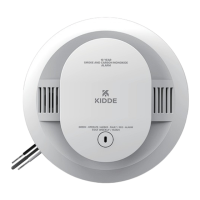
Kidde 30CUA10 - User Manual

Kidde 30CUA10
31 pages
Print Icon
To Next Page IconTo Next Page
Loading...
1
User Guide
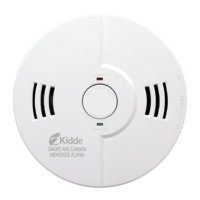
Combination Photoelectric
Smoke & Carbon Monoxide Alarm
with Hardwire Interconnect
Model 30CUA10
120V HARDWIRE INTERCONNECT
10-YEAR BATTERY BACKUP
(AC POWER REQUIRED)
SELF-TESTING (SEE SECTION 10)
COMBINATION ALARM
P/N: G- 000014-00 Rev. A
Helps Reduce Cooking
Nuisance Alarms

Questions and Answers

  • C
    Christopher DiazAug 6, 2025
    What to do if Kidde 30CUA10 has low battery?
    • A
      April HamiltonAug 6, 2025
      If your Kidde Smoke Alarm indicates a low battery, you can push the button once to silence the alarm for 24 hours. Pushing the button again will clear the HushTM and perform a test. Note that 7 days after the low battery notification begins, it cannot be silenced. It is also recommended to remove the alarm, discharge it, dispose of the unit, and replace it as soon as possible.
  • S
    Samuel LopezAug 10, 2025
    How to fix false low battery on Kidde Smoke Alarm?
    • M
      Michelle HillAug 10, 2025
      To address a false low battery alert on your Kidde Smoke Alarm (when AC power is connected before the backup battery is activated), rotate the alarm onto the mounting bracket to activate the backup battery.
  • T
    Troy VelazquezAug 15, 2025
    What to do if my Kidde Smoke Alarm has a CO fault?
    • M
      Michelle HodgesAug 15, 2025
      If your Kidde Smoke Alarm is showing a CO fault, try pushing the button once to reset the unit. If the error continues, remove the alarm, discharge it, dispose of the unit, and replace it as soon as possible.
  • J
    Jordan FriedmanAug 21, 2025
    What to do if my Kidde Smoke Alarm has smoke sensor fault?
    • J
      jessicaclarkeAug 21, 2025
      If your Kidde Smoke Alarm indicates a smoke sensor fault, see the Cleaning Your Alarm section. You can also push the button once to attempt to reset the unit. If the error continues, remove the alarm, discharge it, dispose of the unit, and replace it as soon as possible.
  • K
    kathryn00Aug 26, 2025
    What to do if my Kidde Smoke Alarm button is stuck?
    • N
      Nancy FloresAug 26, 2025
      If the button on your Kidde Smoke Alarm is stuck, try pushing it to dislodge it. If the button cannot be unstuck, remove the alarm, discharge it, dispose of the unit, and replace it as soon as possible.
  • B
    bergmanuelAug 31, 2025
    What to do if Kidde 30CUA10 Smoke Alarm shows MCU failure?
    • L
      lmcclureAug 31, 2025
      If your Kidde Smoke Alarm displays an MCU failure, remove the alarm, discharge it, dispose of the unit, and replace it as soon as possible.

Summary

Smoke Alarm Response Procedures

Carbon Monoxide Alarm Response Procedures

Alarm Visual and Audible Indicators

Troubleshooting Common Issues

Product Introduction and Specifications

Smoke and Carbon Monoxide Alarm Limitations

Recommended Installation Locations

Locations to Avoid for Installation

Wiring, Installation, and Activation Guide

Operation and Testing Procedures

Alarm Operation

Describes how the alarm functions when sensing smoke or carbon monoxide.

Weekly Alarm Testing

Details procedures for manually testing the alarm's functionality on a weekly basis.

Automatic Self-Testing

Explains the alarm's internal automatic self-testing components for continuous monitoring.

Manual Test Procedure

Provides step-by-step instructions for performing the weekly manual test of the alarm.

Understanding Chirping Signals

Explains how to silence specific chirps and what different chirp indications mean.

Recognizing and Handling Nuisance Alarms

Managing Smoke Nuisance Alarms

Guidance on minimizing and handling false alarms caused by smoke from cooking or other sources.

Handling Carbon Monoxide Nuisance Alarms

Information on handling CO alarms that may not indicate a dangerous situation and necessary steps.

Battery Backup System Details

Low Battery Warning Indicator

Details the low battery warning condition and the requirement for timely replacement of the unit.

Permanently Disabling and Discharging Battery

General Carbon Monoxide Information

Cleaning and Maintaining Your Alarm

Developing Good Safety Habits

Home Escape Plan Development

Guidance on creating and practicing a home escape plan for fire emergencies.

Fire Prevention Best Practices

California State Fire Marshal Requirements

FCC Compliance Information

Service and Warranty Information

Kidde 30CUA10 Specifications

General IconGeneral
TypeSmoke Alarm
Silence FeatureYes
Alarm Sound85dB
LED IndicatorYes, Red
Weight8 ounces
ComplianceUL 217
InterconnectabilityYes, up to 24 Kidde devices

Related product manuals