8
Option 1 (Wi-Fi reset): Remove the batteries, wait thirty seconds, re-install
the batteries.
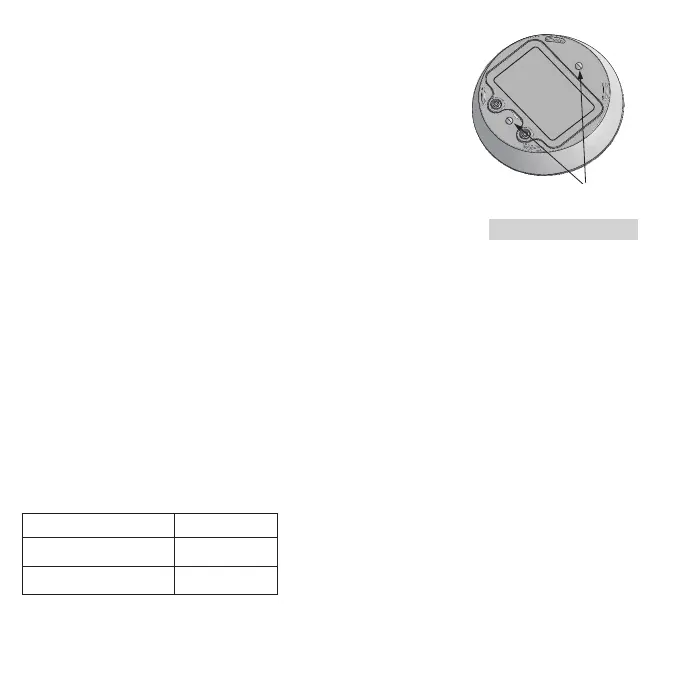
Option 2 (Full device reset): Using a metal screwdriver or paper clip apply
a direct short to the two metal contacts on the bottom of the device three
times within two seconds(See Figure 6.2).
Either of these methods will reset the device and cause it to
automatically search for a Wi-Fi connection. NOTE: Because
the device only searches for Wi-Fi connections for 5 minutes,
it is best to FIRST have the steps completed as outlined
at the top of section 6 before powering or resetting the device.
See Section 6.1 to begin Wi-Fi enrollment.
6.3 Amazon Alexa and Google Assistant
TM
Your Wi-Fi detector is compatible with Amazon Alexa and Google Assistant.
Follow instructions in the Kidde app help section to link your Wi-Fi detector
to Amazon Alexa and/or Google Assistant.*
* AMAZON and ALEXA are trademarks of Amazon Technologies, Inc. or its affiliates.
Google and Google Assistant are trademarks of Google LLC.
7. Operation and Testing
Operation
The detector is operating once it is activated and testing is complete. When water or freeze conditions are
detected the unit sounds a loud alarm (See Section 1 for alarm signal descriptions). In an alarm condition, the
device will sound for a specified amount of time (Alarm Duration) and then will stop alarming to save battery
power. After a specified period of silence (Battery Conserve), the device will alarm again.
Default Setting
(1)
(1)
Note: these settings can be adjusted in the app,
but can affect battery life.
Figure 6.2
Alarm Duration 30 minutes
Battery Conserve time 1 hour
Status update to app
12 hours



 To Next Page