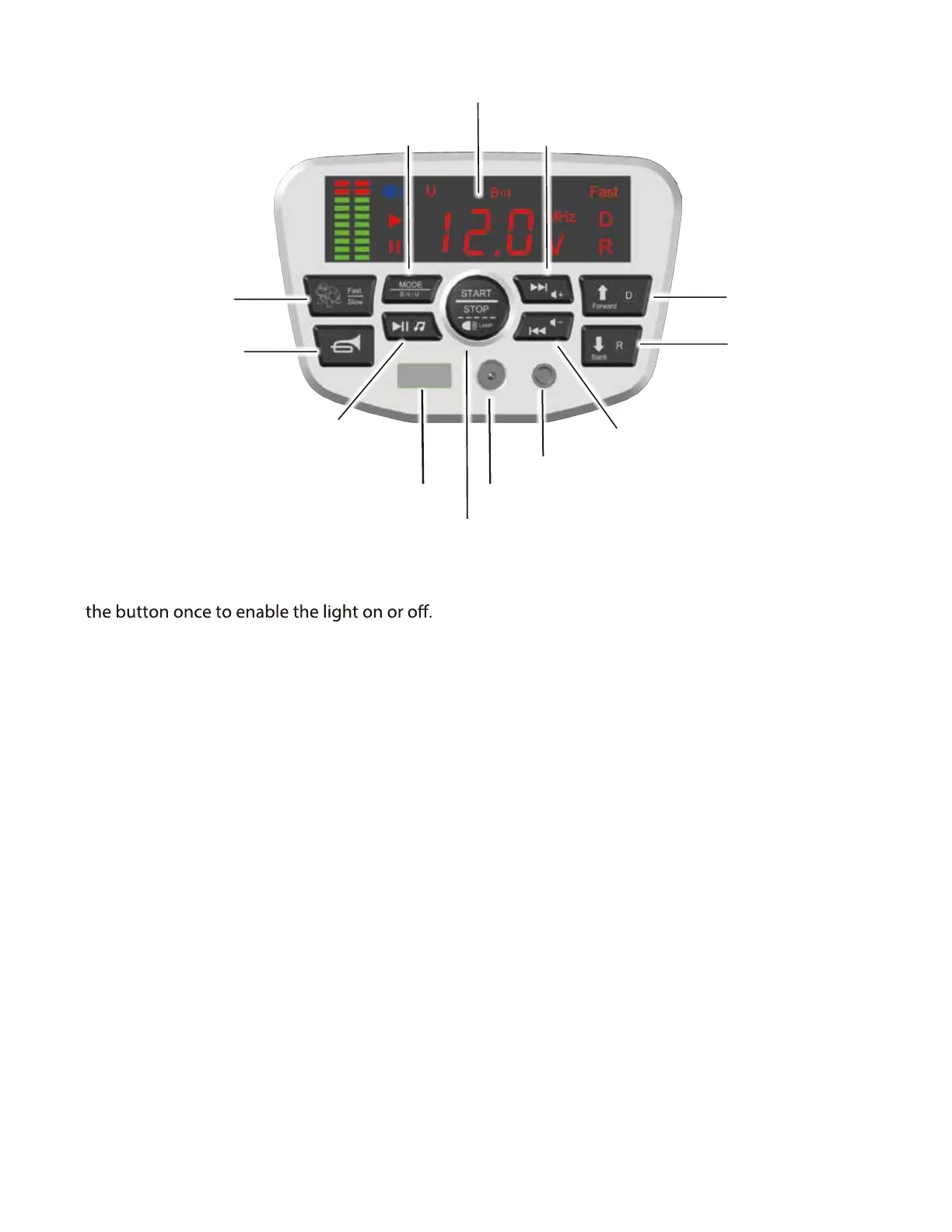
User Instruction (Control Panel)
Charging Port
MP3 Port
Horn Button
Voltage Display
High/low speed
Bluetooth / USB / MP3
Increase Volume/ Next track Button
Decrease Volume / Previous Track Button
Reverse Button
Forward Button
Power / Lamp button
USB Port
Play / Pause
Control the vehicle
A. Power / Lamp Button
Press and hold the button 2-3 seconds to turn ON or OFF the vehicle; Quick press
Press the button to play or pause the music.
B.High /Low Speed Button
Press the button to move the vehicle in high or low speed.
C.Horn Button
Press the horn button to make a beeping sound.
D.Play / Pause Button
E. Charging Port
Connect the charger to the charging port to recharge the battery
F. Decrease Volume / Previous Track Button
Press and hold the button to decrease volume; Press once to play the previous track.
G.Forward / Reverse Button
Press the switch to control the vehicle to move forward / reverse.
Do not switch between forward and reverse until the vehicle comes to a complete stop.
H. Increase Volume / Next track Button
Press and hold the button to increase volume; Press once to play the next track.
I.Voltage Display
J. Mode Button
K. USB Port
Display the voltage of the battery.
Press to switch between bluetooth / USB / MP3.
Connect to USB.
L. MP3 Port
Connect to MP3.



 To Next Page