User Instruction (Remote Control)
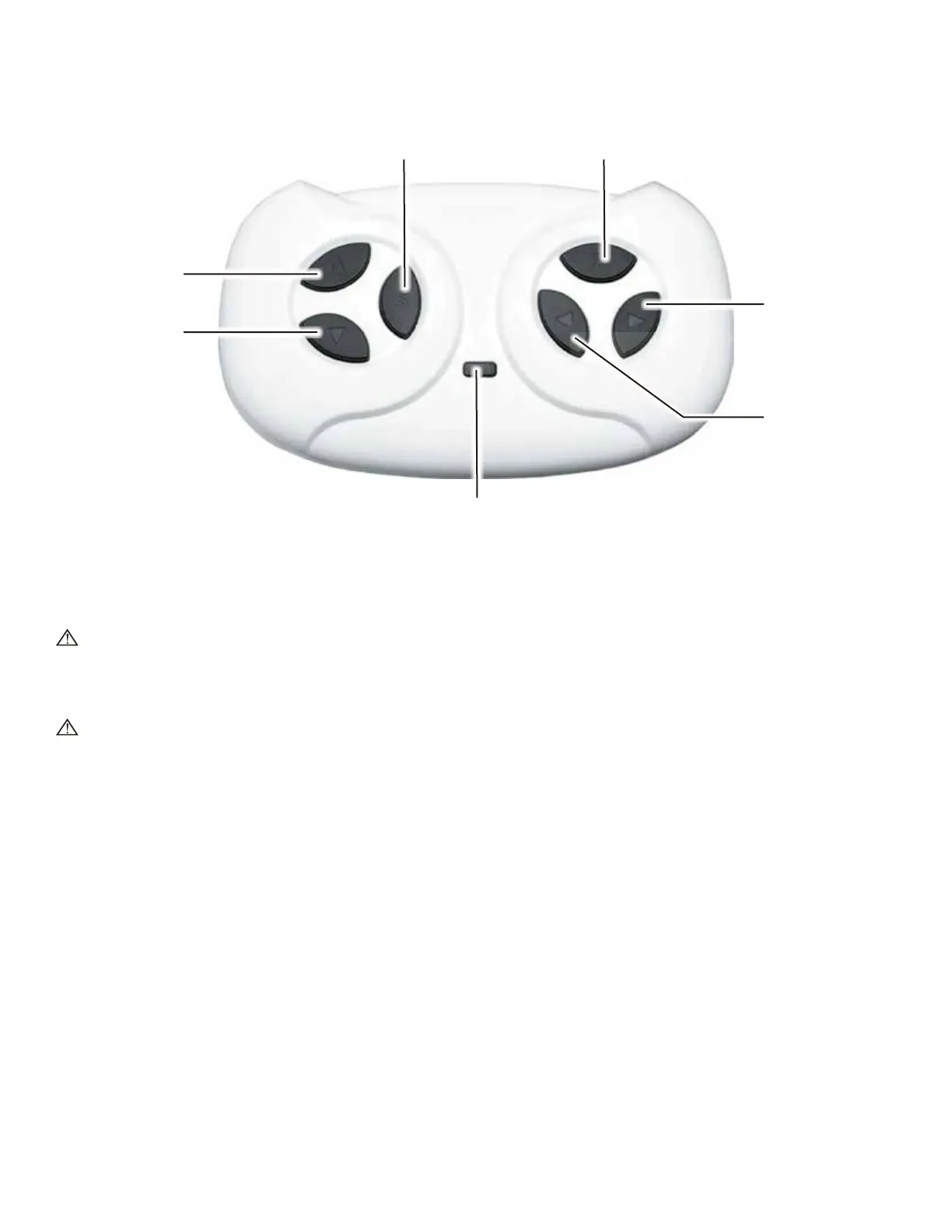
Light Indicator
Speed button Stop button
Foward Button
Reverse Button
Right Button
Left Button
Remote Control Buttons
1. Forward Button
Press to move the vehicle forward.
Do not switch between forward and reverse until the vehicle comes to a complete stop.
2. Reverse Button
Press to move the vehicle backward.
Do not switch between forward and reverse until the vehicle comes to a complete stop.
3. Speed Selection Button
Press to switch between low, middle and high speed.
The light indicator will indicate the speed as this: one light=low speed, two lights = middle speed,
three lights= high speed.
4. Stop Button
Press to stop the vehicle.
5. Right Button
Press to turn the vehicle to the right.
6. Left Button
Press to turn the vehicle to the Left.
7. Light Indicator
Light indicator will indicate the pairing status between the car and the remote control. It also indicate
the speed as this: one light=low speed, two lights = middle speed, three lights= high speed.



 To Next Page