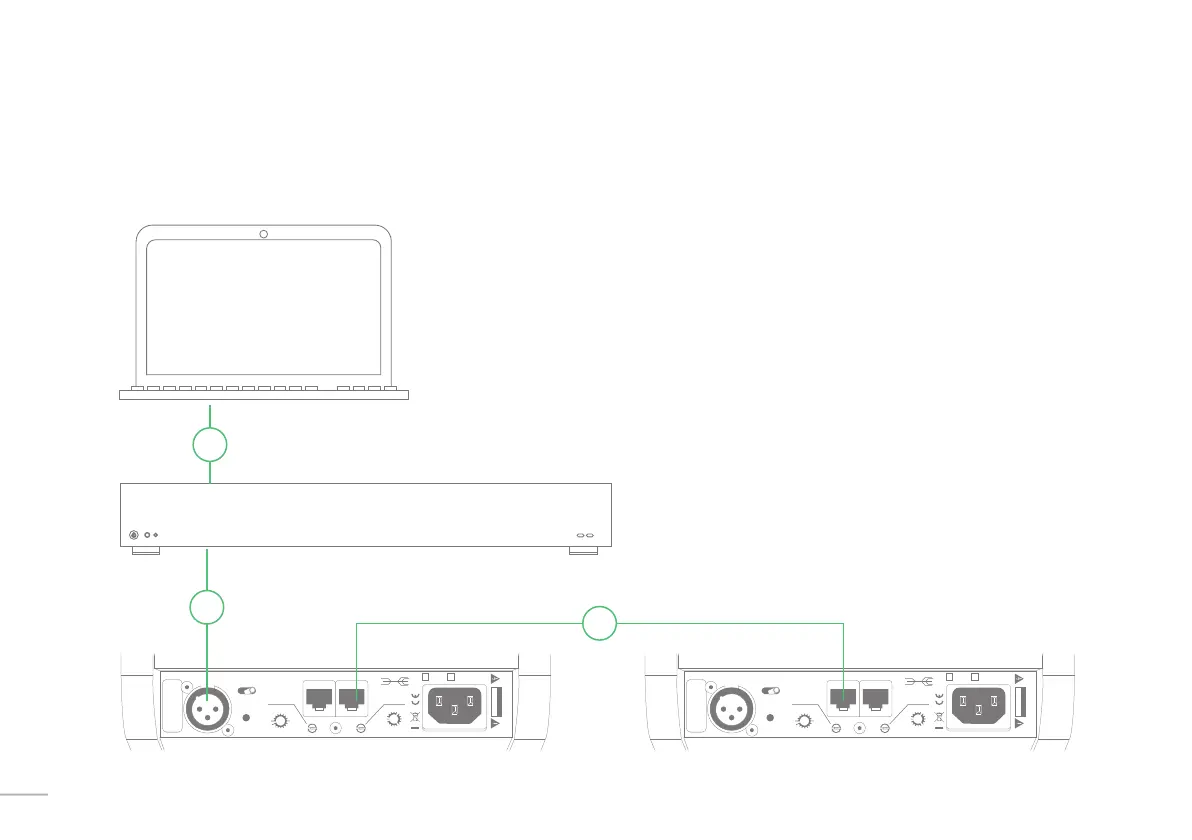
Setup examples A | Kii THREE used with computer + USB to digital interface.
You can use any third party USB interface that provides a digital
output in AES or SPDIF format to connect the Kii THREE to your
computer or laptop.
If your interface has an SPDIF output via RCA, a simple adapter
cable can be used between the interface and the Kii THREE (RCA
to XLR)
In this use case the internal volume control of the playback
software is used, therefore we recommend a good player like
JRiver, Roon or Audirvana.
>
USB CABLE
AES CABLE CAT5 CABLE
USB TO AES
Digital interface
Input Select In Kiilink Thru 230V~ 120V~200W
R Dig L
Analog
Boundary Contour
P/R
S/N
Kii Audio “THREE”
CAUTION
RISK OF ELECTRIC SHOCK
DO NOT OPEN
free
corner
wall
b
a
c
b
a
f
s
c
b
a
f
s
c
f
s
Ff F
B
C
B
b
f
c
a
s
C
F
300
3k
10k
Input Select In Kiilink Thru 230V~ 120V~200W
R Dig L
Analog
Boundary Contour
P/R
S/N
Kii Audio “THREE”
CAUTION
RISK OF ELECTRIC SHOCK
DO NOT OPEN
free
corner
wall
b
a
c
b
a
f
s
c
b
a
f
s
c
f
s
Ff F
B
C
B
b
f
c
a
s
C
F
300
3k
10k
>
>
16


 To Next Page