NOTE:
1. Tap the battery indicator button to indicate the remaining battery capacity and
automatically turn off after 5 seconds. 2. When charging, 4 LED Lights blink in sequence,
and the LED lights are completely off after being fully charged.
Charging Indicator
NOTE: It takes 1-1.5 hours to full charge KIMO battery.
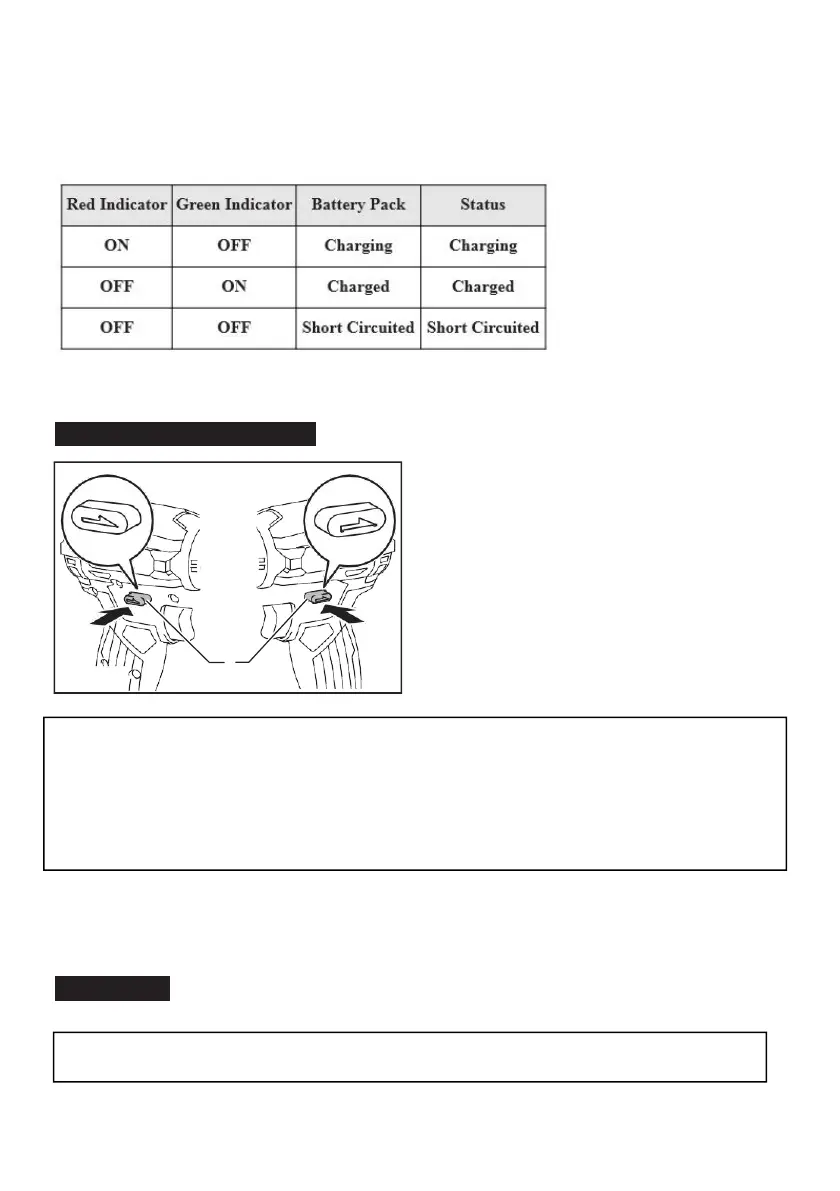
Reversing Switch Action
CAUTION:
Always check the direction of rotation before operation.
CAUTION: Use the reversing switch only after the tool comes to a complete stop.
Changing the direction of rotation before the tool stops may dam- age the tool.
CAUTION:
When not operating the tool, always set the reversing switch lever to the neu- tral
position.
This tool has a reversing switch to change the direction of rotation. Depress the reversing switch lever
from the A side for clockwise rotation or from the B side for counterclockwise rotation.
When the reversing switch lever is in the neutral position, the switch trigger cannot be pulled.
Assembly
CAUTION:
Always be sure that the tool is switched off and the battery cartridge is removed
before carrying out any work on the tool.


 To Next Page