Page 8
EXTERNAL WIRING
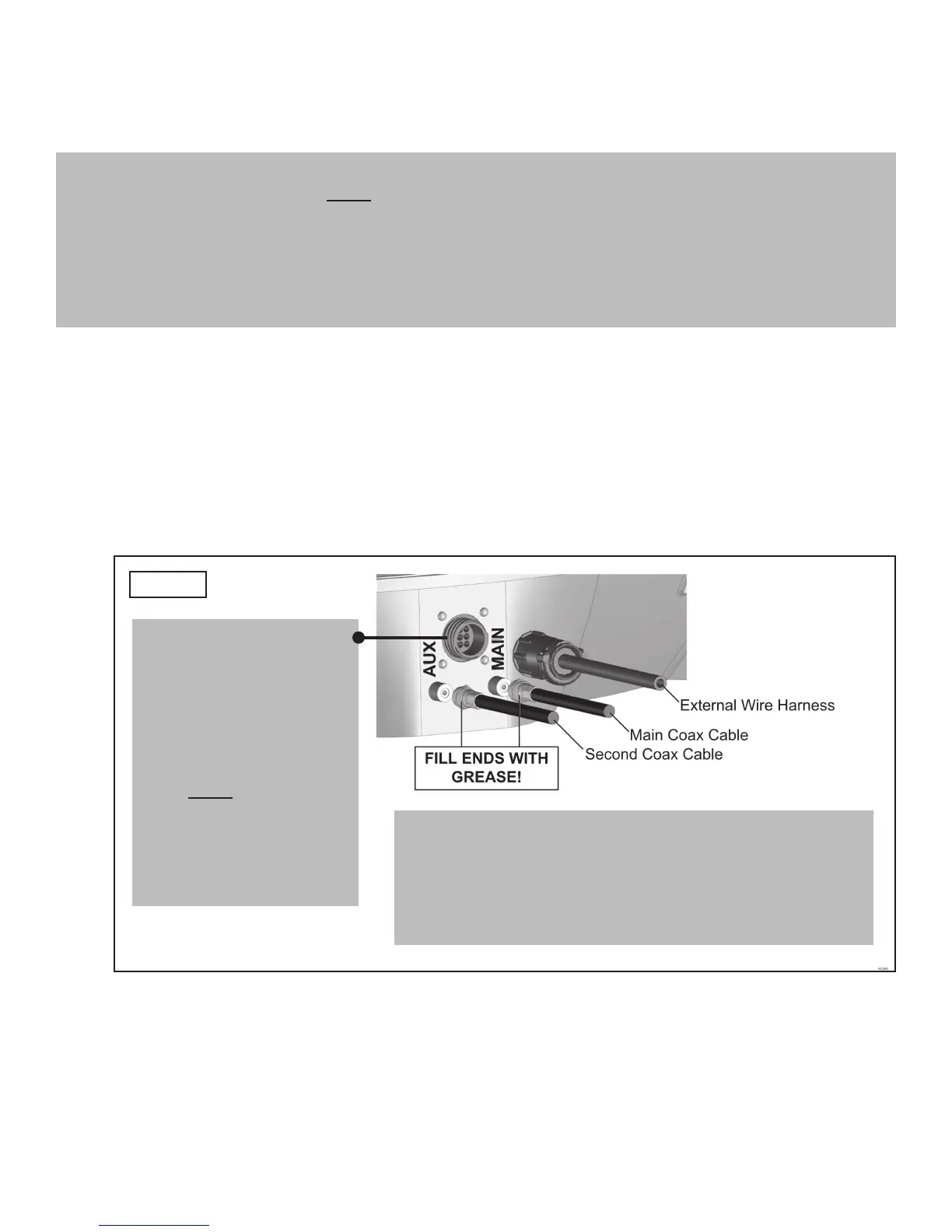
9. Plug external wire harness into wiring port on back of antenna unit and tighten connection until
it clicks past the detent lock (Fig. 9).
10. Fill end of coax cable that will connect to the MAIN port on the antenna unit with supplied
dielectric grease. Connect this end of the coax cable to the MAIN port and tighten connection
(Fig. 9).
If installing second receiver, fi ll end of coax cable that will connect to the AUX port on the
antenna unit with supplied dielectric grease. Connect this end of the coax cable to the AUX
port and tighten connection.
DO NOT OVER TIGHTEN CONNECTIONS.
NOTE: The KING Dome is wired for multiple receiver support. There are two coax ports on the back of the antenna
unit. The one labeled “MAIN” MUST be connected to the main receiver in vehicle. This is the receiver that
will control automatic satellite switching if applicable. The one labeled “AUX” can be used for an additional
receiver hook-up as well. You may wish to label the ends of the coax cables to avoid confusion when making
connections.
IMPORTANT! You must fi ll the ends of all external coax cables with the supplied dielectric grease. Failure to
do so will void product warranty.
IMPORTANT!
The alignment tabs on the
wiring port and the external
wire harness plug must
match up when engaging
plug onto port.
YOU MUST TIGHTEN THE
PLUG UNTIL IT CLICKS
PAST THE DETENT LOCK.
A channel lock pliers may
be used to tighten the
connection.
IMPORTANT!
Fill ends of coax cables with supplied dielectric grease.
Failure to do so will void product warranty.
Coax connections should be snug. DO NOT OVER TIGHTEN!
FIG. 9



 To Next Page