Memory Values Cleaning out
Alternative
MEMORY
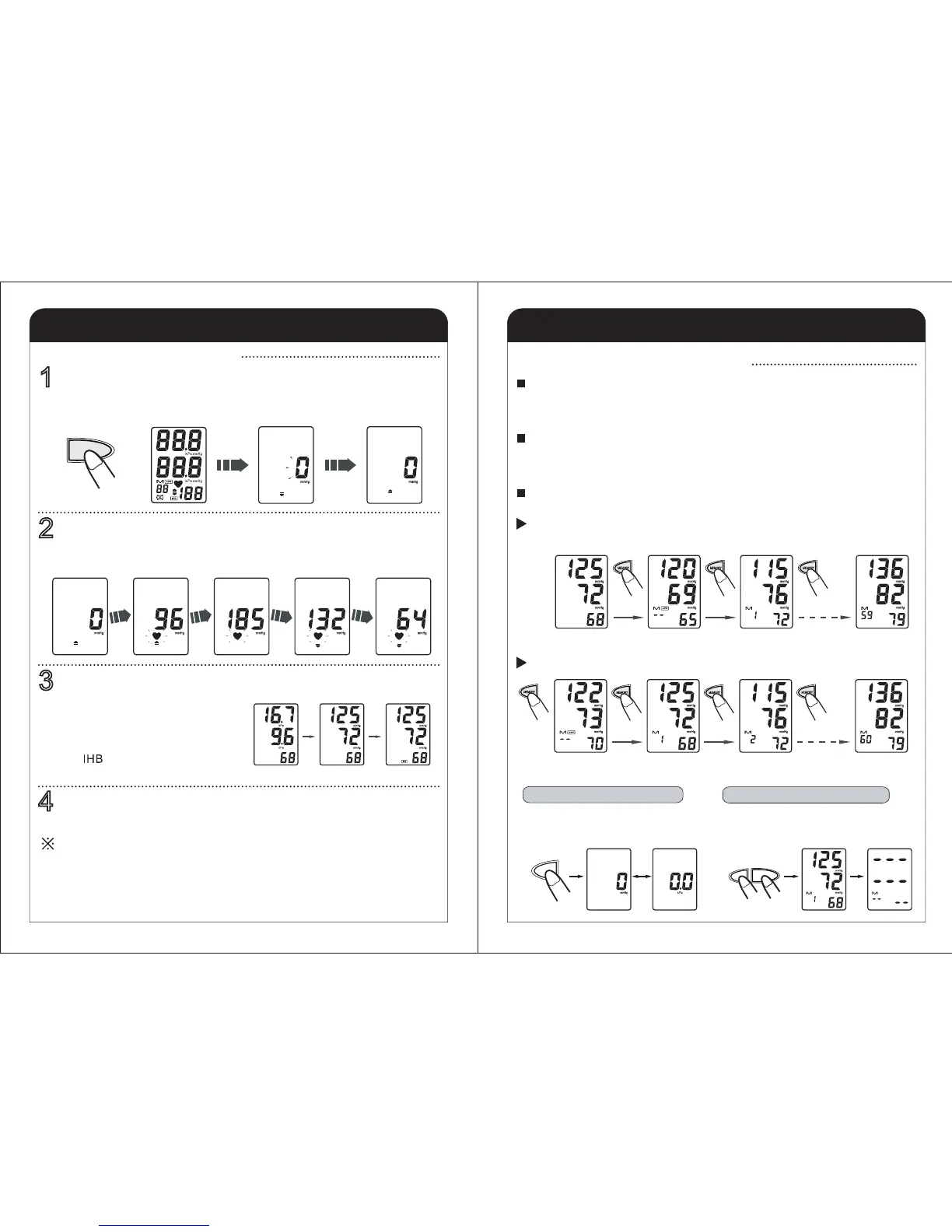
Long press the memory button for 3~4
seconds until the units displayed when
the unit powered off.
Unit Setting (kPa or mmHg)
The Average
measurement value
The 1st latest
measurement value
The 2nd latest
measurement value
The 60th latest
measurement value
Turn to next
MEMORY
MEMORYMEMORY
MEMORY
The display method of memory values when the unit is powered off.
The unit stores the blood pressure and pulse rate in the memory after completing a
measurement every time. It can automatically store 60 sets of measurement
values. The oldest record is deleted to save the latest measurement value when
more than 60 sets.
The unit also calculates an average reading based on the values of the latest 3
times measurement taken. You can get the average measurement value when you
press the memory button for the first time. Press the memory button for the second
time, you can get the latest measurement value, so on and so forth.
The symbol "M" and the relative times will appear at the same time after you press
the memory button.
How to Use the Memory Function
8
Take a Measurement
In order to ensure the accuracy of the measurement for the systolic
pressure more than 180 mmHg, press and hold the memory button until
the unit inflates 30 to 40 mmHg higher than your suspected systolic
pressure if you know. ( The unit will not inflate above 299 mmHg).
Please rest for at least 3 minutes before taking the next measurement.
INSTRUCTIONS FOR SPECIAL CONDITIONS
The unit will automatically turn off after 2 minutes if you have forgotten to turn off it.
4
Press the START/STOP button to turn off the unit.
"IHB" display
OR
"mmHg" display
OR
"kPa" display
The cuff is deflated automatically, and
the measurement results are stored in
the memory.
The symbol will be displayed if
arrhythmia is detected.
3
The blood pressure and pulse rate are displayed when the
measurement completed.
Deflating
DeflatingTo a fit pressureInflating
Start to inflate
The heartbeat symbol flashes once a pulse is detected.
Inflation stop automatically and the measurement is started.
2
Start to inflateDeflating automatically
All symbols display
START/STOP
All display symbols appear on the screen. The cuff starts to inflate automatically.
Press the START/STOP button.
1
How to Take a Measurement
MEMORY
START/STOP
Long press the memory and start/stop button
for 3~4 seconds until the value cleaned out
when reading the memory values.


 To Next Page