5-14 CK25/30/35
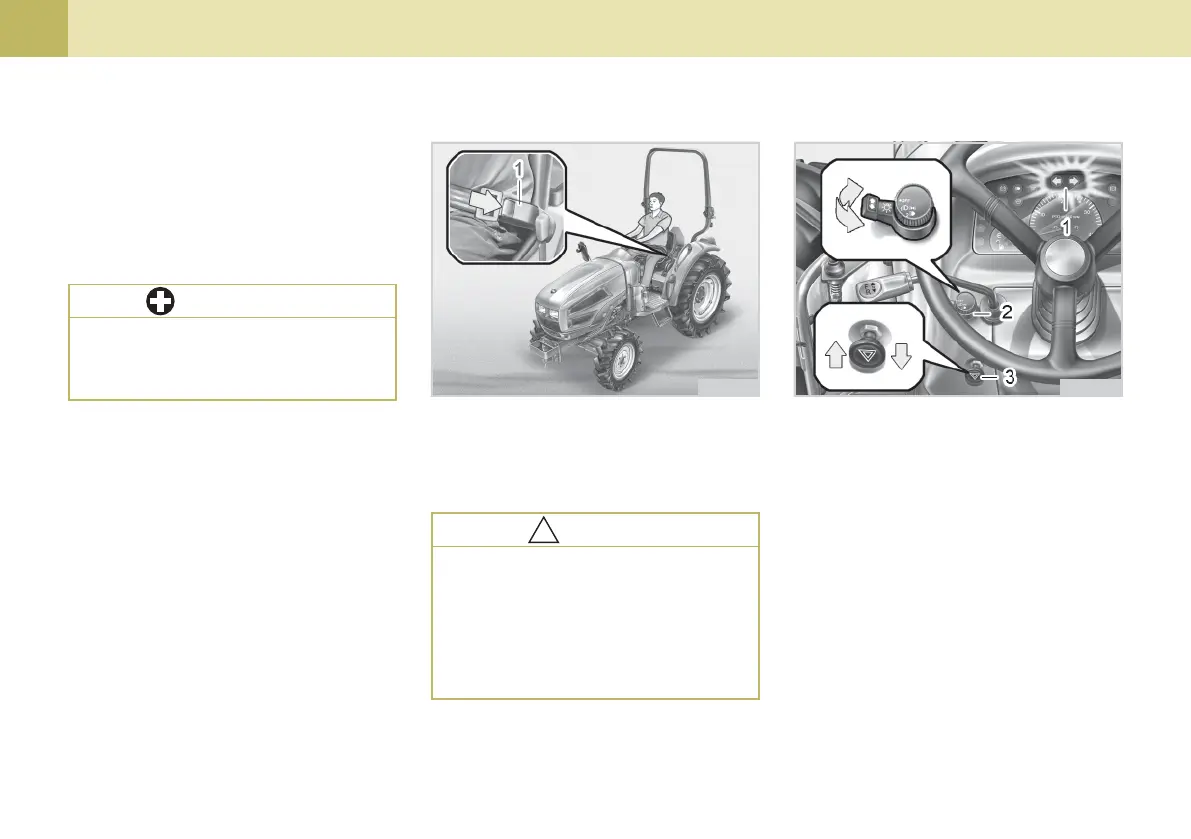
(1) HAZARD LIGHT SWITCH
When hazard light switch is pulled out,
the hazard lights flash along with the
indicator on the instrument panel. Push
the switch in to turn off the light.
2. SELECTING LIGHT SWITCH PO-
SITIONS
(1) Hazard / Turn Signal Indicator
(2) Turn Signal Light Switch
(3) Hazard Light Switch
704O520C
(2) TURN SIGNAL LIGHT SWITCH
To indicate a right turn, push forward.
To indicate a left turn, pull rearward.
704O519C
(2) TRAVEL ADJUSTMENT
Pull out the position adjust lever and
slide the seat backward or forward, as
required. The seat will lock in position
when the lever is released.
(1) Seat Belt
Adjust the seat belt for proper fit and
connect to the buckle. The seat belt is
an auto-locking retractable type.
(3) SEAT BELT
zz
zz
z After adjusting the operator’s
seat, be sure to check that the
seat is properly locked.
IMPORTANT
To avoid personal injury:
zz
zz
z Always use your seat belt when
the ROPS is installed.
zz
zz
z Do not use the seat belt if your
tractor is not equipped with a
ROPS or when it is removed.
!!
!!
!
CAUTION



 To Next Page