Page 6
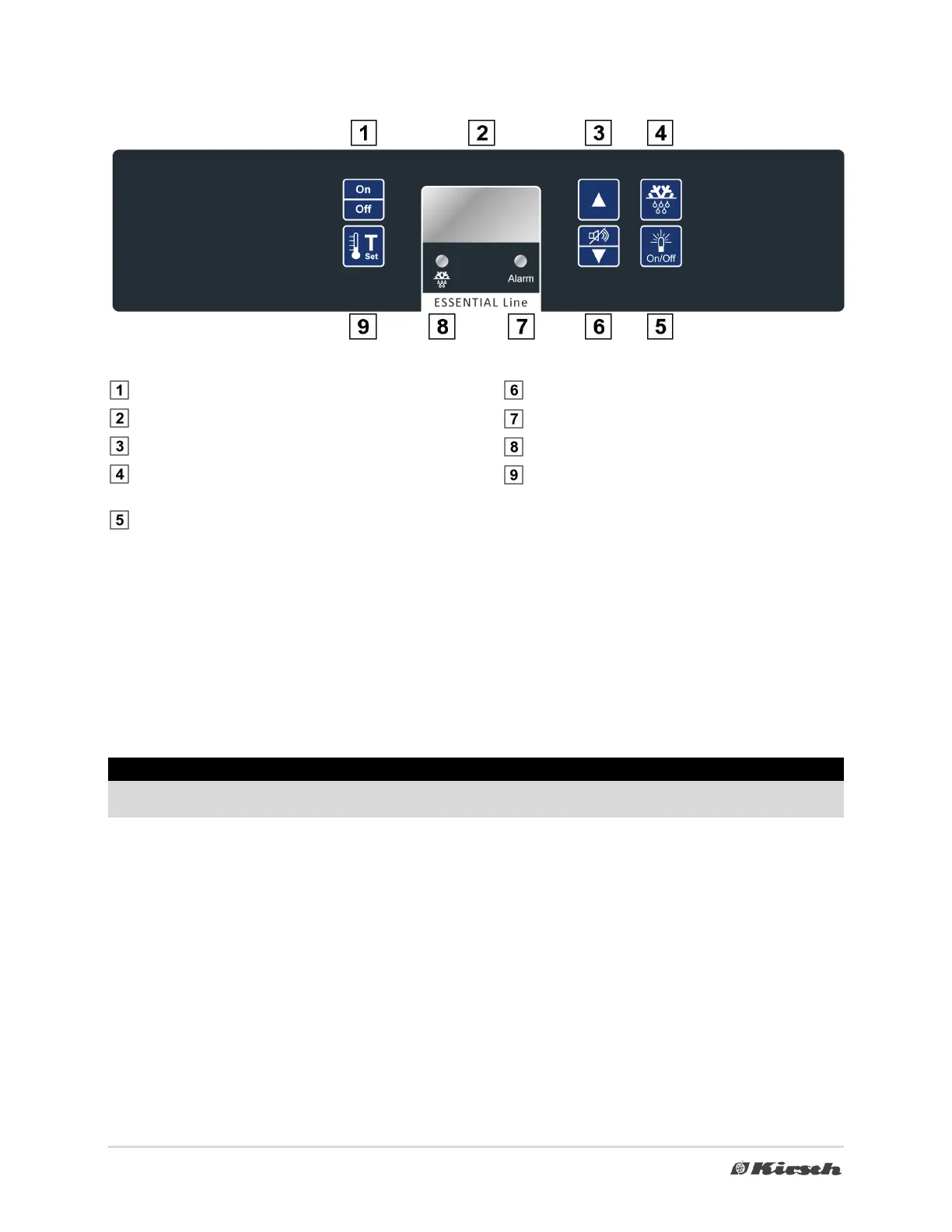
4. Overview of device control and display unit
Device ON/OFF
Display
Cursor UP-button
Additional defrost
(Press button for min.4 seconds)
Light button (LED-strip optional)
Alarm OFF / Cursor DOWN-button
Diode illuminated during alarm
Diode illuminated when defrosting is in progress
Call set interior temperature
5. Commissioning
Before commissioning, observe the safety information from section 3 on set-up, operation, temporary decommis-
sioning and final decommissioning.
Switching ON:
o To switch device ON, press button (1). Interior temperature will be shown on display (2)
o Push button (9) to call set of interior temperatur..
Information
After you have switched on the device, the temperature alarm is activated after the target temperature has been
achieved or after 2 hours, at the latest.
Switching OFF:
o To switch device OFF, press button (1) for min. 6 seconds.
o If the device is still connected to the power supply, "OFF" is shown in the display (2).
Switching OFF (with battery option)
o To switch device OFF, press button (1) for min. 6 seconds.
o If the device is still connected to the power supply, "OFF" is shown in the display (2).
o After disconnection from power supply, optical (diode 7) and acoustical warning will be effected, this
can be quit by pressing button(6) two times. First time to quit acoustical warning, a second time to quit
optical warning.



 To Next Page