Bulk/Absorption, Absorption(ABS)-Float Stage Current Setting
Once the Bulk/Absorption charging current is selected, the Absorption-Float stage current can
be selected. It is recommended to select 1/10 of the Bulk/Absorption charging current as the
Absorption-Float current setting.
DMT1230 Available Current Setting
Bulk/Absorption (“h” setting)
Absorption-Float (“L” setting)
DMT1250 Available Current Setting
Bulk/Absorption (“h” setting)
Absorption Float (“L” setting)
Bulk/Absorption (“h” setting)
Absorption Float (“L” setting)
Note: Use the above table to set the Absorption (ABS)-Float charging current based on the Bulk/Absorption
current setting. If a DC load is always ON and connected to the battery bank, a higher Absorption (ABS)-
Float charging current is recommended. If in doubt of the “L” setting, use the highest available current
setting for battery protection.
Lithium Type Battery Current Setting:
Few charging currents may be selected for Lithium battery charging. Consult the Lithium battery
manufacturer for the maximum allowable charging current and select the right current. The
Termination Current can be selected to determine when to terminate the charging process.
Note: The battery will start the full recharge cycle again when the battery terminal voltage drops to 13.3Vdc.
If a DC load is always ON and connected to the battery bank, a higher Absorption (ABS)-Float charging
current is recommended. If in doubt of the “L” setting, use the highest available current setting for battery
protection.
DMT1230 Available Lithium Battery Charging Voltage and Available Charging Current Setting
13.9 – 14.6Vdc (0.1V step)
Charge Current (“h” setting)
Termination Current (“L” setting)
DMT1250 Available Lithium Battery Charging Voltage and Available Charging Current Setting
13.9 – 14.6Vdc (0.1V step)
Charge Current (“h” setting)
Termination Current (“L” setting)
Charge Current (“h” setting)
Termination Current (“L” setting)
4. INSTALLING THE CHARGER
WARNING: KISAE Technology recommends that all wiring be done by a certified technician
or electrician to ensure adherence to the applicable electrical safety wiring regulations and
installation codes. Failure to follow these instructions can damage the unit and could also
result in personal injury or loss of life.
CAUTION: Before beginning your unit Installation,
please consider the following:
• The unit should be used or stored in an indoor
area away from direct sunlight, heat, moisture or
conductive contaminants.
• When placing the unit, allow a minimum of three
inches of space around the unit for optimal
ventilation.
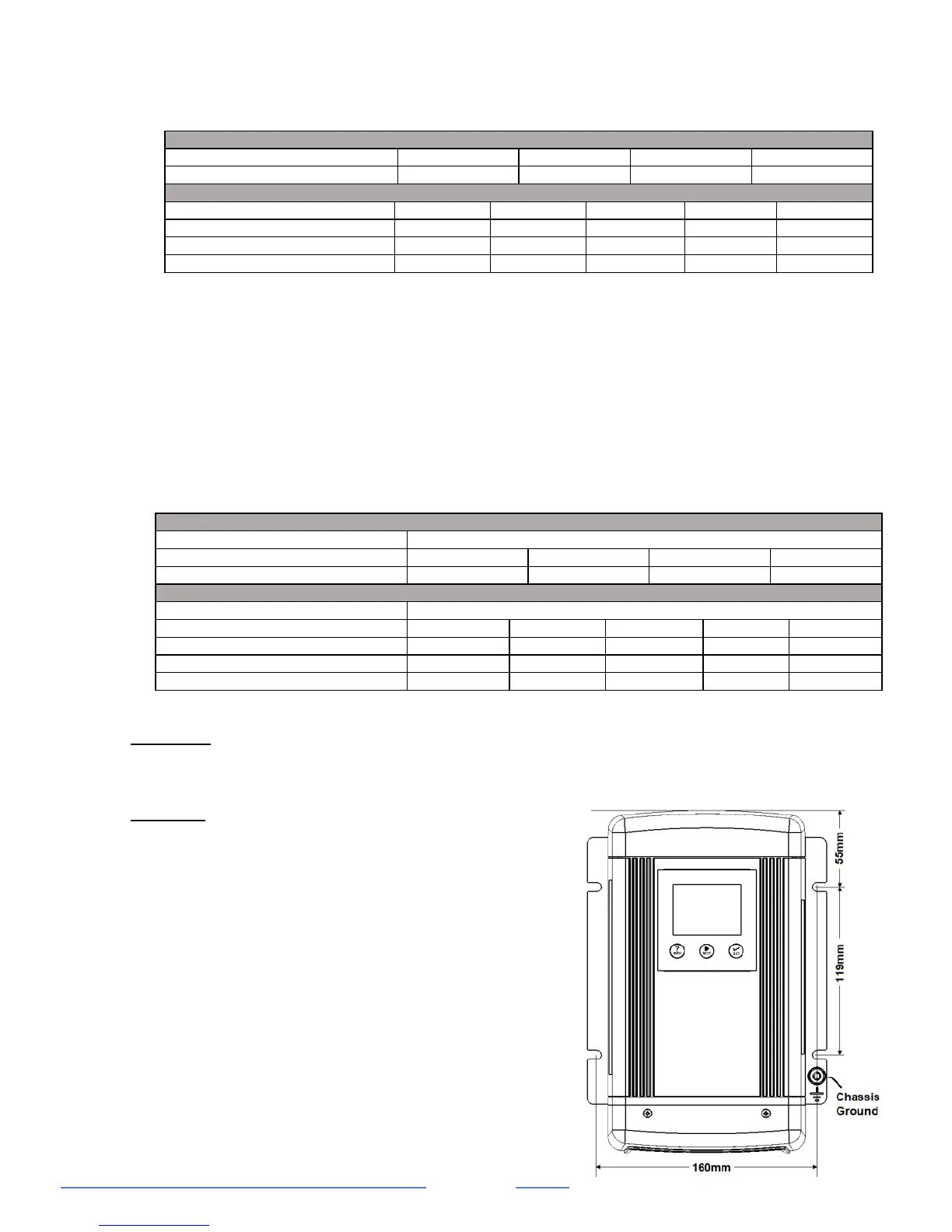
Mounting the Charger:
Choose an appropriate mounting location.
For installing in an indoor location, the unit should be
mounted vertically (with the battery terminals facing
downwards). This provides the best thermal
performance and drip protection. The unit should
NOT be mounted upside down.
For installing in a boat or marine environment, the
unit should only be mounted vertically (Battery
Terminals facing downwards) to provide adequate


 To Next Page
 Loading...