13
English
OPERATING THE COFFEE MAKEROPERATING THE COFFEE MAKER
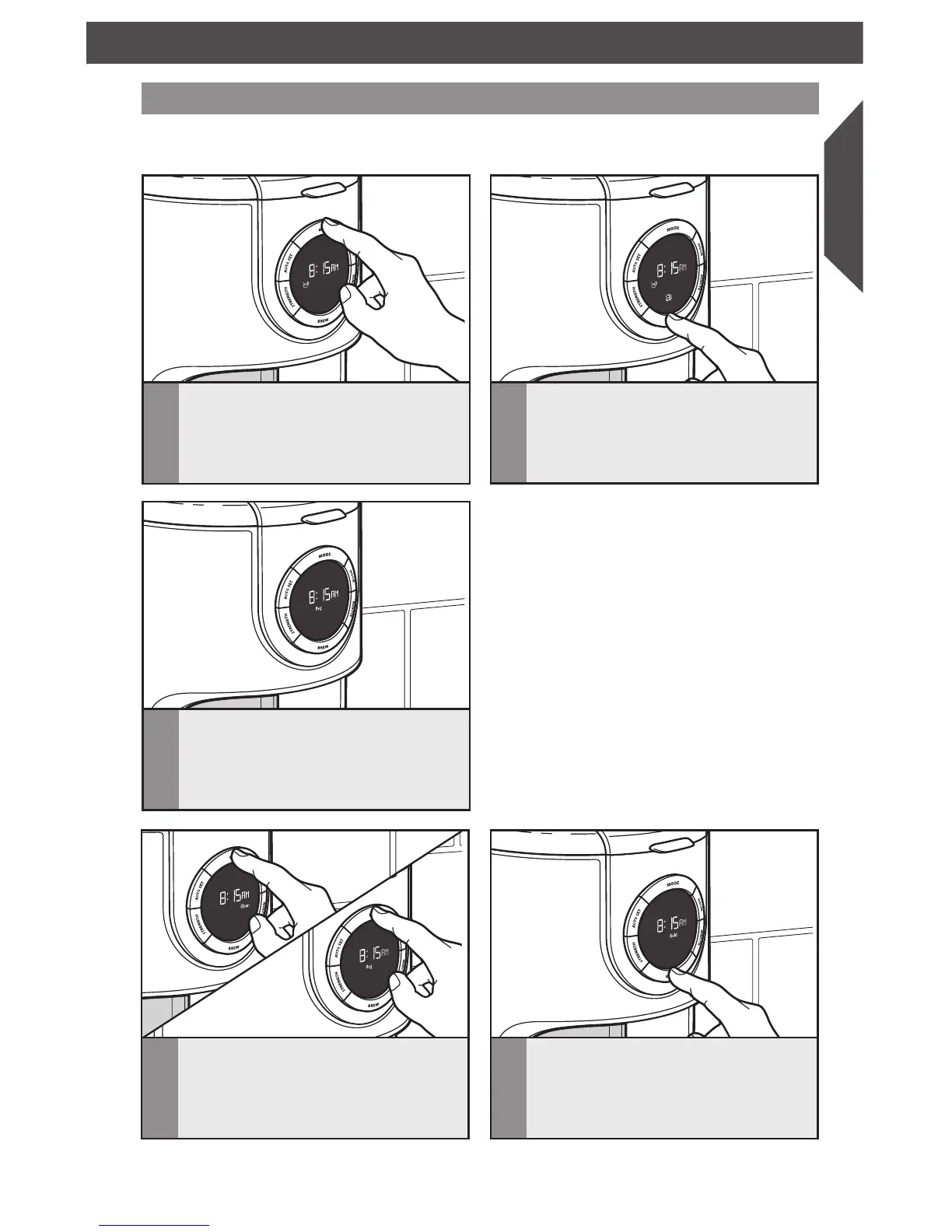
1–4 cup brewing
1
Press MODE once. The indicator will
change from “Reg” to “1–4 Cup”.
3
The Coffee Maker will beep 3 times
when the Brew cycle is complete, then
will automatically initiate the 2 hour
Warm cycle. After the Warm cycle
completes, one long beep will sound.
2
Press the BREW button. One beep will
sound, and the “Brew” icon will light
up. The light will stay on throughout
the duration of the brew cycle, and will
stay lit throughout the Warm cycle.
NOTE: Brew one pot of fresh, cool water and discard before brewing the first pot
of coffee (see the “Preparing the Coffee Maker for Use” section).
4
To cancel
1–4
Cup brewing: Press
MODE twice. The display will first
show “Clean”, then “REG”. The
1–4
Cup brewing cycle will be cancelled.
5
Repeat steps 1–3 to brew additional
carafes of coffee. Always turn off the
Coffee Maker and allow it to cool for
5 minutes before starting the next
brew cycle.
NOTE: When the Brew cycle is complete
the “1–4 Cup” icon will turn off and the
Coffee Maker will change back to the
“Reg” setting
NOTE: If no button is pressed after “
1–4
Cup” mode is selected, the
1–4
Cup brewing
cycle will be cancelled after 10 seconds.









 To Next Page