PARTS AND FEATURES
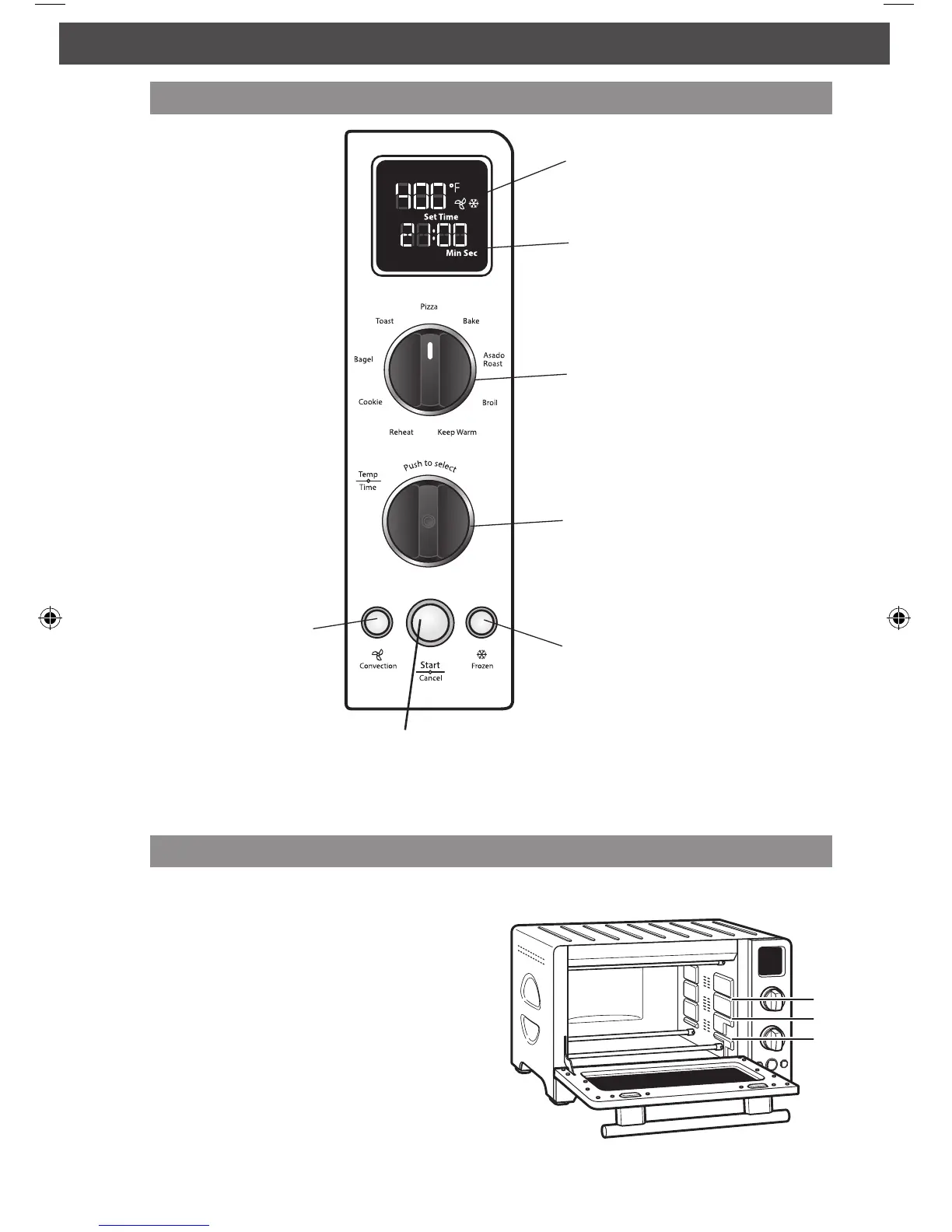
Temperature
Adjustable in 5° Fahrenheit or Celsius*
increments in most cooking modes.
Time
Adjustable in 1 minute increments in
most cooking modes.
Cooking mode selector
Temperature/Time control knob
(press to select)
Frozen button
Convection button
The convection fan
circulates air faster and
more evenly, for better
surface browning and
crisping.
Start/Cancel
button
Selecting rack positions
Follow these guidelines to position rack:
1 (Top)
Use for broiling most meats.
2 (Middle)
Optimal for most baking and cooking
operations, including pizza, reheating,
general cooking, and convection baking.
Must use this setting for toast. Suitable
for broiling some taller items.
3 (Bottom)
The bottom rack leaves plenty of height for
cooking taller items. Use this position for
Asado Roast mode, and for reheating and
warming.
* Hold convection button and frozen button down at the same time to change temperature
to Celsius mode.
Control panel features
W10617644A_CTO_ENv4.indd 8 6/26/13 1:28 PM



 To Next Page