14
USING YOUR OVEN
Temperature Change
The oven temperature can be changed when the oven(s) are in
the Sabbath Mode. No tones will sound, and the display will not
change. The heating elements will not turn on or off for a random
time, anywhere from 16 to 24 seconds. It may take up to 30
minutes for the oven to change temperature.
Number pads 1 through 0 represent temperatures.
Use the following chart as a guide.
NUMBER KEY OVEN TEMPERATURE
1 170°F (77°C)
2 200°F (95°C)
3 225°F (107°C)
4 250°F (120°C)
5 300°F (149°C)
6 325°F (163°C)
7 350°F (177°C)
8 375°F (191°C)
9 400°F (204°C)
0 450°F (232°C)
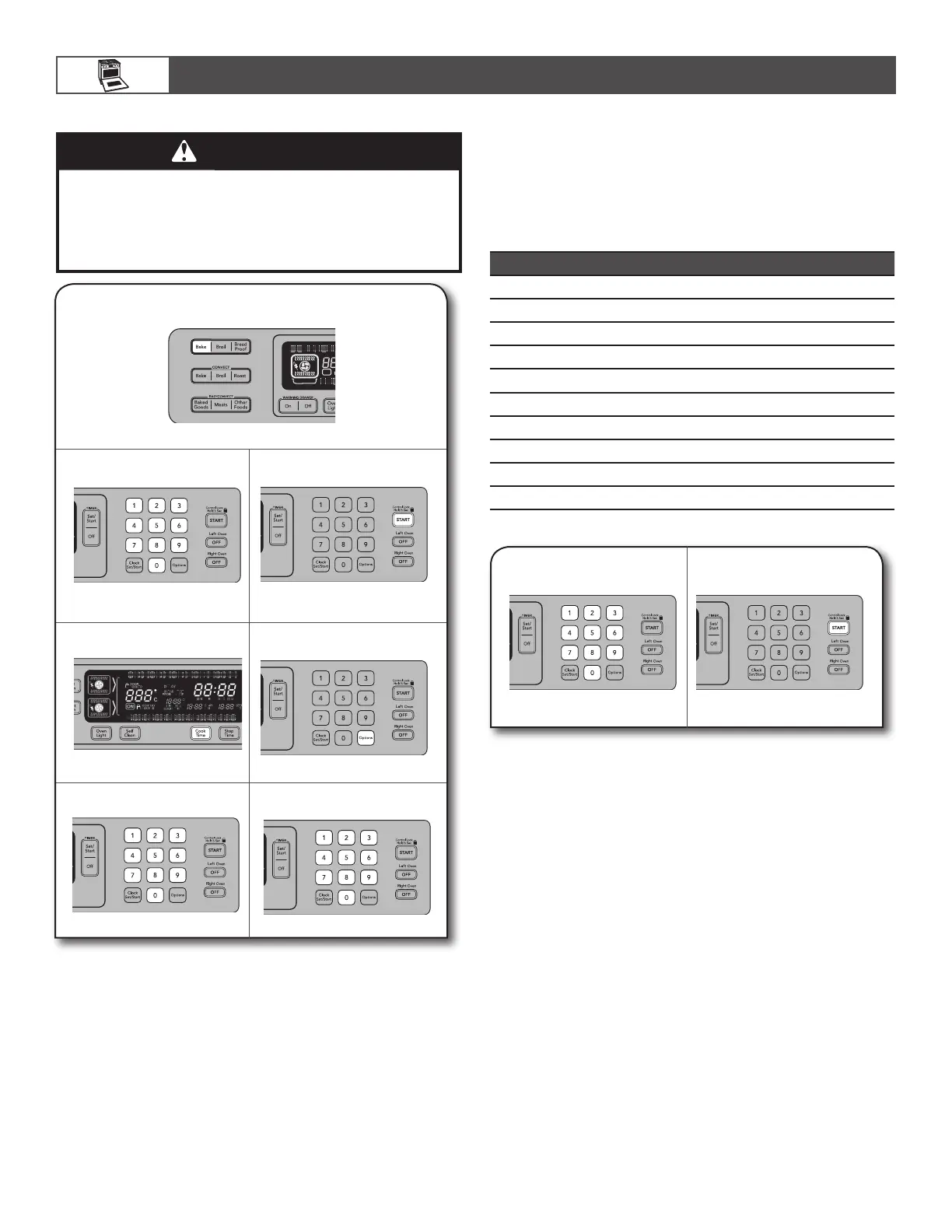
To Change Temperature:
1.
Press the number pad from
the chart.
2.
Press START.
To Set Regularly Timed:
When the stop time is reached, the oven will automatically turn
off. The oven control will remain in the Sabbath Mode until the
OFF button is pressed.
1.
Press BAKE.
2.
Change preset temperature,
if desired.
3.
Press COOK TIME.
4.
Enter cook time.
5.
Press START.
6.
Press OPTIONS.
7.
Press number pad 7.
ON
MED LOW HI
WARNING
Food Poisoning Hazard
Do not let food sit in oven more than one hour before
or after cooking.
Doing so can result in food poisoning or sickness.









 To Next Page