EasyManua.ls Logo

KitchenAid KEBS207D - Page 42

KitchenAid KEBS207D
50 pages
Print Icon
To Next Page IconTo Next Page
To Previous Page IconTo Previous Page
Loading...
39
‘Z/sing
the
Self-Cleaning
Cycle
Before
setting
the
controls
•Make
sure
clock
is
set
to
correct
time
of
day.
•Make
sure
the
oven
door
is
completely
closed.
Setting
the
controls
NOTE:
Displays
and
command
pads
shown
are
from
double
upper
ovens.
In
some
cases,
lower
oven
and
single
oven
displays
and
command
pads
may
look
different
than
those
shown.
To
start
cleaning
immediately:
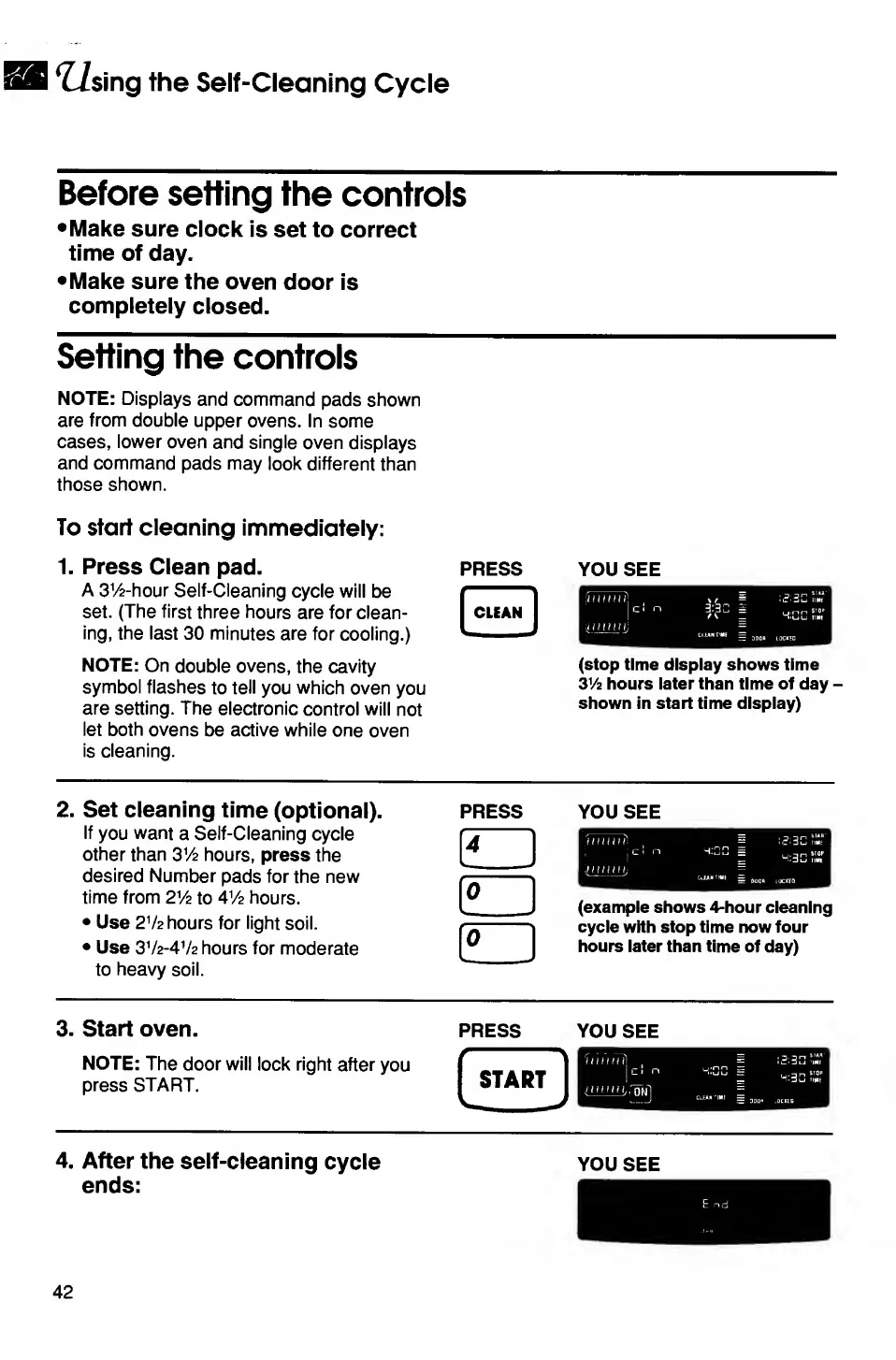
1.
P
ress
Clean
pad.
A
3V2-hour
Self-Cleaning
cycle
will
be
set.
(The
first
three
hours
are
for
clean¬
ing,
the
last
30
minutes
are
for
cooling.)
NOTE:
On
double
ovens,
the
cavity
symbol
flashes
to
tell
you
which
oven
you
are
setting.
The
electronic
control
will
not
let
both
ovens
be
active
while
one
oven
is
cleaning.
PRESS
YOU
SEE
(stop
time
display
shows
time
3V2
hours
later
than
time
of
day
-
shown
in
start
time
display)
2.
S
et
cleaning
time
(optional).
If
you
want
a
Self-Cleaning
cycle
other
than
3V2
hours,
press
the
desired
Number
pads
for
the
new
time
from
2Vz
to
4V2
hours.
Use
2
V
2
hours
for
light
soil.
Use
3
V
2
-
4
V
2
hours
for
moderate
to
heavy
soil.
PRESS
YOU
SEE
(example
shows
4-hour
cleaning
cycle
with
stop
time
now
four
hours
later
than
time
of
day)
3.
S
tart
oven.
NOTE:
The
door
will
lock
right
after
you
press
START.
PRESS
YOU
SEE
4.
A
fter
the
self-cleaning
cycle
ends:
YOU
SEE
42

Related product manuals