_J_ r_sing and Caring for Your Oven
Setting the clock
NOTE: If an oven function is active or
programmed, you cannot change the clock.
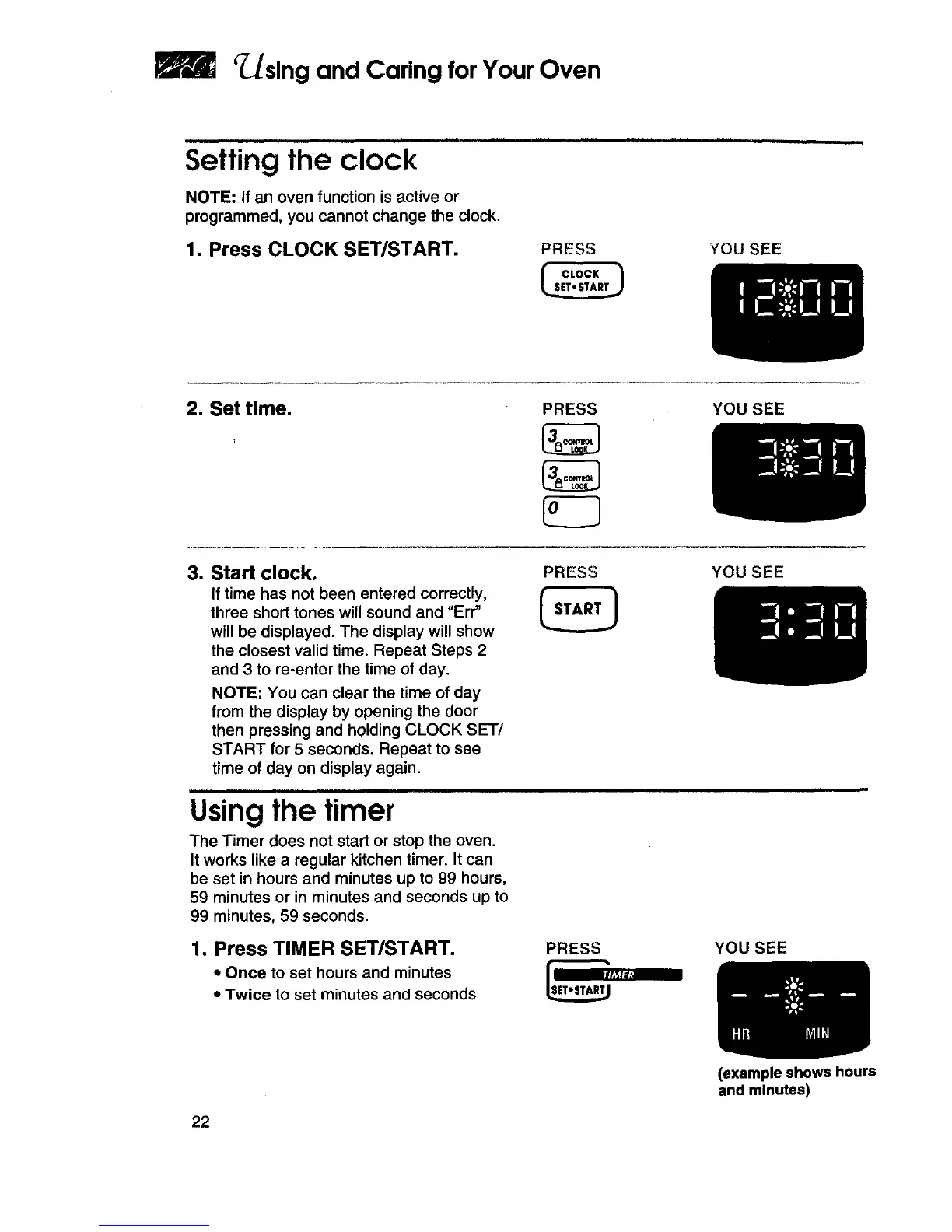
1. Press CLOCK SET/START.
PRESS YOU SEE
2. Set time. PRESS YOU SEE
3. Start clock.
If time has not been entered correctly,
three short tones will sound and "Err"
will be displayed. The display will show
the closest valid time. Repeat Steps 2
and 3 to re-enter the time of day.
NOTE: You can clear the time of day
from the display by opening the door
then pressing and holding CLOCK SET/
START for 5 seconds. Repeat to see
time of day on display again.
PRESS YOU SEE
Using the timer
The Timer does not start or stop the oven.
It works like a regular kitchen timer. It can
be set in hours and minutes up to 99 hours,
59 minutes or in minutes and seconds up to
99 minutes, 59 seconds.
1. Press TIMER SET/START.
• Once to set hours and minutes
• Twice to set minutes and seconds
PRESS YOU SEE
(example shows hours
and minutes)
22







 To Next Page