Using and Caring for Your Oven
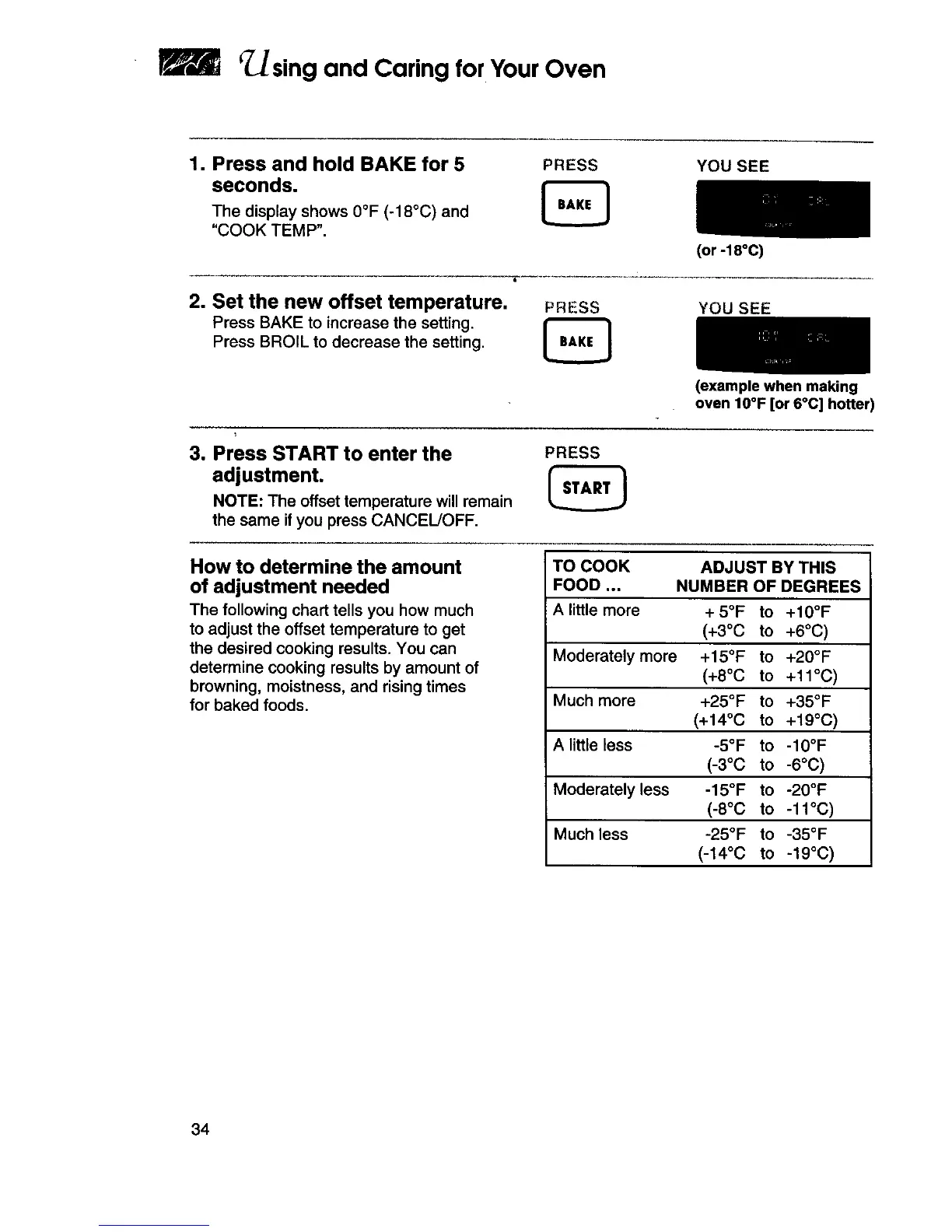
1. Press and hold BAKE for 5
seconds.
The display shows 0°F (-18°C) and
"COOK TEMP".
PRESS YOU SEE
2. Set the new offset temperature.
Press BAKE to increase the setting,
Press BROIL to decrease the setting,
(or -18°C)
PRESS YOU SEE
(example when making
oven IO°F [or 6°C] hotter)
3. Press START to enter the
adjustment.
NOTE: The offset temperature will remain
the same if you press CANCEL/OFF,
PRESS
How to determine the amount
of adjustment needed
The following chart tells you how much
to adjust the offset temperature to get
the desired cooking results. You can
determine cooking results by amount of
browning, moistness, and rising times
for baked foods.
TO COOK ADJUST BY THIS
FOOD .., NUMBER OF DEGREES
A little more + 5°F to +10°F
(+3°0 to +6°C)
Moderately more +15°F to +20°F
(+8°C to +11°C)
Much more +25°F to +35°F
(+14°C to +19°C)
Alittle less -5°F to -10°F
(-3°C to-6°C)
Moderatelyless -15°F to -20°F
(-8°0 to -11°C)
Much less -25°F to -35°F
(-14°C to-19°C)
34







 To Next Page