Using and Caring for Your Oven
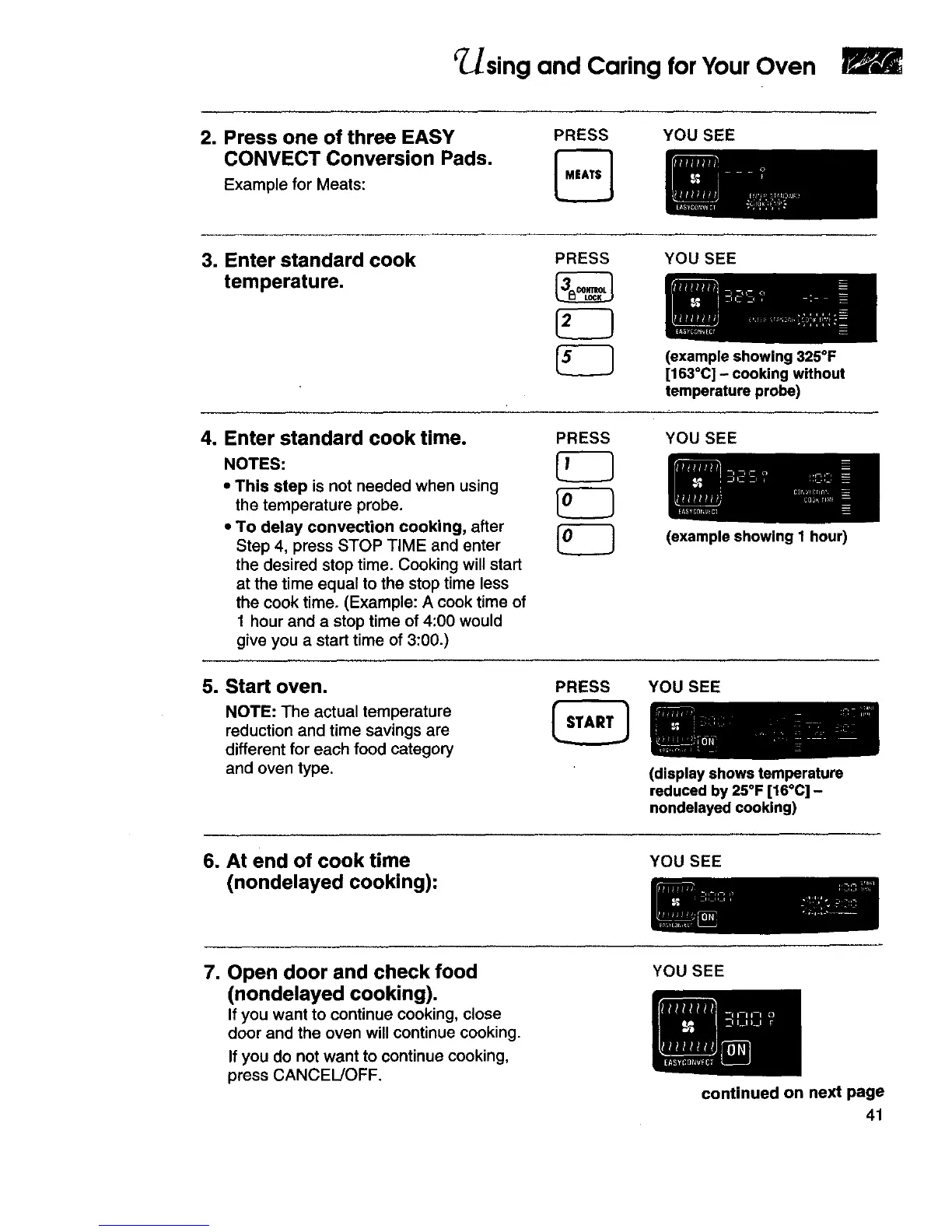
2. Press one of three EASY
CONVECT Conversion Pads.
Example for Meats:
PRESS YOU SEE
3. Enter standard cook
temperature.
PRESS YOU SEE
(example showing 325°F
[163°C] - cooking without
temperature probe)
4. Enter standard cook time.
NOTES:
• This step is not needed when using
the temperature probe.
• To delay convection cooking, after
Step 4, press STOP TIME and enter
the desired stop time. Cooking will start
at the time equal to the stop time less
the cook time. (Example: A cook time of
1 hour and a stop time of 4:00 would
give you a start time of 3:00.)
PRESS YOU SEE
(example showing 1 hour)
5. Sta_ oven.
NOTE: The actual temperature
reduction and time savings are
different for each food category
and oven type,
PRESS YOU SEE
(display shows temperature
reduced by 25°F [16°C] -
nondelayed cooking)
6. At end of cook time
(nondelayed cooking):
YOU SEE
7. Open door and check food
(nondelayed cooking).
If you want to continue cooking, close
door and the oven will continue cooking.
If you do not want to continue cooking,
press CANCEL/OFF.
YOU SEE
continued on next page
41







 To Next Page