PARTS AND FEATURES
This manual covers several different models. The cooktop you have purchased may have some or all of the items listed. The locations
and appearances of the features shown here may not match those of your model.
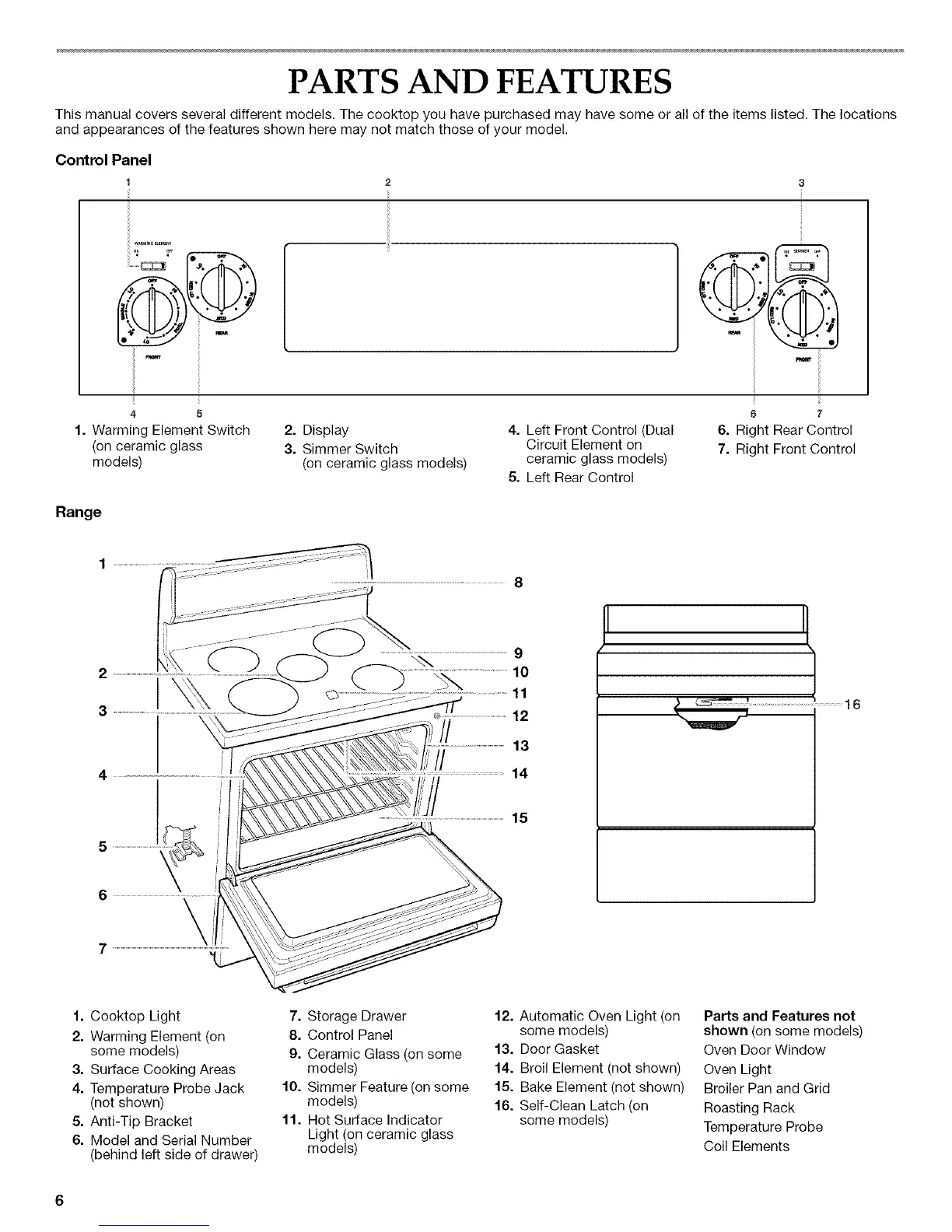
Control Panel
1 2
m
w
4 5
1. Warming Element Switch 2. Display
(on ceramic glass 3. Simmer Switch
models) (on ceramic glass models)
Range
4. Left Front Control (Dual
Circuit Element on
ceramic glass models)
5. Left Rear Control
6 7
6. Right Rear Control
7. Right Front Control
5 .................
) _ _ 16
1. Cooktop Light
2. Warming Element (on
some models)
3. Surface Cooking Areas
4. Temperature Probe Jack
(not shown)
5. Anti-Tip Bracket
6. Model and Serial Number
(behind left side of drawer)
7. Storage Drawer
8. Control Panel
9. Ceramic Glass (on some
models)
10. Simmer Feature (on some
models)
11. Hot Surface Indicator
Light (on ceramic glass
models)
12. Automatic Oven Light (on
some models)
13. Door Gasket
14. Broil Element (not shown)
15. Bake Element (not shown)
16. Self-Clean Latch (on
some models)
Parts and Features not
shown (on some models)
Oven Door Window
Oven Light
Broiler Pan and Grid
Roasting Rack
Temperature Probe
Coil Elements







 To Next Page