_J_sing and Caring for Your Oven
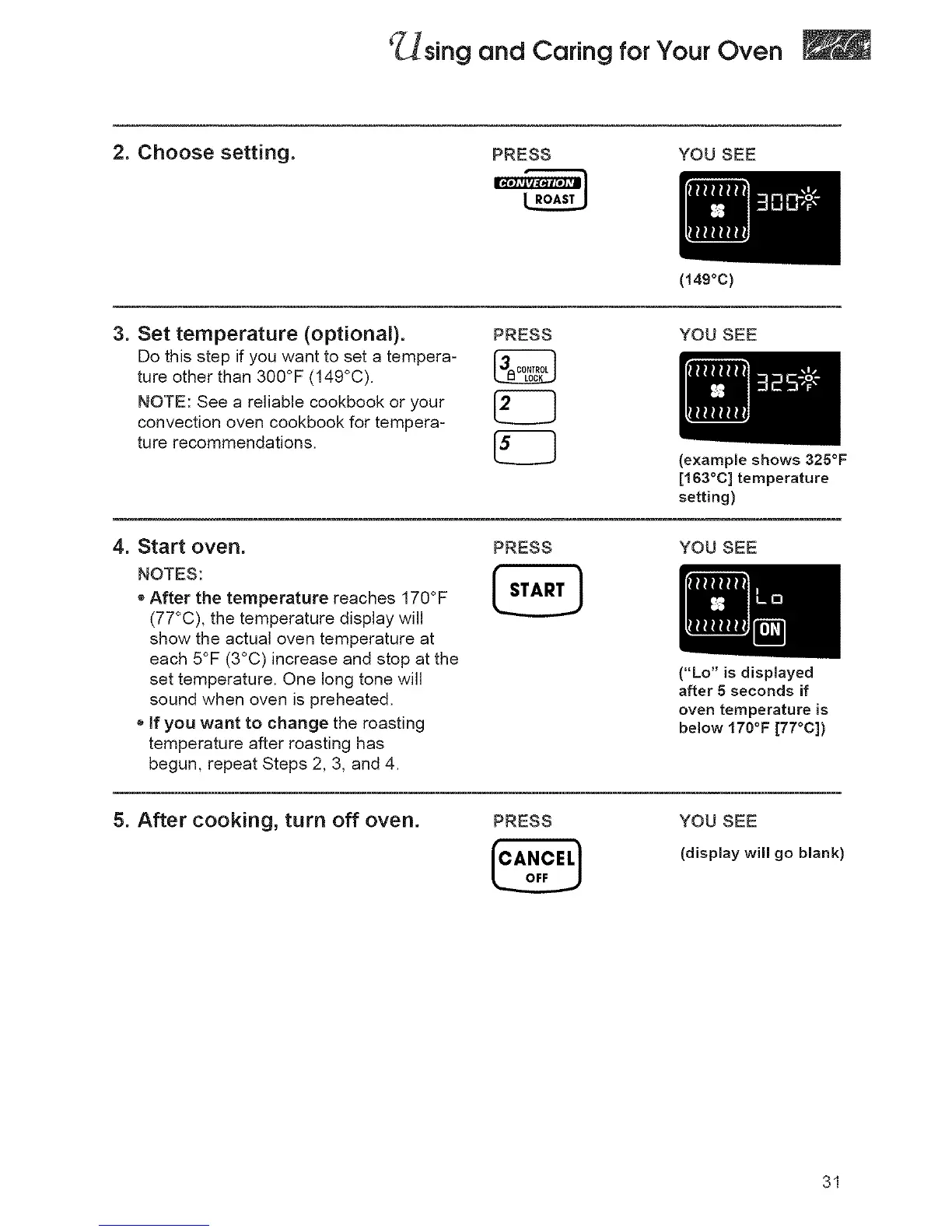
2. Choose setting.
PRESS YOU SEE
3. Set temperature (optional). PRESS
Do this step if you want to set a tempera-
ture other than 300°F (149°C)
NOTE: See a reliable cookbook or your |
convection oven cookbook for tempera-
L..____.J
ture recommendations.
(149oc)
YOU SEE
(example shows 325°F
[163°C] temperature
setting)
4. Start oven.
NOTES:
e After the temperature reaches 170°F
(77°C), the temperature display will
show the actual oven temperature at
each 5°F (3°C) increase and stop at the
set temperature. One long tone will
sound when oven is preheated.
o If you want to change the roasting
temperature after roasting has
begun, repeat Steps 2, 3, and 4.
PRESS YOU SEE
("Lo" is displayed
after 5 seconds if
oven temperature is
below 170°F [77°C])
5. After cooking, turn off oven.
PRESS
[°,.°,'!
YOU SEE
(display will go blank)
31




 To Next Page