_._singand Caring forYour Oven
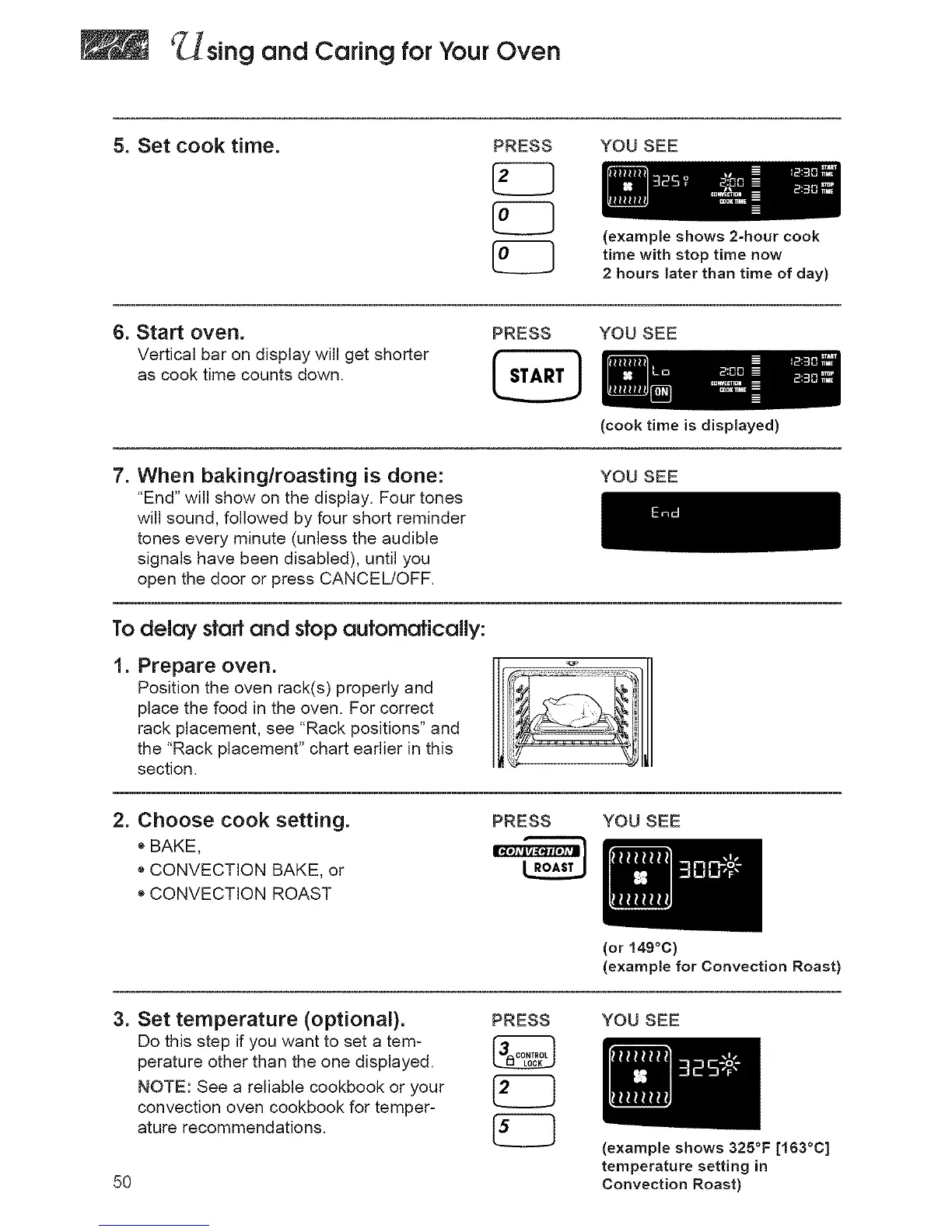
5. Set cook time. PRESS YOU SEE
(example shows 2-hour cook
time with stop time now
2 hours later than time of day)
6. Start oven.
Vertical bar on display will get shorter
as cook time counts down.
PRESS YOU SEE
7. When baking/roasting is done:
"End" will show on the display. Four tones
will sound, followed by four short reminder
tones every minute (unless the audible
signals have been disabled), until you
open the door or press CANCEL/OFF.
(cook time is displayed)
YOU SEE
To delay stoff end stop oufomaficolly:
1. Prepare oven.
Position the oven rack(s) properly and
place the food in the oven. For correct
rack placement, see "Rack positions" and
the "Rack placement" chart earlier in this
section.
2. Choose cook setting.
e BAKE,
o CONVECTION BAKE, or
e CONVECTION ROAST
PRESS YOU SEE
(or 149°C)
(example for Convection Roast)
3. Set temperature (optional).
Do this step if you want to set a tem-
perature other than the one displayed.
NOTE: See a reliable cookbook or your
convection oven cookbook for temper-
ature recommendations.
5O
PRESS YOU SEE
(example shows 325°F [163°C]
temperature setting in
Convection Roast)




 To Next Page