_._sing the Self-Cleaning Cycle
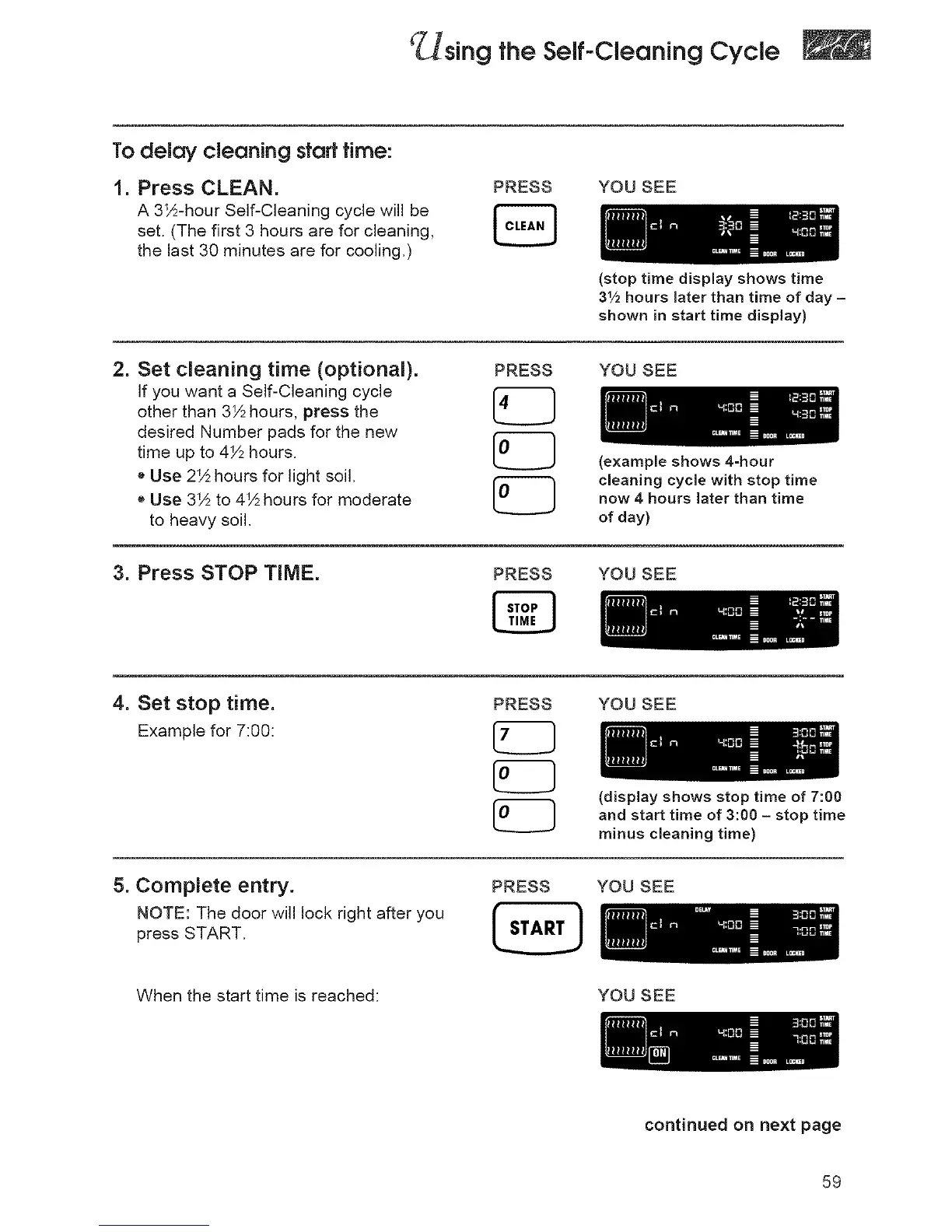
To delay cleaning start time:
1. Press CLEAN.
A 3S½-hourSelf-Cleaning cycle will be
set. (The first 3 hours are for cleaning,
the last 30 minutes are for cooling,)
PRESS YOU SEE
(stop time display shows time
3Y2 hours later than time of day -
shown in start time display)
2. Set cleaning time (optional).
If you want a Self-Cleaning cycle
other than 3½ hours, press the
desired Number pads for the new
time up to 4½ hours.
o Use 2_½hours for light soil.
e Use 3_½to 4_½hours for moderate
to heavy soil.
PRESS YOU SEE
(example shows 4-hour
cleaning cycle with stop time
now 4 hours later than time
of day)
3. Press STOP TIME.
PRESS YOU SEE
4. Set stop time.
Example for 7:00:
PRESS YOU SEE
(display shows stop time of 7:00
and start time of 3:00 - stop time
minus cleaning time)
5. Complete entry.
NOTE: The door will lock right after you
press START.
PRESS YOU SEE
When the start time is reached: YOU SEE
continued on next page
59




 To Next Page