CMD + SHIFT CLICK TO CHANGE COPY CMD + SHIFT CLICK TO CHANGE COPY
11
English
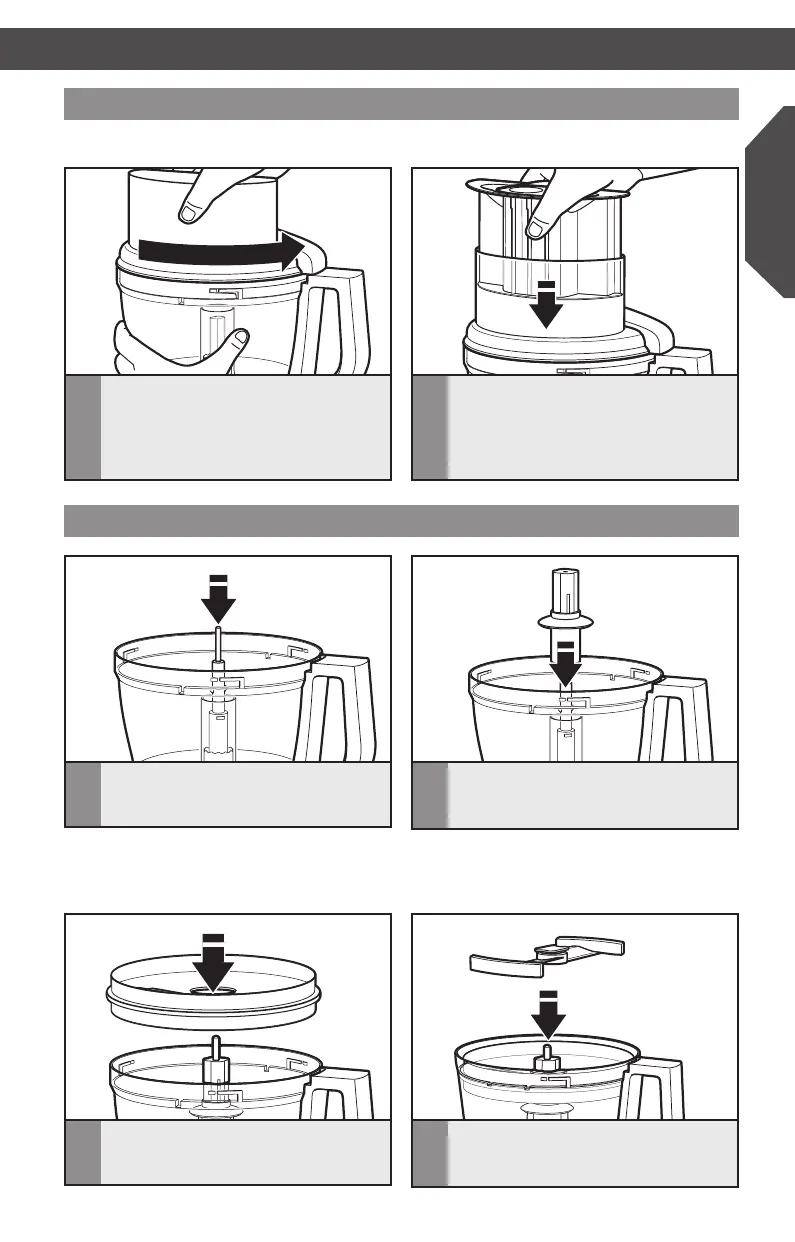
ASSEMBLING THE FOOD PROCESSOR ASSEMBLING THE FOOD PROCESSOR
Attaching the work bowl cover
NOTE: Be sure to install the desired accessory before attaching the work bowl cover.
1
Place the work bowl cover on the work
bowl with the feed tube just to the left
of the work bowl handle. Grasp the feed
tube and turn the cover to the right until
it locks into place.
2
Fit the food pusher into the 3-in-1
feed tube. See “Using the 3-in-1 feed
tube” for details on working with
different sized foods.
Installing the dicing kit
1
Drop the drive adapter over the power
shaft.
3
Drop the dicing kit base onto the
drive adapter and make sure it is
firmly in place.
2
Drop the disc adapter onto the drive
adapter and push until it clicks firmly
into place.
4
Insert the dicing blade into the dicing
kit base.
TIP: You may need to adjust the drive
adapter with a slight turn on the power
shaft until it drops into place.
W10745720A_EN_v09.indd 11 10/8/14 6:10 PM



 To Next Page