13
English
ASSEMBLING THE FOOD PROCESSOR ASSEMBLING THE FOOD PROCESSOR
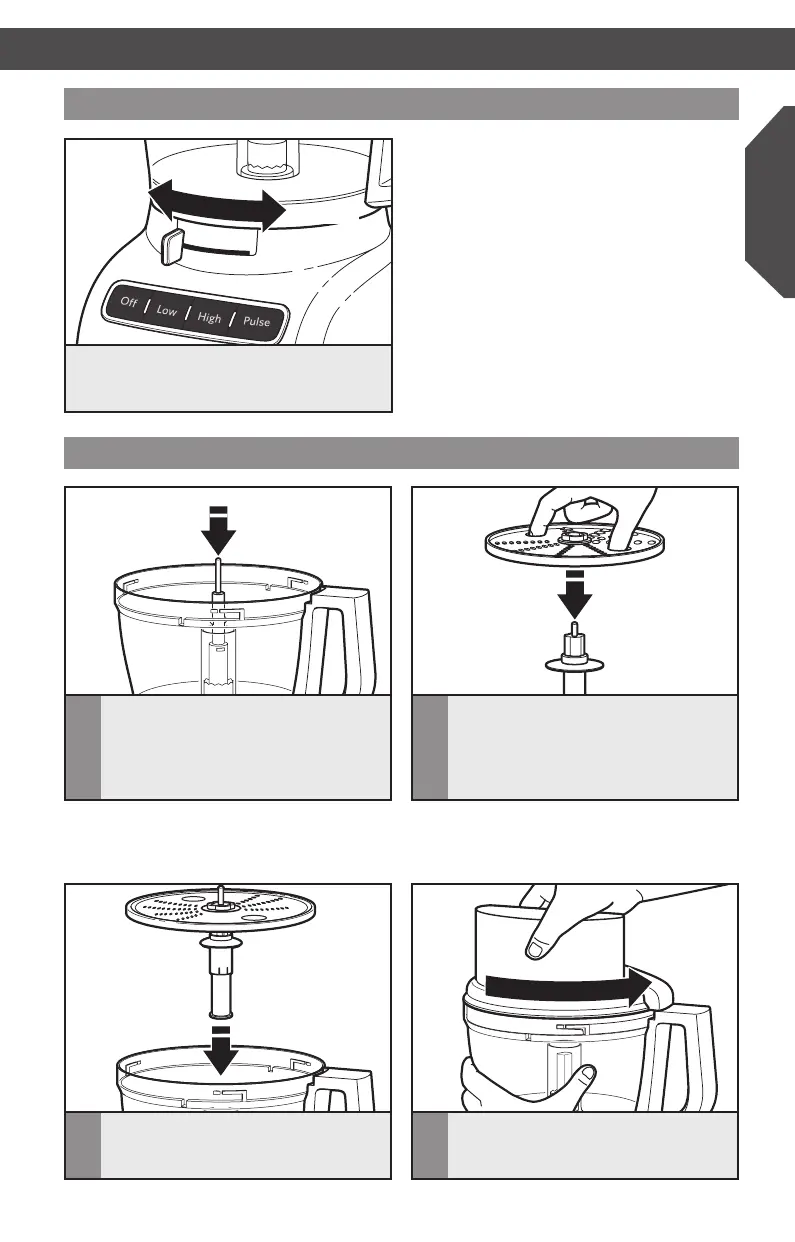
Adjusting the slicing thickness
Set the desired thickness by moving the lever
to the left for thinner slices and to the right
for thicker slices.
NOTE: The lever only works with
the externally adjustable slicing disc.
Changing thickness settings with other
discs or blades installed will have no
effect on operation.
Thicker
Thinner
TIP: You may need to adjust the drive
adapter with a slight turn on the power
shaft until it drops into place.
Installing the reversible shredding disc
1
Drop the drive adapter over the
power shaft.
3
Drop the assembled disc onto the drive
adapter and push until it clicks firmly
into place.
2
Hold the reversible shredding disc by
the finger holes with the desired side
(medium or fine) facing up; then push
the disc adapter into the bottom of
the disc.
4
Install the work bowl cover, being sure
it locks into place.
W10745720A_EN_v09.indd 13 10/8/14 6:10 PM



 To Next Page