CMD + SHIFT CLICK TO CHANGE COPY CMD + SHIFT CLICK TO CHANGE COPY
16
OPERATING THE FOOD PROCESSOR
Before operating the Food Processor, be
sure the work bowl, blades, and work bowl
cover are properly assembled on the Food
Processor base (see “Assembling the Food
Processor” section).
Rotating Blade Hazard
Always use food pusher.
Keep ngers out of openings.
Keep away from children.
Failure to do so can result in
amputation or cuts.
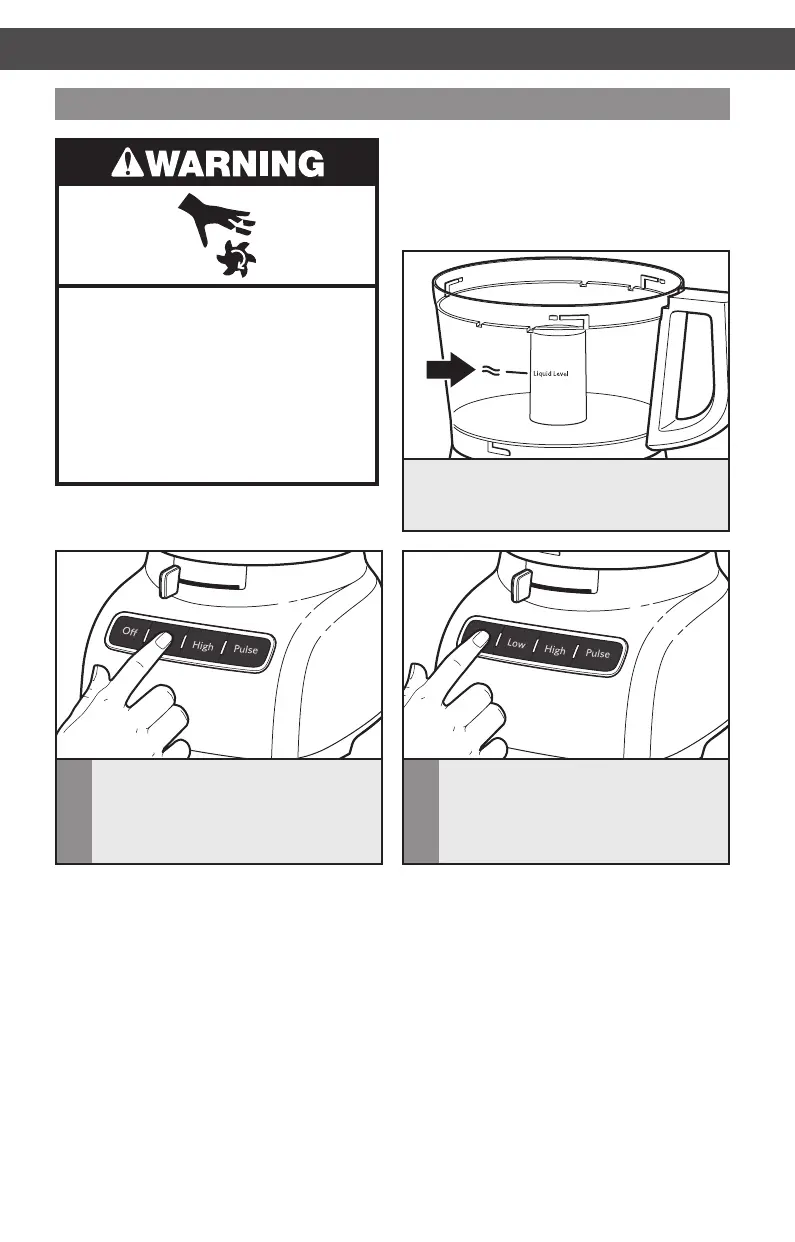
Using the Food Processor
2
When finished, press the OFF button.
The indicator light will go out and the
blade or disc will slow to a stop.
1
To turn on, plug the Food Processor
into a grounded outlet, then press LOW
or HIGH. The Food Processor will run
continuously and the indicator light
will glow.
This line on the work bowl indicates
the maximum level of liquid that can be
processed by the Food Processor.
OPERATING THE FOOD PROCESSOR
W10745720A_EN_v09.indd 16 10/8/14 6:10 PM



 To Next Page