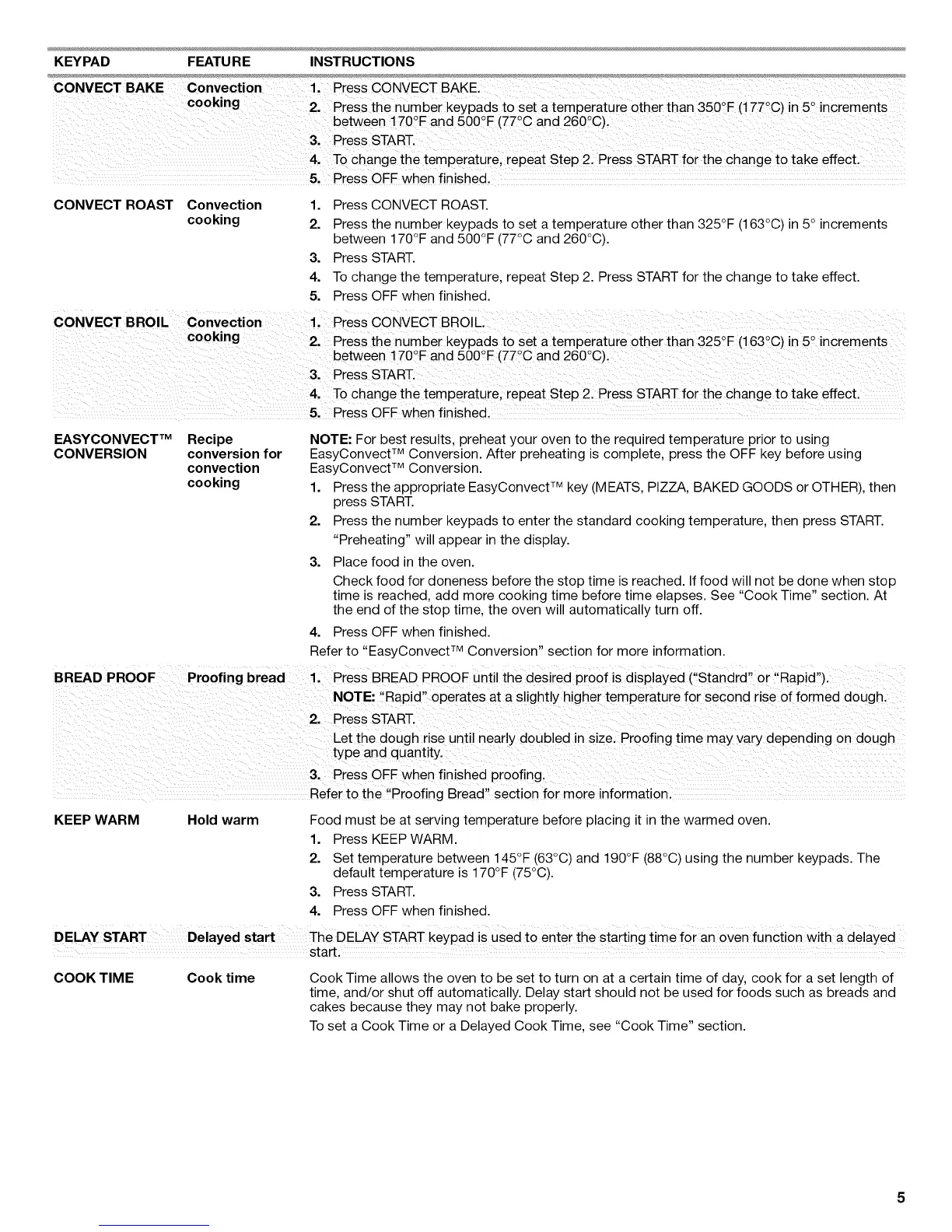
KEYPAD FEATURE INSTRUCTIONS
5. Press OFF when finished.
CONVECT ROAST Convection
cooking
1. Press CONVECT ROAST.
2. Press the number keypads to set a temperature other than 325°F (163°C) in 5° increments
between 170°F and 500°F (77°C and 260°C).
3. Press START.
4. To change the temperature, repeat Step 2. Press START for the change to take effect.
5. Press OFF when finished.
CONVECT BROIL convection 1' Press coNVECTBROiL
cooking o o
• 2, Press the nUmber keypads tO set atemperature otherthan 325 F(i63 C)in5 increments
o
between 170 Fand 500 F(77 C and 260 C),
3' Press START.
4, To change the temperature, repeat Step 2. Press START for the change to take effect.
5. Press OFF When finished.
EASYCONVECT TM Recipe
CONVERSION conversion for
convection
cooking
NOTE: For best results, preheat your oven to the required temperature prior to using
EasyConvect TM Conversion. After preheating is complete, press the OFF key before using
EasyConvect TM Conversion.
1. Press the appropriate EasyConvect TM key (MEATS, PIZZA, BAKED GOODS or OTHER), then
press START.
2. Press the number keypads to enter the standard cooking temperature, then press START.
"Preheating" will appear in the display.
3. Place food in the oven.
Check food for doneness before the stop time is reached. If food will not be done when stop
time is reached, add more cooking time before time elapses. See "Cook Time" section. At
the end of the stop time, the oven will automatically turn off.
4. Press OFF when finished.
Refer to "EasyConvect TM Conversion" section for more information.
r Rai-"
BREAD PROOF Proofing bread 1. Press BREAD PROOF until the desired proof is displayed CStandrd '_o p a _.
NOTE: ',Rapid" operates at a slightly higher temperatur e for second rise of formed dough.
2. Press START.
Let the dough rise until nearly doubled in size; Proofing time may vaiY depending on dough
type and quantity.
31 Press OF.Fwhen finished, Pro0fing
Refer to the Proofing Bread section for m0re informationl
KEEP WARM Hold warm Food must be at serving temperature before placing it in the warmed oven.
1. Press KEEP WARM.
2. Set temperature between 145°F (63°C) and 190°F (88°C) using the number keypads. The
default temperature is 170°F (75°C).
3. Press START.
4. Press OFF when finished.
DELAY START Delayed The DELAY START keypad is used to enter the starting time for an oven function with a delayed
start,
COOK TIME Cook time
Cook Time allows the oven to be set to turn on at a certain time of day, cook for a set length of
time, and/or shut off automatically. Delay start should not be used for foods such as breads and
cakes because they may not bake properly.
To set a Cook Time or a Delayed Cook Time, see "Cook Time" section.



 To Next Page